







Question: In G 16 : Use the product code breakdown provided at the top of the worksheet as a guide to create appropriate nested functions to
In G16: Use the product code breakdown provided at the top of the worksheet as a guide to create appropriate nested functions to complete the following:
If the product is a Premium, Stainless Steel, 120 V, Microwave insert the product Price, otherwise the cell should be blank. Copy the function down to the other cells in the column.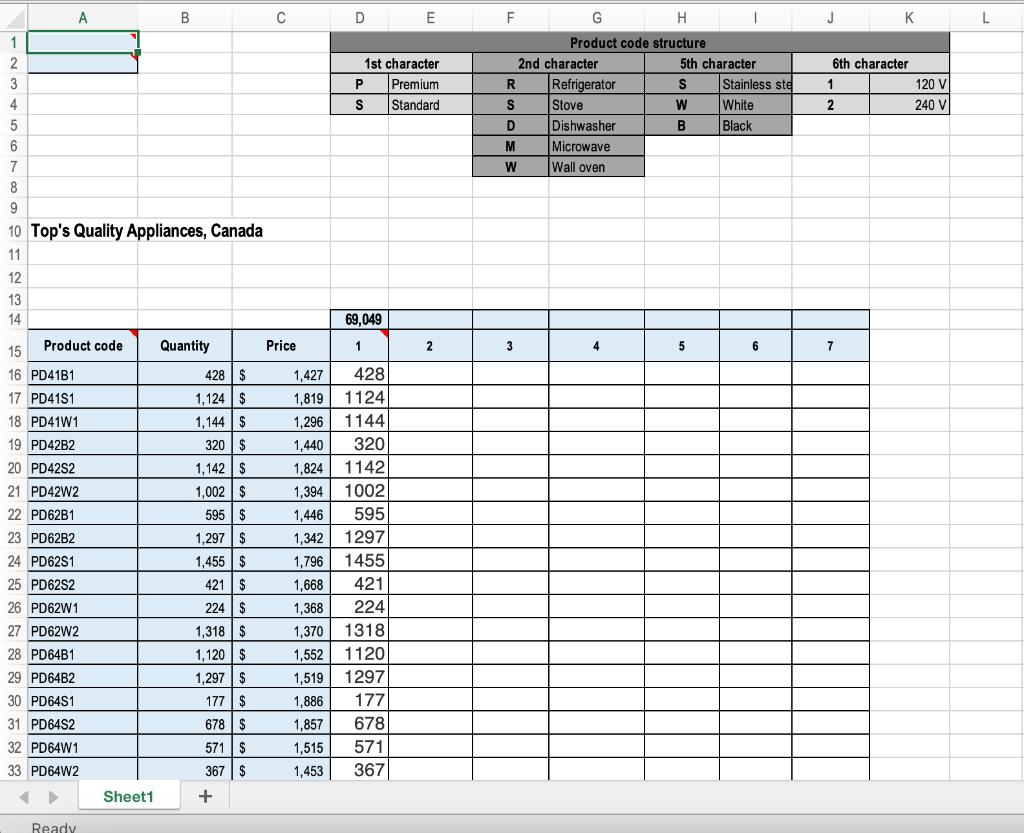
A C D E F J K L Product code structure 1st character 2nd character 5th character 6th character Refrigerator Stove P Premium S Stainless ste 120 V 4 S Standard White 2 240 V D Dishwasher Black 6 Microwave 7 W Wall oven 10 Top's Quality Appliances, Canada 11 12 13 14 69,049 15 Product code Quantity Price 1 2 3 4 5 6 7 16 PD41B1 428 $ 1,427 428 17 PD41S1 1,124 $ 1,819 1124 18 PD41W1 1,144 $ 1,296 1144 19 PD42B2 320 | $ 1,440 320 20 PD42S2 1,142 $ 1,824 1142 21 PD42W2 1,002 $ 1,394 1002 22 PD62B1 595 $ 1,446 595 23 PD62B2 1,297 $ 1,342 1297 24 PD62S1 1,455 $ 1,796 1455 25 PD62S2 421 $ 1,668 421 26 PD62W1 224 $ 1,368 224 27 PD62W2 1,318 $ 1,370 1318 1,120 $ 1.297 | $ 28 PD64B1 1,552 1120 29 PD64B2 1,519 1297 30 PD64S1 177 $ 1,886 177 31 PD64S2 678 $ 1,857 678 32 PD64W1 571 $ 1,515 571 33 PD64W2 367 $ 1,453 367 Sheet1 Ready -23 -
Step by Step Solution
3.36 Rating (165 Votes )
There are 3 Steps involved in it
Answer Type the following formula in the cell G16 IFLEFTA... View full answer

Get step-by-step solutions from verified subject matter experts
 Study Help