







Question: (in java programming language) help me in this GUI question AND BELOW THIS IS PART #5 -b __________ ( WrongQuizGradeException.java) public class WrongQuizGradeException extends Exception
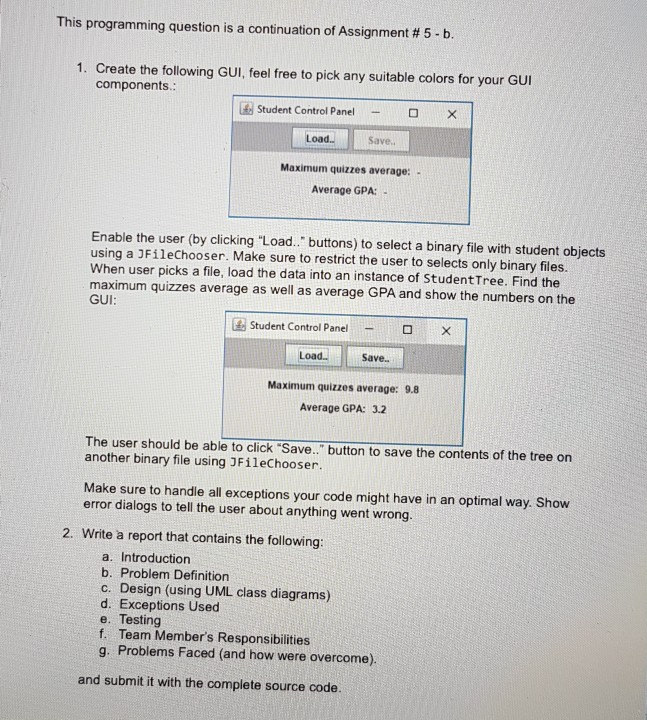
(in java programming language) help me in this GUI question
AND BELOW THIS IS PART #5 -b
__________
( WrongQuizGradeException.java)
public class WrongQuizGradeException extends Exception { WrongQuizGradeException(){ System.err.println("Quizz Grade Must Be Between 0 and 10!!!!"); } }
___________ (Student.java)
import java.util.ArrayList; import java.util.Iterator; public class Student { private String name; private Integer ID; private Double GPA; private ArrayList
_____________ (Test.java) public class Test { public static void main(String[] args) { Student S=new Student ("Ali",67,3.0); try { S.addQuiz(9); } catch (WrongQuizGradeException e) { e.getMessage(); } try { S.addQuiz(11); } catch (WrongQuizGradeException e) { e.getMessage(); } try { S.addQuiz(7); } catch (WrongQuizGradeException e) { e.getMessage(); } try { S.addQuiz(-1); } catch (WrongQuizGradeException e) { e.getMessage(); } try { S.addQuiz(5); } catch (WrongQuizGradeException e) { e.getMessage(); } //System.out.println(S.quizzesAvg()); S.Print(); } }
This programming question is a continuation of Assignment # 5-b 1. Create the following GUI, feel free to pick any suitable colors for your GUI components Student Control Panelx Load.. Save. Maximum quizzes average: Average GPA: Enable the user (by clicking "Load. buttons) to select a binary file with student objects using a JFileChooser. Make sure to restrict the user to selects only binary files. When user picks a file, load the data into an instance of StudentTree. Find the maximum quizzes average as well as average GPA and show the numbers on the GUI Student Control Panel? ? LoadS Save. Maximum quizzes average: 9.8 Average GPA: 3.2 The user should be able to click "Save." button to save the contents of the tree on another binary file using 3FileChooser. Make sure to handle all exceptions your code might have in an optimal way. Show error dialogs to tell the user about anything went wrong. 2. Write a report that contains the following: a. Introduction b. Problem Definition c. Design (using UML class diagrams) d. Exceptions Used e. Testing f. Team Member's Responsibilities g. Problems Faced (and how were overcome). and submit it with the complete source code
Step by Step Solution
There are 3 Steps involved in it

Get step-by-step solutions from verified subject matter experts
 Study Help