







Question: In python, i have a .txt file that has rows of numbers. For example: I need to import this file above .txt file and sort
In python, i have a .txt file that has rows of numbers. For example:
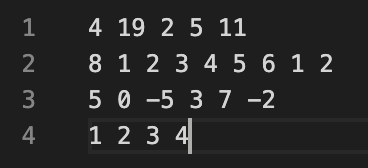
I need to import this file above .txt file and sort the integers in each row. I have the sort functions, but when I am sorting the rows, it is sorting by the first number of each row rather than sorting the entire row itself. Below is what I have as the driver code. I realize that the .readlines() is an issue, but when I change it to just .read(), it still doesn't work properly.
Also if possible, I would like to know how to remove the first number from each row and only sort everything from position [1] and larger only. So 4 19 2 5 11 would only sort 19 2 5 11.
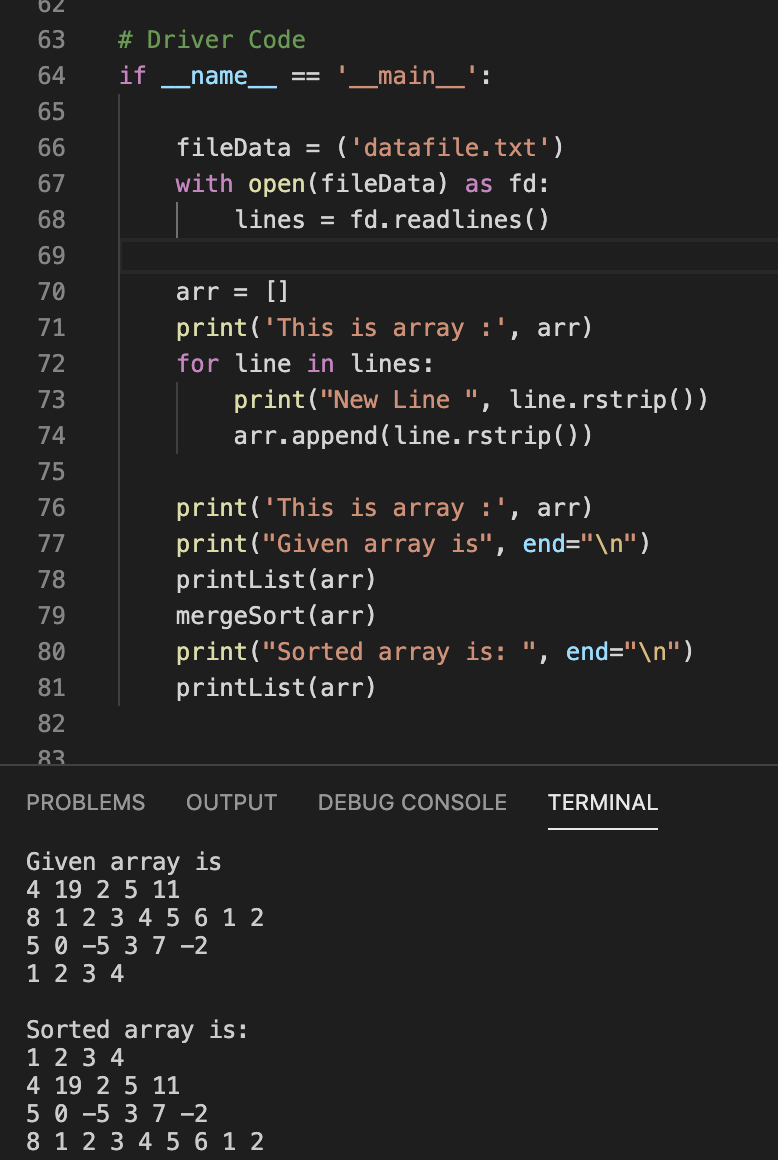
1 2 3 4 14 192511 812345612 50 -537-2 1234 62 63 64 # Driver Code if name _main_' 65 66 67 fileData = ('datafile.txt') with open(fileData) as fd: lines = fd.readlines() 68 69 70 71 72 73 74 arr = [] print('This is array :', arr) for line in lines: print("New Line ", line.rstrip()) arr.append(line. rstrip()) 75 76 77 78 print('This is array :', arr) print("Given array is", end=" ") printList(arr) mergeSort(arr) print("Sorted array is: ". end=" ") printList(arr) 79 80 81 82 83 PROBLEMS OUTPUT DEBUG CONSOLE TERMINAL Given array is 4 19 2 5 11 8 1 2 3 4 5 6 1 2 50 -5 3 7 -2 1 2 3 4 Sorted array is: 1 2 3 4 4 19 2 5 11 50 -5 3 7 -2 8 1 2 3 4 5 6 1 2
Step by Step Solution
There are 3 Steps involved in it

Get step-by-step solutions from verified subject matter experts
 Study Help