







Question: in the following javascript code follow the directons below and in the picture /* JavaScript 6th Edition Chapter 10 Hands-on Project 10-1 Author: Date: Filename:
in the following javascript code follow the directons below and in the picture
/* JavaScript 6th Edition Chapter 10 Hands-on Project 10-1
Author: Date:
Filename: script.js */
"use strict";
// global variables var loc = []; var origin; var onTop;
// perform setup tasks when page first loads function setUpPage() { var puzzlePieces = document.querySelectorAll("#pieces div"); onTop = puzzlePieces.length + 1; for (var i = 0; i
// add event listeners and move object when user starts dragging function startDrag(event) { this.style.zIndex = onTop; // set z-index to move selected element on top of other elements onTop++; // increment z-index counter so next selected element is on top of other elements event.preventDefault();
this.addEventListener("mousemove", moveDrag, false); this.addEventListener("mouseup", removeDragListener, false);
loc = [this.offsetLeft,this.offsetTop]; origin = getCoords(event); }
// calculate new location of dragged object function moveDrag(event) { var currentPos = getCoords(event); var deltaX = currentPos[0] - origin[0]; var deltaY = currentPos[1] - origin[1]; this.style.left = (loc[0] + deltaX) + "px"; this.style.top = (loc[1] + deltaY) + "px"; }
// identify location of event function getCoords(event) { var coords = []; coords[0] = event.clientX; coords[1] = event.clientY; return coords; }
// remove mouse event listeners when dragging ends function removeDragListener() { this.removeEventListener("mousemove", moveDrag, false); this.removeEventListener("mouseup", removeDragListener, false); }
// run setUpPage() function when page finishes loading if (window.addEventListener) { window.addEventListener("load", setUpPage, false); }
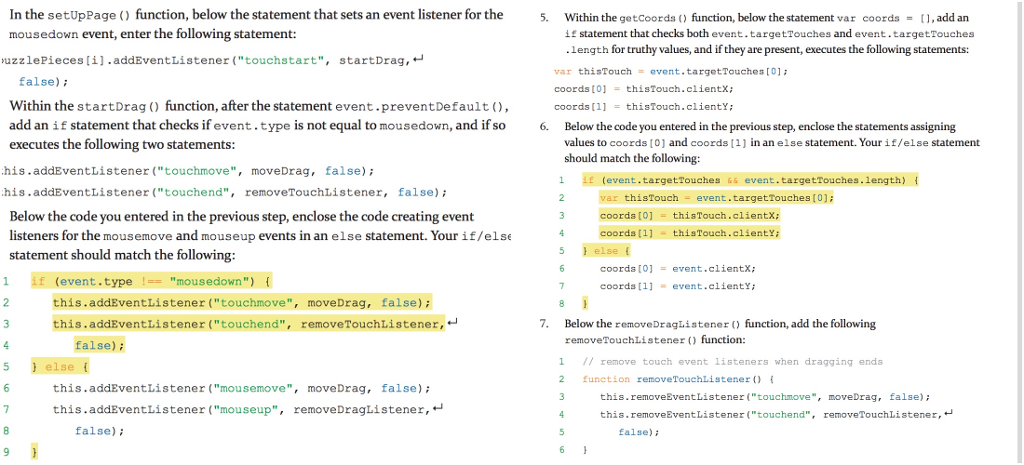
In the setUppage () function, below the statement that sets an event listener for the mousedown evententer the following statement puzzlePieces [i].addEventListener ("touchstart ", startDrag , 5. Within the getCoords (o function, below the statement var coords = ], add an 1 statement that checks both event. targetTouches and event .targetTouches .length for truthy values, and if they are present, executes the following statements: false ); var thisTouche event, targetTouches o ]; coords to ] = thisTouch.clientx ; Within the startDrag () function, after the statement event preventDefault (0, add an if statement that checks if event. type is not equal to mousedown, and if so executes the following two statements: coords [1] = this Touch.clienty ; his. addEventListener ("touchmove", moveDrag , false); 6. Below the code you entered in the previous step, enclose the statements assigning values to coords (O) and coords (1) in an else statementYour if/else statement should match the following: (event, targetTouches is event. targetTouche As, length) his. addEventListener ("touchend ", removeTouchListener, false); var thisTouch - event.targetTouches (0); Below the code you entered in the previous step, enclose the code creating event listeners for the mousemove and mouseup events in an else statement. Your if/else statement should match the following: coords o ] = this Touch.client, coords [1] - thiTouch.clientY; coords o = event .clientX; (event.type !== 'mousedown") { , coords [1] = event. clienty; this. addEventListener (" touchmove moveDrag, false); this. addEventListener ("touchend", remove TouchListener, false 7. Below the removeDraglistener () function, add the following removeTouchListener (o function: } else { remove touch event listeners when dragging ends this. addEventListener ("mousemove", moveDrag, false); function removeTouchListener of this. addEventListener ("mouseup", removeDragListener, this.removeEventListener" touchmove ", moveDrag, false ); this , removeEventListener ("touchend", removeTouch Listener , false); false
Step by Step Solution
There are 3 Steps involved in it

Get step-by-step solutions from verified subject matter experts
 Study Help