







Question: 9.1in the javascript code follow the directions on the picture Hands-on Project 9-1 Hands-on Project 9-1 Create Greeting Card Greeting Text 2. Before the closing
9.1in the javascript code follow the directions on the picture
Hands-on Project 9-1
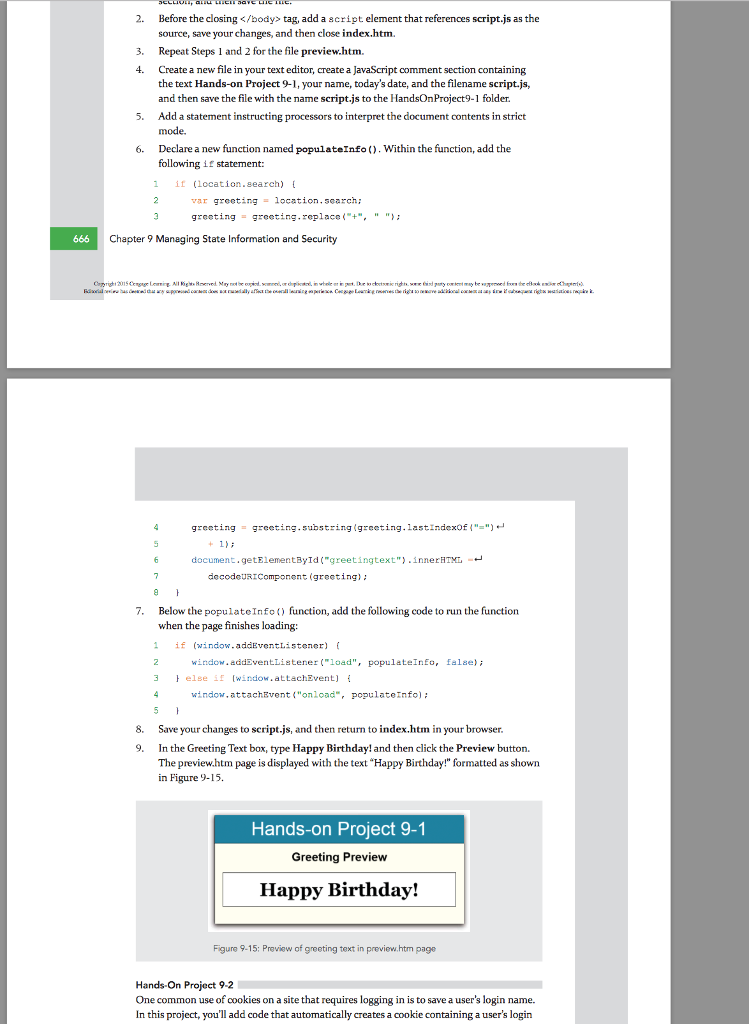
tag, add a script element that references script.js as the source, save your changes, and then close index.htm. Repeat Steps 1 and 2 for the file preview.htm. 3. Create a new file in your text editor, create a JavaScript comment section containing the text Hands-on Project 9-1, your name, today's date, and the filename script.js, and then save the file with the name script.js to the HandsOnProject9-1 folder. Add a statement instructing processors to interpret the document contents in strict mode. 4. 5. 6. Declare a new function named populateInfo. Within the function, add the following if statement: 1 if (location.search) var greeting = location.s@arch; greeting = greting, replac0(-+", " "; 666 C Chapter 9 Managing State Information and Security greeting greeting . substring(greeting. 1astindexdf { "-")" = document.getElementById( greetingtext") .innerHTML + decodeURIComponent (greeting 7. Below the populateInfo function, add the following code to un the function when the page finishes loading 1if (window.adEventlistener) window. addventlistener (load", populateInEo, falae)i else if [window.attachEvent] { 3 window.attachEvent("onload, populateInfo); 8. Save your changes to script.js, and then return to index.htm in your browser 9. In the Greeting Text box, type Happy Birthday! and then click the Preview button. The preview.htm page is displayed with the text "Happy Birthday!" formatted as shown in Figure 9-15. Hands-on Project 9-1 Greeting Preview Happy Birthday! Figure 9-15: Praview of greeting text in preview.htm page Hands-On Project 9-2 One common use of cookies on a site that requires logging in is to save a user's login name. In this project, you'll add code that automatically creates a cookie containing a user's login
Step by Step Solution
There are 3 Steps involved in it
1 Expert Approved Answer
Step: 1 Unlock

Question Has Been Solved by an Expert!
Get step-by-step solutions from verified subject matter experts
Step: 2 Unlock
Step: 3 Unlock
 Study Help