







Question: in the following javascript code follow the direction below /* JavaScript 6th Edition Chapter 10 Hands-on Project 10-1 Author: Nick Date: july 27 Filename: script.js
in the following javascript code follow the direction below
/* JavaScript 6th Edition Chapter 10 Hands-on Project 10-1
Author: Nick Date: july 27
Filename: script.js */ "use strict";
// global variables var loc = []; var origin; var onTop;
// perform setup tasks when page first loads function setUpPage() { var puzzlePieces = document.querySelectorAll("#pieces div"); onTop = puzzlePieces.length + 1; for (var i = 0; i
// add event listeners and move object when user starts dragging function startDrag(event) { this.style.zIndex = onTop; // set z-index to move selected element on top of other elements onTop++; // increment z-index counter so next selected element is on top of other elements event.preventDefault(); if(event.type !== "mousedown"){ this.addEventListener("touchmove", moveDrag, false); this.addEventListener("touchend", removeTouchListener, false); }else{ this.addEventListener("mousemove", moveDrag, false); this.addEventListener("mouseup", removeDragListener, false); } this.addEventListener("mousemove", moveDrag, false); this.addEventListener("mouseup", removeDragListener, false);
loc = [this.offsetLeft,this.offsetTop]; origin = getCoords(event); }
// calculate new location of dragged object function moveDrag(event) { var currentPos = getCoords(event); var deltaX = currentPos[0] - origin[0]; var deltaY = currentPos[1] - origin[1]; this.style.left = (loc[0] + deltaX) + "px"; this.style.top = (loc[1] + deltaY) + "px"; }
// identify location of event function getCoords(event) { var coords = []; if(event.targetTouches && event.targetTouches.length){ var thisTouch = event.targetTouches[0]; coords[0] = thisTouch.clientX; coords[1] = thisTouch.clientY; }else{ coords[0] = event.clientX; coords[1] = event.clientY; } return coords; }
// remove mouse event listeners when dragging ends function removeDragListener() { this.removeEventListener("mousemove", moveDrag, false); this.removeEventListener("mouseup", removeDragListener, false); } // remove touch event listeners when dragging ends function removeTouchListener(){ this.removeEventListener("touchmove", moveDrag, false); this.removeEventListener("touchend", removeTouchListener, false); }
// run setUpPage() function when page finishes loading if (window.addEventListener) { window.addEventListener("load", setUpPage, false); }
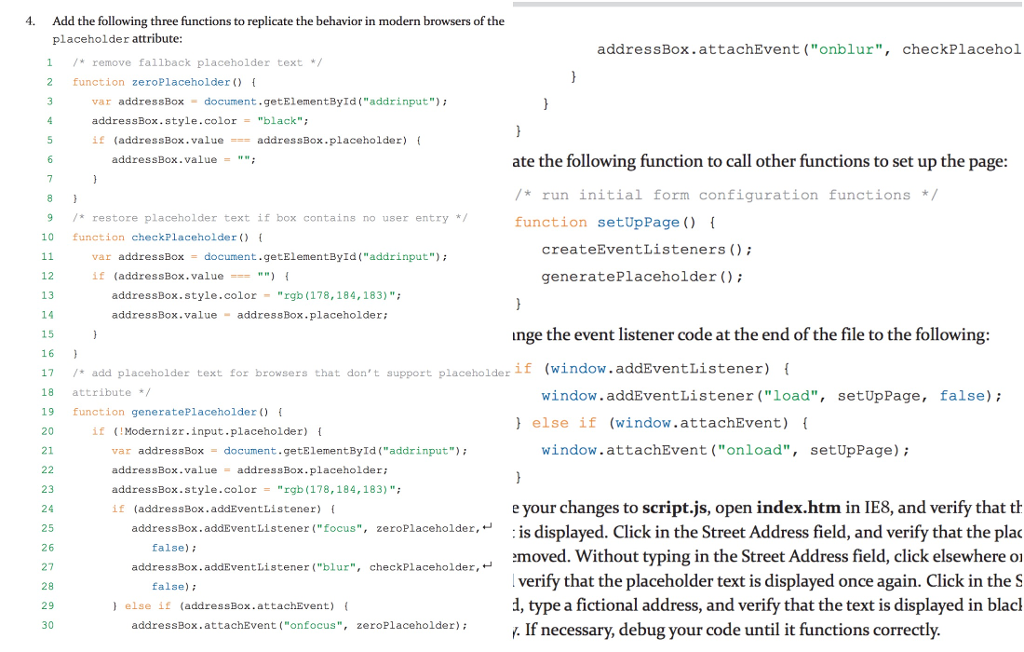
4. Add the following three functions to replicate the behavior in modern browsers of the placeholder attribute: addressBox.attachEvent ("onblur, checkPlacehol 1 remove fallback placeholder text 2 function zeroPlaceholder) var addressBox document.getElementById ("addrinput") addressBox. style. color = "black"; if (addressBox . value-= addres sBox . placeholder) { addressBox.value"" ate the following function to call other functions to set up the page: run initial form configuration functions */ function setUpPage ) 9*restore placeholder text if box contains no user entry 10 nction checkPlaceholder createEventListeners () var addressBox document.getElementById( "addrinput"); if (addressBox . value=-= "") { generatePlaceholder ) 12 13 14 15 16 17 /*add placeholder text for browsers that don't support placeholder 18 attribute / 19 function generatePlaceholder f 20 21 addressBox.style.color "rgb (178,184,183)" addressBox.value addressBox.placeholder: inge the event listener code at the end of the file to the following: 17add placeholder text for browsers that don't support placeholderif (window.addEventListener) window.addEventListener ("1oad", setUpPage, false) l else if (window.attachEvent) if (Modernizr.input.placeholder) window.attachEvent ("onload", setUpPage) var addressBox = document.getElementById("addrinput"); addressBox.value addressBox.placeholder addressBox.style.colorrgb (178,184,183) " if (addressBox.addEventListener) ( 23 24 25 26 27 28 29 30 e your changes to script.js, open index.htm in IE8, and verify that t addressBox.addEventListener tocus", zeroPlaceholder,:is displayed. Click in the Street Address field, and verify that the plac emoved. Without typing in the Street Address field, click elsewhere or verify that the placeholder text is displayed once again. Click in the S d, type a fictional address, and verify that the text is displayed in blac addressBox . addEventListener ("focus", zeroPlaceholder, false) addressBox.addEventListener(.'blur", checkPlaceholder, false); ) else if (addressBox.attachEvent) ( addressBox.attachEvent ("onfocus", zeroPlaceholder) y. If necessary, debug your code until it functions correctly. 4. Add the following three functions to replicate the behavior in modern browsers of the placeholder attribute: addressBox.attachEvent ("onblur, checkPlacehol 1 remove fallback placeholder text 2 function zeroPlaceholder) var addressBox document.getElementById ("addrinput") addressBox. style. color = "black"; if (addressBox . value-= addres sBox . placeholder) { addressBox.value"" ate the following function to call other functions to set up the page: run initial form configuration functions */ function setUpPage ) 9*restore placeholder text if box contains no user entry 10 nction checkPlaceholder createEventListeners () var addressBox document.getElementById( "addrinput"); if (addressBox . value=-= "") { generatePlaceholder ) 12 13 14 15 16 17 /*add placeholder text for browsers that don't support placeholder 18 attribute / 19 function generatePlaceholder f 20 21 addressBox.style.color "rgb (178,184,183)" addressBox.value addressBox.placeholder: inge the event listener code at the end of the file to the following: 17add placeholder text for browsers that don't support placeholderif (window.addEventListener) window.addEventListener ("1oad", setUpPage, false) l else if (window.attachEvent) if (Modernizr.input.placeholder) window.attachEvent ("onload", setUpPage) var addressBox = document.getElementById("addrinput"); addressBox.value addressBox.placeholder addressBox.style.colorrgb (178,184,183) " if (addressBox.addEventListener) ( 23 24 25 26 27 28 29 30 e your changes to script.js, open index.htm in IE8, and verify that t addressBox.addEventListener tocus", zeroPlaceholder,:is displayed. Click in the Street Address field, and verify that the plac emoved. Without typing in the Street Address field, click elsewhere or verify that the placeholder text is displayed once again. Click in the S d, type a fictional address, and verify that the text is displayed in blac addressBox . addEventListener ("focus", zeroPlaceholder, false) addressBox.addEventListener(.'blur", checkPlaceholder, false); ) else if (addressBox.attachEvent) ( addressBox.attachEvent ("onfocus", zeroPlaceholder) y. If necessary, debug your code until it functions correctly
Step by Step Solution
There are 3 Steps involved in it

Get step-by-step solutions from verified subject matter experts
 Study Help