







Question: #include #include class complex{ double re, im;/// can also use double re= 0; ////double im =0; public: complex() : re
#include
#include
class complex{
double re, im;/// can also use double re= 0;
////double im =0;
public:
complex() : re {0}, im {0}
{
/* re = 0; are the same as above
im = 0; */
}
complex(double r, double i) : re {r}, im {i} {}
complex (double r) : re {r}, im{0} {}
complex (complex &z) : re {z. re}, im {z.im} {}
///accessor
double real() const{return re; } ///const means the function does change or mutate the object
void real (double d) {re = d;} ///mutator, update values of the object
double imag() const{return im;}
void imag (double d) {im = d;}
complex &operator +=(complex z) {
re =+ z.re;
im += z.im;
return *this;
}
complex &operator -=(complex z) {
re -= z.re;
im -= z.im;
return *this;
}
complex &operator *=(complex z) {
re *= z.re;
im *= z.im;
return *this;
}
complex &operator /= (complex z) {
re /= z.re;
im /= z.im;
return *this;
}
};
int main () {
complex z = { 1,0 };
const complex cz {1,3};
z = cz ; ///will work because we're assigning to a non-const variable
///cz = z; ///error, assignment to a const
/*complex c{1, 0};
complex c2(3,0);
c += c2;
/// double r = c.real();
///c.real(3);*/
}
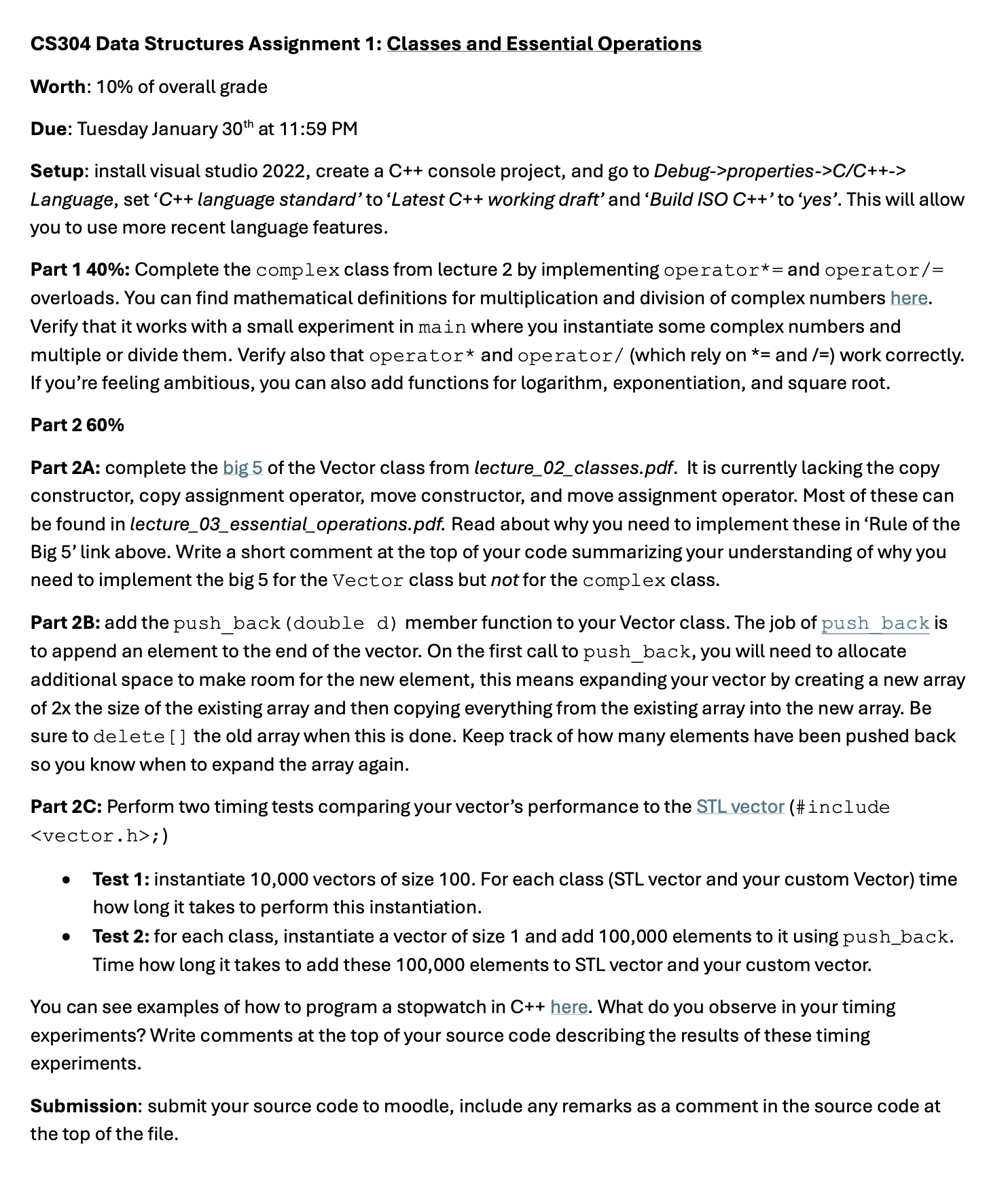
CS304 Data Structures Assignment 1: Classes and Essential Operations Worth: 10% of overall grade Due: Tuesday January 30th at 11:59 PM Setup: install visual studio 2022, create a C++ console project, and go to Debug->properties->C/C++-> Language, set 'C++ language standard' to 'Latest C++ working draft' and 'Build ISO C++' to 'yes'. This will allow you to use more recent language features. Part 1 40%: Complete the complex class from lecture 2 by implementing operator*= and operator/= overloads. You can find mathematical definitions for multiplication and division of complex numbers here. Verify that it works with a small experiment in main where you instantiate some complex numbers and multiple or divide them. Verify also that operator* and operator/ (which rely on *= and /=) work correctly. If you're feeling ambitious, you can also add functions for logarithm, exponentiation, and square root. Part 2 60% Part 2A: complete the big 5 of the Vector class from lecture_02_classes.pdf. It is currently lacking the copy constructor, copy assignment operator, move constructor, and move assignment operator. Most of these can be found in lecture_03_essential_operations.pdf. Read about why you need to implement these in 'Rule of the Big 5' link above. Write a short comment at the top of your code summarizing your understanding of why you need to implement the big 5 for the Vector class but not for the complex class. Part 2B: add the push_back (double d) member function to your Vector class. The job of push back is to append an element to the end of the vector. On the first call to push_back, you will need to allocate additional space to make room for the new element, this means expanding your vector by creating a new array of 2x the size of the existing array and then copying everything from the existing array into the new array. Be sure to delete [] the old array when this is done. Keep track of how many elements have been pushed back so you know when to expand the array again. Part 2C: Perform two timing tests comparing your vector's performance to the STL vector (#include ;) Test 1: instantiate 10,000 vectors of size 100. For each class (STL vector and your custom Vector) time how long it takes to perform this instantiation. Test 2: for each class, instantiate a vector of size 1 and add 100,000 elements to it using push_back. Time how long it takes to add these 100,000 elements to STL vector and your custom vector. You can see examples of how to program a stopwatch in C++ here. What do you observe in your timing experiments? Write comments at the top of your source code describing the results of these timing experiments. Submission: submit your source code to moodle, include any remarks as a comment in the source code at the top of the file.
Step by Step Solution
There are 3 Steps involved in it

Get step-by-step solutions from verified subject matter experts
 Study Help