







Question: Instructions: Complete code to access data in a JSON file and display the data in a web table. Steps: - In index.html: - Enter your
Instructions: Complete code to access data in a JSON file and display the data in a web table.
Steps:
In index.html:
Enter your name and today's date where indicated in the comment section in the document head.
Add script tag to access script.js file
In script.js:
Go to the onload event handler for the fr file reader variable and add the following code:
Add a command to convert the contents of the JSON data in frresult into an object named staff.
Call the makeStaffTable function using staff as the parameter value.
Go to the makeStaffTable function and add the commands:
Create a table row containing the property names stored in the JSON file using the properties from the first directory entry.
Create a for in loop for the object stored in staff.directory and add the following commands to the loop:
Use the document.createElement method to create a th element named headerCell.
Store prop as the text content of headerCell.
Use the appendChild method to append headerCell to the headerRow object.
After the for in loop completes, append headerRow to the staffTable object.
Create table rows containing the property values for each entry in the directory array.
Add a for loop that loops through the items of staff.directory. Within the for loop do the following:
Create an element node for the tr element and store it in the tableRow variable
Create a for in loop for the properties listed in the staff.directoryi For each property do the following:
Create an element node for the td element and store it in the tableCell variable;
store the value of staff.directoryiprop as the text content of tableCell;
append tableCell to the tableRow object.
After the for in loop completes, append tableRow to the staffTable object.
After the for loop is finished, use the appendChild method to append staffTable to the containerBox object.
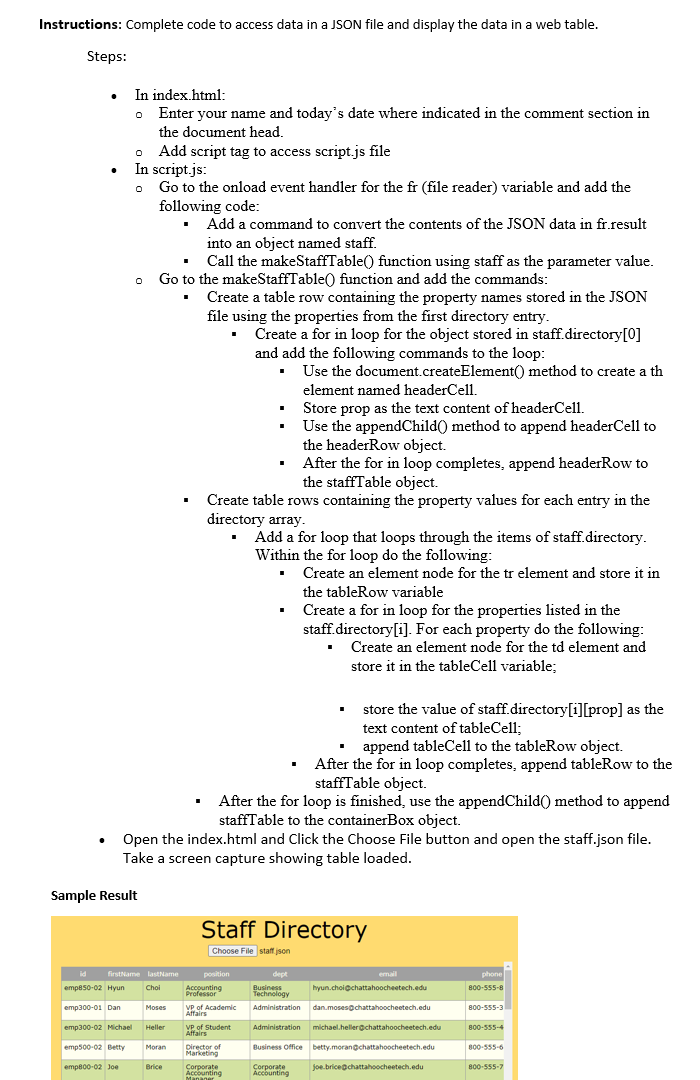
Open the index.html and Click the Choose File button and open the staff.json file. Take a screen capture showing table loaded.
Sample Result
Step by Step Solution
There are 3 Steps involved in it
1 Expert Approved Answer
Step: 1 Unlock

Question Has Been Solved by an Expert!
Get step-by-step solutions from verified subject matter experts
Step: 2 Unlock
Step: 3 Unlock
 Study Help