







Question: iPhone Production Standards Element ID Work Element Decription Precedence A Fixture and Secure the rear case (base) --- B Install the Lightning plug connector assembly
| iPhone Production Standards | ||
| Element ID | Work Element Decription | Precedence |
| A | Fixture and Secure the rear case (base) | --- |
| B | Install the Lightning plug connector assembly into the rear case (base) | A |
| C | Affix (fasten) the lightning connector assembly; 4 screws | B |
| D | Install the Power Button | A |
| E | Install 3 side buttons (Mute switch and volume controlS) | A |
| F | Install the Power & Volume button flex cable assembly | D,E |
| G | Prepare the Wifi antenna assy | --- |
| H | Install and fasten Blue tooth antenna PCBA assy | F |
| J | Secure/affix wifi and Bluetooth assemblies with metal bracket | G,H |
| K | install the taptic engine (vibrations & sensory motor) and secure the metal bracket | F |
| L | connect the side buttons to the power & volume flex cable | C,K |
| M | secure the button and cable assembly with 2 metal brackets and screws | L |
| N | Install the rear facing camera assembly (includes flex cable) | L |
| O | Install the front facing & infrared camera assembly (includes flex cable) | L |
| P | Install upper speaker assembly | J,O |
| Q | Quality check! Ensure proper fastening & function of the side buttons, toggle, Power, Vibration) | M,N,P |
| R | Prepare the SIM card tray and ejection mechanism/assembly | --- |
| S | Install Logic board PCBA_1 | Q |
| T | install Logic Board PCBA_2 | Q |
| U | Connect the rear facing camera flex cable to PCBA_1 | S |
| V | Connect the front facing camera with infrared camera assembly and IR flex cable to PCBA_2 | R,T |
| W | Connect the power switch/volume flex cable to PCBA_1 | S |
| X | Secure all cable connections with fasteners | U,V,W |
| Y | LCD screen & digitizer assembly is prepared by removing protective foils and attaching LCD to the digitizer via 4 screws | --- |
| Z | Attach and Secure (with 2 screws) the home button assembly within the LCD screen frame (hole provided). | --- |
| AA | Install front facing camera's flex cable assembly | Y,Z |
| BB | Install microphone and bottom speaker assembly and secure with metal bracket + 3 screws | R,AA |
| CC | Battery & Charging coil assembly is prepared by applying double-sided adhesive strip to both the battery assembly and the charging coil assembly. | --- |
| DD | Install (adhere) the charging coil onto the battery pack | CC |
| EE | Adhere the battery/coil assembly into the case (base) by press/hold allowing the adhesive to settle. | DD |
| FF | Connect the LCD screen to the logic boards_PCBA_1/2 & secure with metal plates (2 plates) (6 screws) | BB,EE |
| GG | Connect the home button flex cable to the logic board_PCBA | FF |
| HH | insert waterproofing gaskets | GG |
| JJ | Press/insert SIM card tray into side location of base/case | HH |
| KK | Snap-press together the base/case and LCD assembly to become an enclosed/finished assembly | X,JJ |
| LL | Secure the overall assembly with 2 screws in the lower end of the base/case assembly | KK |
| MM | Power up and test/inspect functionality of: screen touch activation, sounds, antennas, location services, swiping & setting of app preferences, battery health, cameras, utilities, and calling (send/receive), 360 Visual Check | LL |
| OO | Place phone into the fibreboard crate for transit to packaging depot (3rd party packager) | MM |
From the above table information, Form a precedence block to show the step-by-step process to produce the iPhone using the sample diagram below. ( just to show which action comes first, followed by which, till ends in a block form as shown in the diagram below.
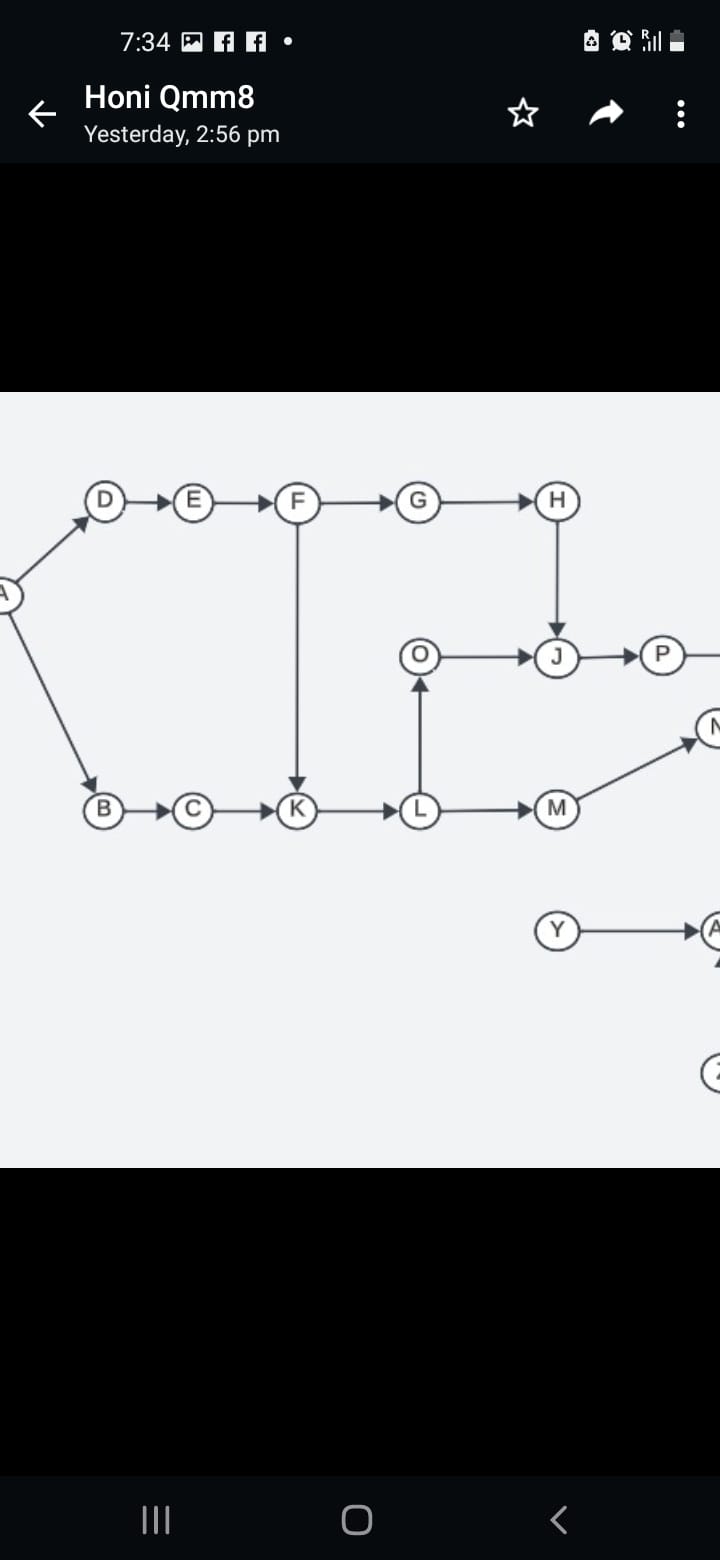
7:34 f f . Honi Qmm8 . . . Yesterday, 2:56 pm G III O K
Step by Step Solution
There are 3 Steps involved in it
1 Expert Approved Answer
Step: 1 Unlock

Question Has Been Solved by an Expert!
Get step-by-step solutions from verified subject matter experts
Step: 2 Unlock
Step: 3 Unlock
 Study Help