







Question: Java Programming Please make sure your code is working correctly and I will give you a good review! Thank you very much!!! Key Steps: 1.
Java Programming Please make sure your code is working correctly and I will give you a good review! Thank you very much!!!
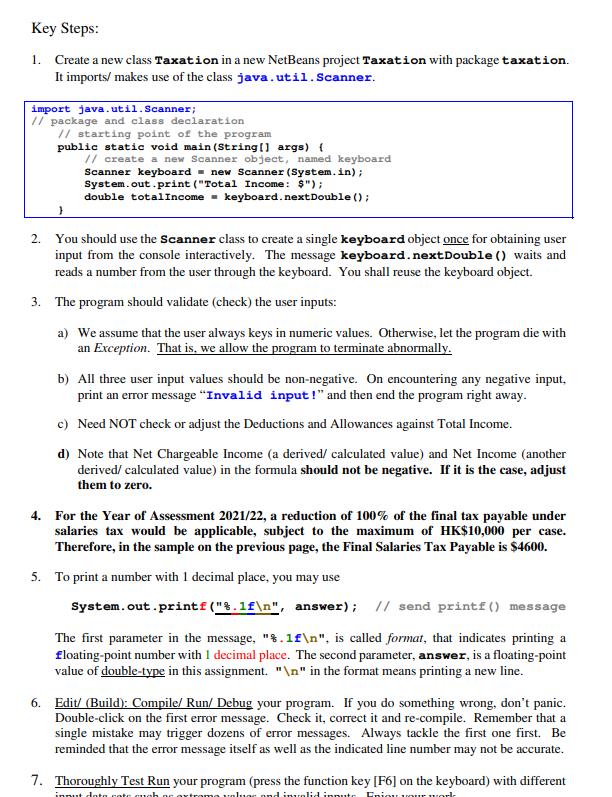
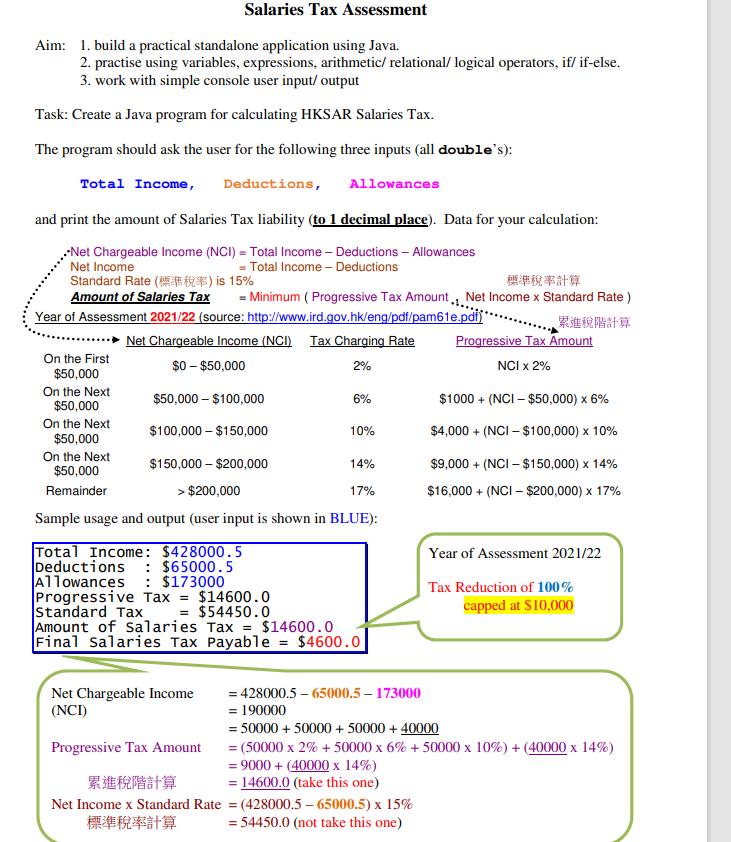
Key Steps: 1. Create a new class Taxation in a new NetBeans project Taxation with package taxation. It imports/ makes use of the class java.util. Scanner. import java.util.Scanner; // package and class declaration // starting point of the program public static void main(String[] args) { } // create a new Scanner object, named keyboard Scanner keyboard = new Scanner(System.in); System.out.print ("Total Income: $"); double totalIncome keyboard. next Double(); 2. You should use the Scanner class to create a single keyboard object once for obtaining user input from the console interactively. The message keyboard. next Double () waits and reads a number from the user through the keyboard. You shall reuse the keyboard object. 3. The program should validate (check) the user inputs: a) We assume that the user always keys in numeric values. Otherwise, let the program die with an Exception. That is, we allow the program to terminate abnormally. b) All three user input values should be non-negative. On encountering any negative input. print an error message "Invalid input!" and then end the program right away. c) Need NOT check or adjust the Deductions and Allowances against Total Income. d) Note that Net Chargeable Income (a derived/ calculated value) and Net Income (another derived/ calculated value) in the formula should not be negative. If it is the case, adjust them to zero. 4. For the Year of Assessment 2021/22, a reduction of 100% of the final tax payable under salaries tax would be applicable, subject to the maximum of HK$10,000 per case. Therefore, in the sample on the previous page, the Final Salaries Tax Payable is $4600. 5. To print a number with 1 decimal place, you may use System.out.printf("%.1f ", answer); // send printf() message The first parameter in the message, "%.1f ", is called format, that indicates printing a floating-point number with 1 decimal place. The second parameter, answer, is a floating-point value of double-type in this assignment. " " in the format means printing a new line. 6. Edit/ (Build): Compile/ Run/ Debug your program. If you do something wrong, don't panic. Double-click on the first error message. Check it, correct it and re-compile. Remember that a single mistake may trigger dozens of error messages. Always tackle the first one first. Be reminded that the error message itself as well as the indicated line number may not be accurate. 7. Thoroughly Test Run your program (press the function key [F6] on the keyboard) with different innut data cate such an extrama valuar and invalid inpute Eniou your work
Step by Step Solution
There are 3 Steps involved in it
The answer provided below has been developed in a clear step by step mannerStep 1 code package and c... View full answer

Get step-by-step solutions from verified subject matter experts
 Study Help