







Question: Java Programming Question: You are asked to create a smart home system for collecting two sensor data from a thermometer and a hygrometer. Both sensor
Java Programming Question:
You are asked to create a smart home system for collecting two sensor data from a thermometer and a hygrometer. Both sensor data should continuously show on a monitor.
The data collecting frequency for the thermometer is about 1 second, and the frequency for the hygrometer is about 2 seconds. In addition, the data range for a thermometer is between 0 to 45 degrees, and the data range for a hygrometer is between 0 to 100%.
Both sensors should run forever unless the user shuts down the system.
You should implement this system according to the design below:
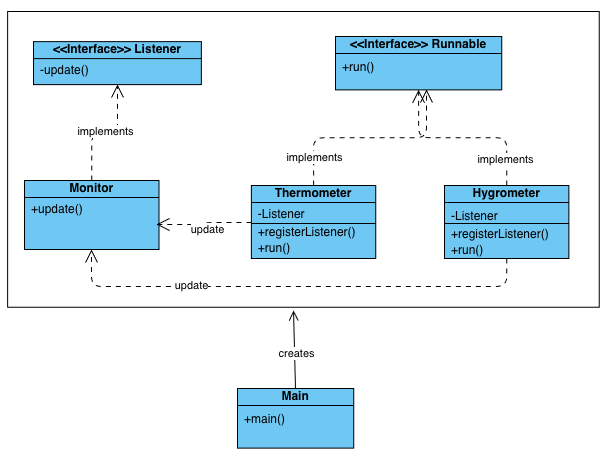
Please check below for a sample output when the system is activated. You must follow the system design and have the same printing format in order to receive full marks.
[Thermometer]:5 degree
[Hygrometer]:84%
[Thermometer]:9 degree
[Thermometer]:21 degree
[Hygrometer]:57%
[Thermometer]:15 degree
[Thermometer]:14 degree
[Hygrometer]:96%
[Thermometer]:29 degree
[Thermometer]:6 degree
[Hygrometer]:22%
[Thermometer]:0 degree
[Thermometer]:17 degree
[Hygrometer]:4%
[Thermometer]:33 degree
[Thermometer]:10 degree
[Hygrometer]:59%
[Thermometer]:8 degree
[Thermometer]:12 degree
[Hygrometer]:75%
[Thermometer]:18 degree
[Thermometer]:11 degree
[Hygrometer]:49%
[Thermometer]:27 degree
[Thermometer]:18 degree
[Hygrometer]:76%
[Thermometer]:22 degree
[Thermometer]:44 degree
[Hygrometer]:73%
[Thermometer]:36 degree
\begin{tabular}{|l|} \hline \multicolumn{2}{|c|}{ interface> Listener } \\ \hline -update() \\ \hline \end{tabular} \begin{tabular}{|l|} \hline \multicolumn{2}{|c|}{ Hygrometer } \\ \hline -Listener \\ \hline +registerListener()+run() \\ \hline \end{tabular} \begin{tabular}{|l|} \hline \multicolumn{1}{|c|}{ Thermometer } \\ \hline -Listener \\ \hline +registerListener()+run() \\ \hline \end{tabular}
Step by Step Solution
There are 3 Steps involved in it

Get step-by-step solutions from verified subject matter experts
 Study Help