



Question: Lab Configure Trucking Please find the attached Switching Lab assignment template. You can use 10.1.1.x/24, 20.1.1.x/24 sub-nets. Provide a screenshot possible Task1 Create VLANs according
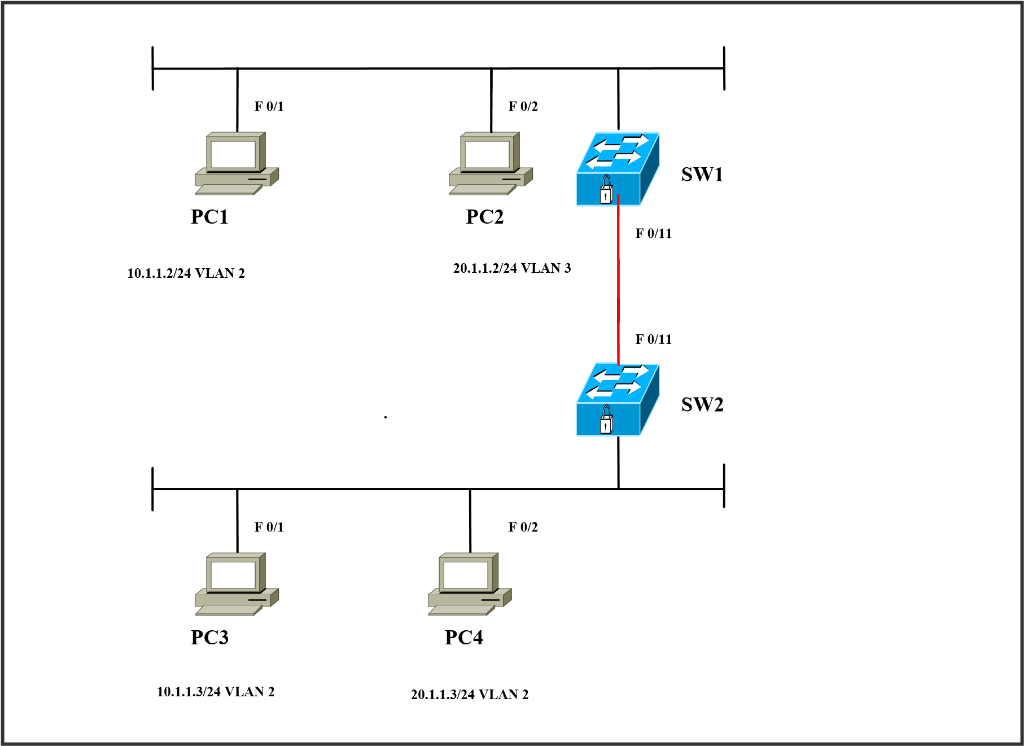
Lab Configure Trucking
Please find the attached Switching Lab assignment template. You can use 10.1.1.x/24, 20.1.1.x/24 sub-nets. Provide a screenshot possible
Task1
Create VLANs according to the scenario and assign to their respective access-ports. Configure ISL trunk between SW1 (fa0/11) and SW 2 (fa0/11)
SW1
Vlan 2 name sales
Vlan 3 name finance
Int fa0/1
Switchport mode access
Switchport access vlan2
Int fa0/2
Switchport mode access
Switchport access vlan3
Int fa0/11
Shutdown
Switchport trunk encapsulation isl
Switchport mode trunk
No shutdown
Task 2
Create VLANs according to the scenario and assign to their respective access-ports. Configure 802.1q (dot1q) trunk between SW1 (fa0/11) and SW 2 (fa0/11)
SW1
Ports Assigned VLANs PC FA 0/1 VLAN 2 PC 1 (10.1.1.2) FA 0/2 VLAN 3 PC 2 (20.1.1.2) FA 0/11 Configured as trunk
SW2
Ports Assigned VLANs PC FA 0/1 VLAN 2 PC 3 (10.1.1.3) FA 0/2 VLAN 3 PC 4 (20.1.1.3) FA 0/11 Configured as trunk
F 0/2 SW1 PC1 PC2 10.1.1.2/24 VLAN 2 20.1.1.2/24 VLAN 3 SW2 F0/2 PC3 PC4 10.1.1.3/24 VLAN 2 20.1.1.3/24 VLAN2 F 0/2 SW1 PC1 PC2 10.1.1.2/24 VLAN 2 20.1.1.2/24 VLAN 3 SW2 F0/2 PC3 PC4 10.1.1.3/24 VLAN 2 20.1.1.3/24 VLAN2
Step by Step Solution
There are 3 Steps involved in it

Get step-by-step solutions from verified subject matter experts