







Question: MAN400-S22-Individual Assignment # 1 - Project Schedule - Word Kunal Chopra KC X File Home Insert Design Layout References Mailings Review View Help Tell me
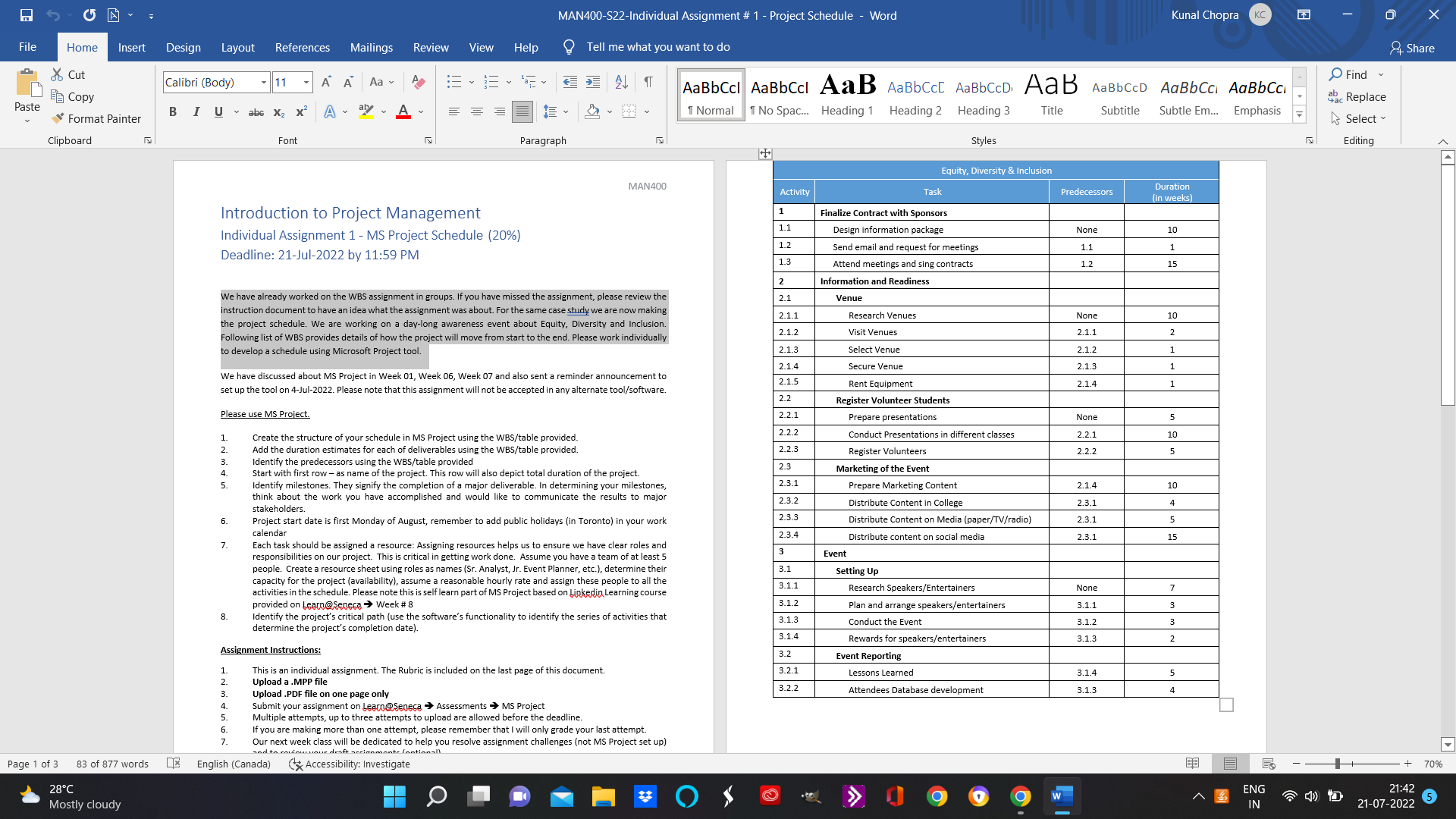
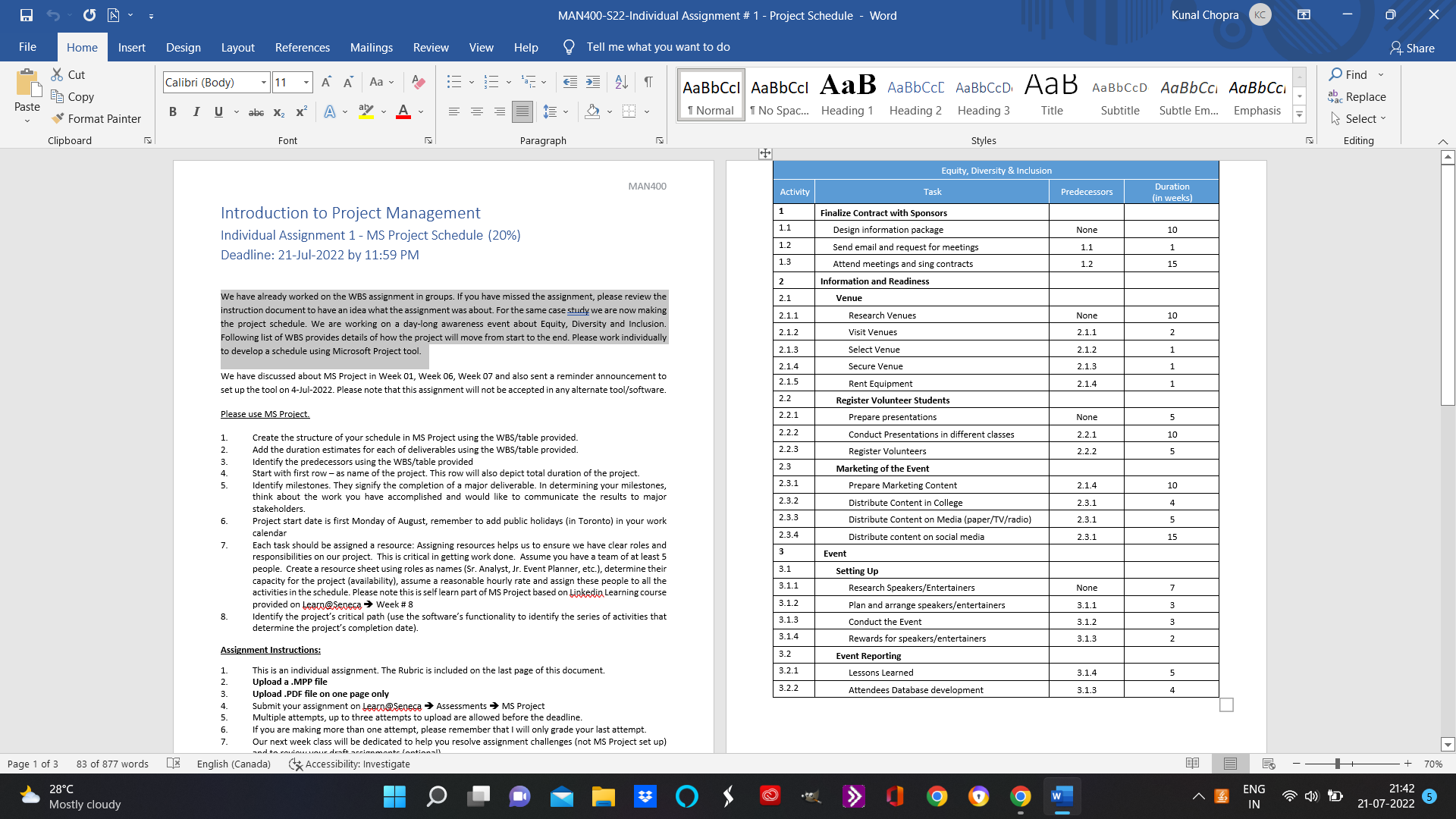
MAN400-S22-Individual Assignment # 1 - Project Schedule - Word Kunal Chopra KC X File Home Insert Design Layout References Mailings Review View Help Tell me what you want to do & Share Cut Calibri (Body) - 11 - A A Aa~ A Find BE Copy AaBbCcl AaBbCcl AaB AaBbCc[ AaBbCCD, AaB AaBbCCD AaBbCci AaBbCci Gac Replace Paste Format Painter BI U~ abe X2 x AZA 1 Normal 1 No Spac... Heading 1 Heading 2 Heading 3 Title Subtitle Subtle Em... Emphasis Select Clipboard Font Paragraph Styles Editing Equity, Diversity & Inclusion MAN400 Activity Task Predecessors Duration (in weeks) Introduction to Project Management Finalize Contract with Sponsors Individual Assignment 1 - MS Project Schedule (20%) 1.1 Design information package None 10 1.2 Deadline: 21-Jul-2022 by 11:59 PM Send email and request for meeting 1.1 1.3 Attend meetings and sing contracts 1 7 75 2 Information and Readiness We have already worked on the WBS assignment in groups. If you have missed the assignment, please review the 2.1 Venue instruction document to have an idea what the assignment was about. For the same case study we are now making 2.1.1 Research Venues None the project schedule. We are working on a day-long awareness event about Equity, Diversity and Inclusion. 10 Following list of WBS provides details of how the project will move from start to the end. Please work individually 2.1.2 Visit Venues 2.1.1 to develop a schedule using Microsoft Project tool. 2.1.3 Select Venue 2.1.2 2.1.4 Secure Venue 2.1.3 We have discussed about MS Project in Week 01, Week 06, Week 07 and also sent a reminder announcement to 2.1.5 Rent Equipment 2.14 set up the tool on 4-Jul-2022. Please note that this assignment will not be accepted in any alternate tool/software. 2.2 Register Volunteer Students Please use MS Project. 2.2.1 Prepare presentations None Create the structure of your schedule in MS Project using the WBS/table provided. 2.2.2 Conduct Presentations in different classes 2.2.1 Add the duration estimates for each of deliverables using the WBS/table provided. 2.2.3 egister Volunteers 2.2 2 identify the predecessors using the WBS/table provided Start with first row - as name of the project. This row will also depict total duration of the project. 2.3 Marketing of the Event Identify milestones. They signify the completion of a major deliverable. In determining your milestones, 2.3.1 Prepare Marketing Content 2.1.4 10 think about the work you have accomplished and would like to communicate the results to major 2.3.2 Distribute Content in College 2.3.1 stakeholders. 6 Project start date is first Monday of August, remember to add public holidays (in Toronto) in your work 2.3.3 istribute Content on Media (paper/TV/radio) 2.3.1 calendar 2.3.4 Distribute content on social media .3.1 15 7 Each task should be assigned a resource: Assigning resources helps us to ensure we have clear roles and responsibilities on our project. This is critical in getting work done. Assume you have a team of at least 5 3 Event people. Create a resource sheet using roles as names (Sr. Analyst, Jr. Event Planner, etc.), determine their 3.1 Setting Up capacity for the project (availability), assume a reasonable hourly rate and assign these people to all the activities in the schedule. Please note this is self learn part of MS Project based on Linkedin Learning course 3.1.1 Research Speakers/Entertainers None provided on Learn@Seneca > Week # 8 3.1.2 Plan and arrange speakers/entertainers 3.1.1 8. Identify the project's critical path (use the software's functionality to identify the series of activities that 3.1.3 determine the project's completion date). Conduct the Event 3.1.2 3.1.4 Rewards for speakers/ entertainers 3.1.3 A UT N W W V Assignment Instructions: 3.2 Event Reporting This is an individual assignment. The Rubric is included on the last page of this document. 3.2.1 Lessons Learned 3.1.4 Upload a . MPP file 3.2.2 Upload .PDF file on one page only Attendees Database development 3.1.3 Submit your assignment on Learn@Seneca => Assessments => MS Project Multiple attempts, up to three attempts to upload are allowed before the deadline. if you are making more than one attempt, please remember that I will only grade your last attempt. Our next week class will be dedicated to help you resolve assignment challenges (not MS Project set up) and to ave draft ar monte lontionall Page 1 of 3 83 of 877 words English (Canada) Accessibility: Investigate + 70% 28.C Mostly cloudy O W ENG 21:42 IN 21-07-2022 5
Step by Step Solution
There are 3 Steps involved in it

Get step-by-step solutions from verified subject matter experts
 Study Help