







Question: Matlab: Having trouble with the graphing aspect and getting the correct values to ouput. Beta^1/4 lambda^2 + (alpha_1 beta - alpha_2) + lambda + alpha_3
Matlab: Having trouble with the graphing aspect and getting the correct values to ouput.
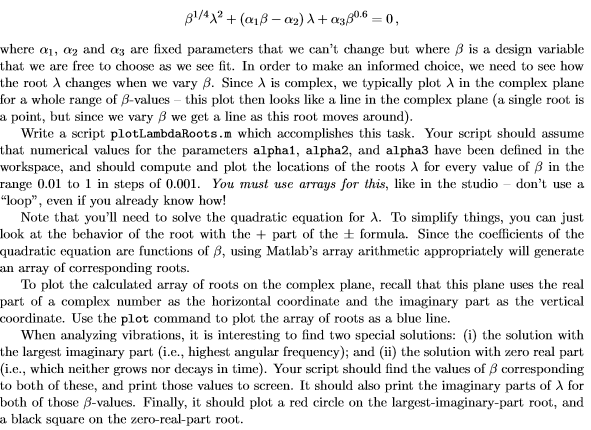
Beta^1/4 lambda^2 + (alpha_1 beta - alpha_2) + lambda + alpha_3 beta^0.6 = 0, where alpha_1, alpha_2 and alpha_3 are fixed parameters that we can't change but where beta is a design variable that we are free to choose as we see fit. In order to make an informed choice, we need to sec how the root lambda changes when wo vary beta. Since lambda is complex, we typically plot lambda in the complex plane for a whole range of beta-values - this plot then looks like a line in the complex plane (a single root is a point, but since we vary beta we get a line as this root moves around). Write a script plotLambdaRoots.m which accomplishes this task. Your script should assume that numerical values for the parameters alpha1, alpha2, and alpha3 have been defined in the workspace, and should compute and plot the locations of the roots lambda for every value of beta in the range 0.01 to 1 in steps of 0.001. You must use arrays for this, like in the studio - don't use a "loop", even if you already know how! Note that you'll need to solve the quadratic equation for lambda. To simplify things, you can just look at the behavior of the root with the + part of the plusminus formula. Since the coefficients of the quadratic equation are functions of beta, using Matlab's array arithmetic appropriately will generate an array of corresponding roots. To plot the calculated array of roots on the complex plane, recall that this plane uses the real part of a complex number as the horizontal coordinate and the imaginary part as the vertical coordinate. Use the plot command to plot the array of roots as a blue line. When analyzing vibrations, it is interesting to find two special solutions: (i) the solution with the largest imaginary part (i.e., highest angular frequency): and (ii) the solution with zero real part (i.e., which neither grows nor decays in time). Your script should find the values of beta corresponding to both of these, and print those values to screen. It should also print the imaginary parts of lambda for both of those beta-values. Finally, it should plot a red circle on the largest-imaginary-part root, and a black square on the zero-real-part root. Beta^1/4 lambda^2 + (alpha_1 beta - alpha_2) + lambda + alpha_3 beta^0.6 = 0, where alpha_1, alpha_2 and alpha_3 are fixed parameters that we can't change but where beta is a design variable that we are free to choose as we see fit. In order to make an informed choice, we need to sec how the root lambda changes when wo vary beta. Since lambda is complex, we typically plot lambda in the complex plane for a whole range of beta-values - this plot then looks like a line in the complex plane (a single root is a point, but since we vary beta we get a line as this root moves around). Write a script plotLambdaRoots.m which accomplishes this task. Your script should assume that numerical values for the parameters alpha1, alpha2, and alpha3 have been defined in the workspace, and should compute and plot the locations of the roots lambda for every value of beta in the range 0.01 to 1 in steps of 0.001. You must use arrays for this, like in the studio - don't use a "loop", even if you already know how! Note that you'll need to solve the quadratic equation for lambda. To simplify things, you can just look at the behavior of the root with the + part of the plusminus formula. Since the coefficients of the quadratic equation are functions of beta, using Matlab's array arithmetic appropriately will generate an array of corresponding roots. To plot the calculated array of roots on the complex plane, recall that this plane uses the real part of a complex number as the horizontal coordinate and the imaginary part as the vertical coordinate. Use the plot command to plot the array of roots as a blue line. When analyzing vibrations, it is interesting to find two special solutions: (i) the solution with the largest imaginary part (i.e., highest angular frequency): and (ii) the solution with zero real part (i.e., which neither grows nor decays in time). Your script should find the values of beta corresponding to both of these, and print those values to screen. It should also print the imaginary parts of lambda for both of those beta-values. Finally, it should plot a red circle on the largest-imaginary-part root, and a black square on the zero-real-part root
Step by Step Solution
There are 3 Steps involved in it

Get step-by-step solutions from verified subject matter experts
 Study Help