







Question: Matlab Programming 7. Create the matrix shown below by using the vector notation for creating vectors with constant spacing and/or the linspace command when entering
Matlab Programming
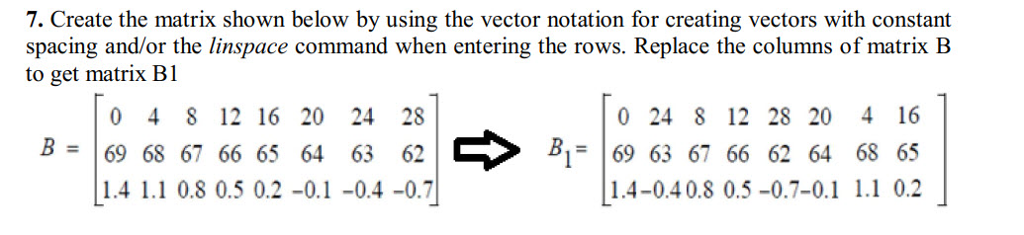
7. Create the matrix shown below by using the vector notation for creating vectors with constant spacing and/or the linspace command when entering the rows. Replace the columns of matrix B to get matrix Bl 0 4 8 12 16 20 24 28 69 68 67 66 65 64 63 62 1.4 1.1 0.8 0.5 0.2 -0.1-0.4 -0.7 0 24 8 12 28 20 4 16 B69 63 67 66 62 64 68 65 1.4-0.40.8 0.5-0.7-0.1 1.1 0.2 7. Create the matrix shown below by using the vector notation for creating vectors with constant spacing and/or the linspace command when entering the rows. Replace the columns of matrix B to get matrix Bl 0 4 8 12 16 20 24 28 69 68 67 66 65 64 63 62 1.4 1.1 0.8 0.5 0.2 -0.1-0.4 -0.7 0 24 8 12 28 20 4 16 B69 63 67 66 62 64 68 65 1.4-0.40.8 0.5-0.7-0.1 1.1 0.2
Step by Step Solution
There are 3 Steps involved in it

Get step-by-step solutions from verified subject matter experts
 Study Help