







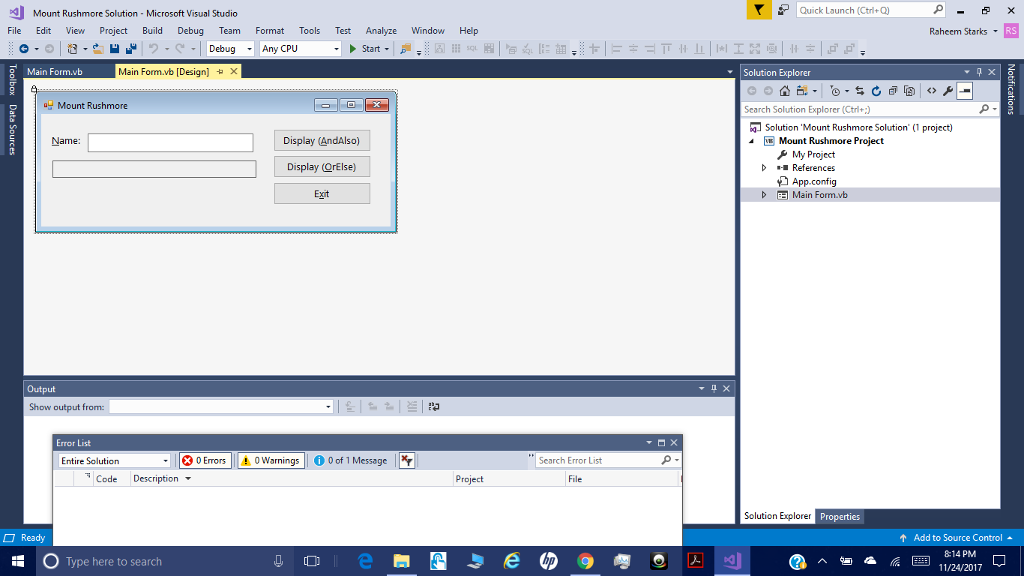
Question: Microsoft Visual Basic 2015: RELOADED (6th Edition) pg 223 Open the Mount Rushmore Solution (Mount Rushmore Solution.sln) file contained in the VbReloaded2015Chap04Mount Rushmore Solution folder.
Microsoft Visual Basic 2015: RELOADED (6th Edition) pg 223
Open the Mount Rushmore Solution (Mount Rushmore Solution.sln) file contained in the VbReloaded2015\Chap04\Mount Rushmore Solution folder. The Display (AndAlso) and Display (OrElse) buttons should display the message On Mount Rushmore when the user enters the name of any of the four Mount Rushmore presidents; otherwise, they should display the message Not on Mount Rushmore. The application should allow the user to enter the name using any combination of lowercase and uppercase letters. Use the AndAlso operator in the Display (AndAlso) buttons Click event procedure. Use the OrElse operator in the Display (OrElse) buttons Click event procedure. Save the solution and then start and test the application. Close the solution. (24, 10)
Mount Rushmore Solution Microsoft Visual Studio Quick Launch (Ctrl+Q) File Edit View Project Build Debug Team Format Tools Test Analyze Window Help Raheem Starks RS -Any Main Form.vb Main Formub [Design] Solution Explorer Mount Rushmore Search Solution Explorer (Ctri+) Solution 'Mount Rushmore Solution' (1 project) [W Mount Rushmore Project Display (AndAlso) Display (QrElse) Exit Name 4 & My Project References App.config Main Form.vb Output Show output from Error List Entire Solution ErrosWarngs0of 1 Message Search Error List Code Description Project File Solution Explorer Properties Ready Add to Source Control 8-14 PM Type here to search f Mount Rushmore Solution Microsoft Visual Studio Quick Launch (Ctrl+Q) File Edit View Project Build Debug Team Format Tools Test Analyze Window Help Raheem Starks RS -Any Main Form.vb Main Formub [Design] Solution Explorer Mount Rushmore Search Solution Explorer (Ctri+) Solution 'Mount Rushmore Solution' (1 project) [W Mount Rushmore Project Display (AndAlso) Display (QrElse) Exit Name 4 & My Project References App.config Main Form.vb Output Show output from Error List Entire Solution ErrosWarngs0of 1 Message Search Error List Code Description Project File Solution Explorer Properties Ready Add to Source Control 8-14 PM Type here to search f
Step by Step Solution
There are 3 Steps involved in it

Get step-by-step solutions from verified subject matter experts
 Study Help