







Question: Microsoft Visual Basic Question .VB Private Sub btnSoftballClick!(ByVal sender AsSystem.Object, ByVal e As System.EventArgs) Handles btnSoftball.Click Dim decHits As Decimal 210 Dim decTimesAtBat Dim decBattingAverage
Microsoft Visual Basic Question .VB
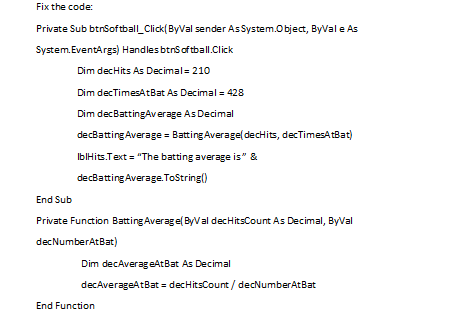
Private Sub btnSoftballClick!(ByVal sender AsSystem.Object, ByVal e As System.EventArgs) Handles btnSoftball.Click Dim decHits As Decimal 210 Dim decTimesAtBat Dim decBattingAverage As Decimal decBattingAverage BattingAverage(decHits, decTimesAtBat blHits.Text "The batting average is & decBattingAverage ToString) As Decimal 428 End Sub Private Function Batting Averagel(ByVal decHitsCount As Decimal, ByVal decNumberAtBat) Dim decAverageAtBat As Decimal decAverageAtBat - decHitsCount/ End Function
Step by Step Solution
There are 3 Steps involved in it
1 Expert Approved Answer
Step: 1 Unlock

Question Has Been Solved by an Expert!
Get step-by-step solutions from verified subject matter experts
Step: 2 Unlock
Step: 3 Unlock
 Study Help