







Question: My HTML website will not work correctly due to my javascript files. I was wondering if anyone could figure out what I am doing wrong.
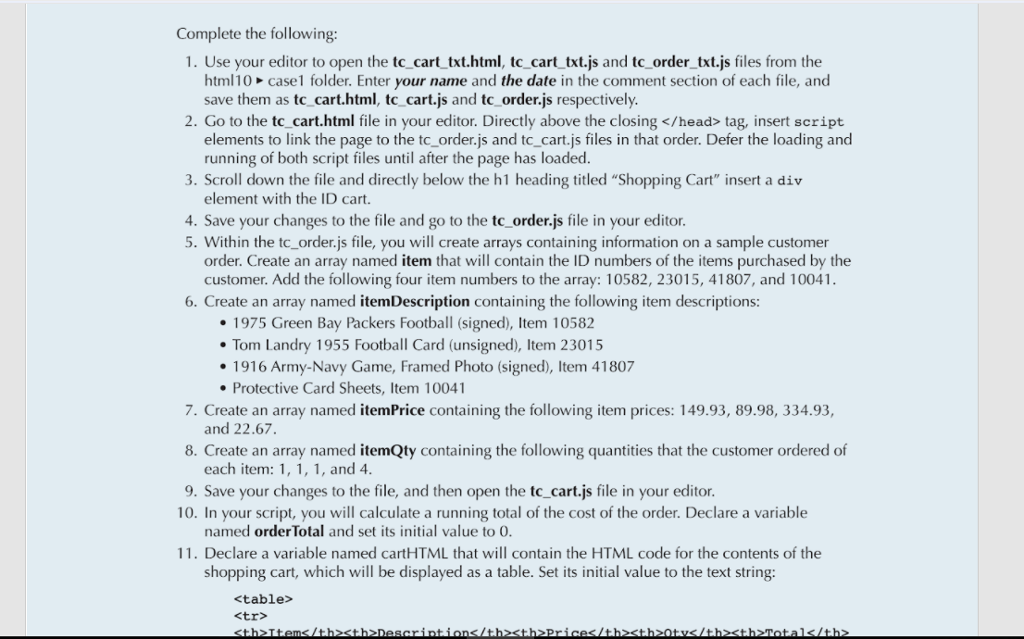
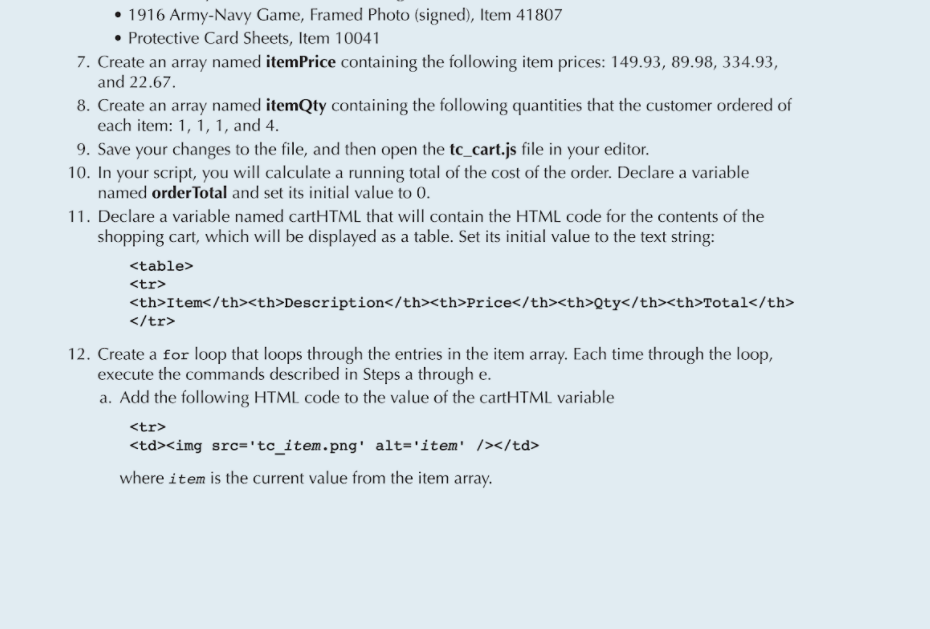
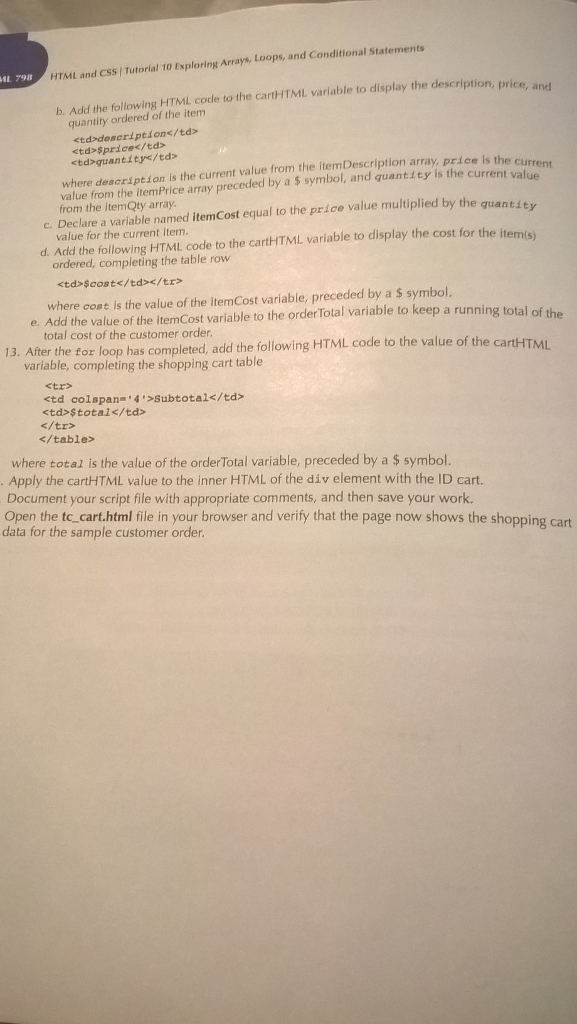
My HTML website will not work correctly due to my javascript files. I was wondering if anyone could figure out what I am doing wrong. I have provided the two codes below as well as the instructions.
tc_cart.js file
"use-strict";
var orderTotal = 0;
var cartHTML = "
| Item | Description | Price | Qty | Total | $cost | ";
|---|---|---|---|---|
| "; | " + itemDescription[i] + " | $" + itemPrice[i] + " | " + itemQty[i] +" | ";$" + itemCost + " |
| Subtotal | $" + orderTotal + " | |||
";
document.getElementById("cart").innerHTML = cartHTML;
tc_order.js file
"use-strict";
var item = [10582, 23015, 41807, 10041]; var itemDescription = ["1975 Green Bay Packers Football (signed), Item 10582", "Tom Landry 1955 Football Card (unsigned), Item 23015", "1916 Army-Navy Game, Framed Photo (signed), Item 41807", "Protective Card Sheets, Item 10041"]; var itemPrice = [149.93, 89.98, 334.93, 22.67]; var itemQty = [1, 1, 1, 4];
Here are my two javascript codes. I will provide the book instructions. I did the HTML sheet correctly. I am having a lot of errors with the js files.
 ;
;
Complete the following: 1. Use your editor to open the tc cart txt.html, tc_cart txt.js and tc_order_txt.js files from the 2. Go to the tc_cart.html file in your editor. Directly above the closing tag, insert script 3. Scroll down the file and directly below the h1 heading titled "Shopping Cart" insert a div 4. Save your changes to the file and go to the tc_order.js file in your editor html10 case1 folder. Enter your name and the date in the comment section of each file, and save them as tc cart.html, tc_cart.js and tc order.js respectively elements to link the page to the tc_order.js and tc_cart.js files in that order. Defer the loading and running of both script files until after the page has loaded element with the ID cart 5. Within the tc_order.js file, you will create arrays containing information on a sample customer order. Create an array named item that will contain the ID numbers of the items purchased by the customer. Add the following four item numbers to the array: 10582, 23015, 41807, and 10041 6. Create an array named itemDescription containing the following item descriptions 1975 Green Bay Packers Football (signed), Item 10582 Tom Landry 1955 Football Card (unsigned), Item 23015 1916 Army-Navy Game, Framed Photo (signed), Item 41807 Protective Card Sheets, Item 10041 7. Create an array named itemPrice containing the following item prices: 149.93, 89.98, 334.93, and 22.67. 8. Create an array named itemQty containing the following quantities that the customer ordered of each item: 1, 1, 1, and 4 9. Save your changes to the file, and then open the tc cart.js file in your editor 10. In your script, you will calculate a running total of the cost of the order. Declare a variable named order Total and set its initial value to 0 11. Declare a variable named cartHTML that will contain the HTML code for the contents of the shopping cart, which will be displayed as a table. Set its initial value to the text string:
Step by Step Solution
There are 3 Steps involved in it

Get step-by-step solutions from verified subject matter experts
 Study Help