







Question: Need help with code in uVision using ARM Assembly: Have one read - only byte called Input and one read / write byte called Output
Need help with code in uVision using ARM Assembly:
Have one readonly byte called Input and one readwrite byte called Output
Each bit of Output is to be setcleared based on the following, with being the least
significant bit and being the most significant bit.
o Output bit is equal to Input bit
o Output bit is the opposite of Input bit
o Output bit is only set if Input bits andor are set
o Output bit is only set if both Input bits and are set
o Output bit is only set if neither Input bits or are set
o Output bit is only set if only one of Input bit or Input bit are set it will
be cleared if both or neither are set
o Output bit is set if Input bit is set and Input bit is clear
o Output bit is set if both Input bits and are clear
Have a comment on the first line stating that this is part A of the homework
Below are examples of Input arrays and their corresponding Output arrays.
Input dcb xB
;Output: x
Input dcb x
;Output: x
Input dcb xA
;Output: x
Input dcb xFF
;Output: xD
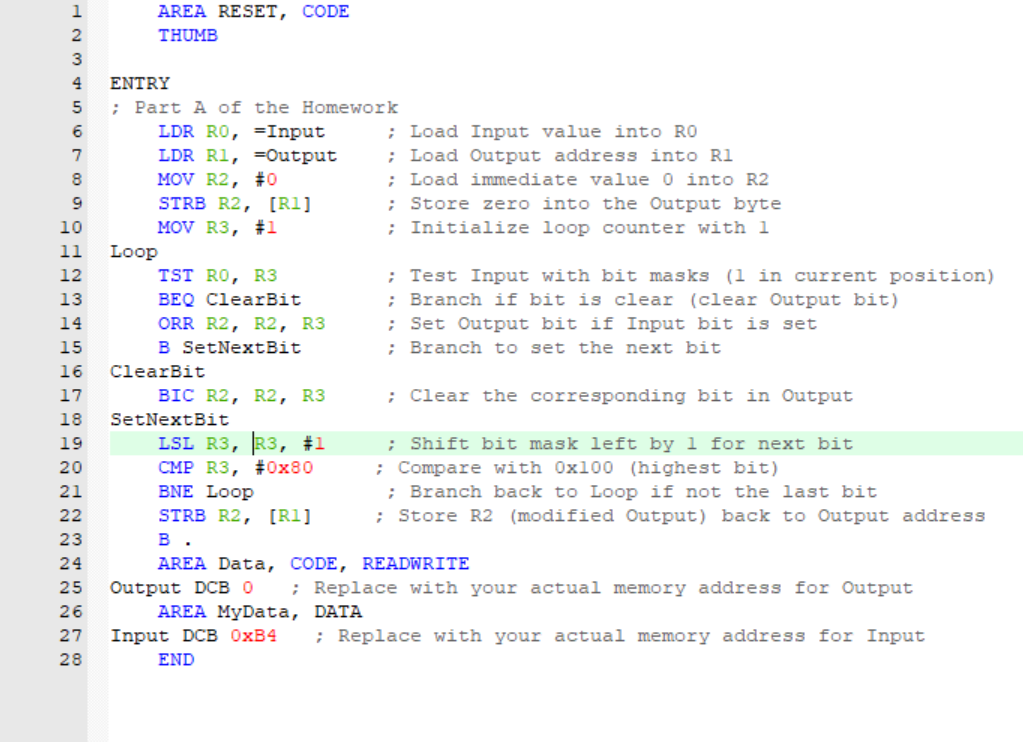
The code Ive tried to implement but does not work as intended is shown below.
AREA RESET, CODE
THUMB
ENTRY
; Part of the Homework
LDR ROInput ; Load Input value into RO
LDR RIoutput ; Load Output address into RI
MOV R # ; Load immediate value into R
STRB RR ; Store zero into the Output byte
MOV R # ; Initialize loop counter with
Loop
TST R R ; Test Input with bit masks in current position
BEQ ClearBit ; Branch if bit is clear clear Output bit
ORR R R R ; Set Output bit if Input bit is set
B SetNextBit ; Branch to set the next bit
ClearBit
BIC R R R ; Clear the corresponding bit in Output
SetNextBit
LSL R R # ; Shift bit mask left by for next bit
CMP R #x ; Compare with xhighest bit
BNE Loop ; Branch back to Loop if not the last bit
STRB RR ; Store Rmodified Output back to Output address
B
AREA Data, CODE, READWRITE
Output DCB ; Replace with your actual memory address for Output
AREA MyData, DATA
Input DCB OxB ; Replace with your actual memory address for Input
END
Step by Step Solution
There are 3 Steps involved in it
1 Expert Approved Answer
Step: 1 Unlock

Question Has Been Solved by an Expert!
Get step-by-step solutions from verified subject matter experts
Step: 2 Unlock
Step: 3 Unlock
 Study Help