







Question: Need help with Linuxzoo Tutorial 2 Question 4: Relative move Make misc your current directory. Move the file vimrc to the progs directory. Use ls
Need help with Linuxzoo Tutorial 2
Question 4: Relative move
- Make misc your current directory.
- Move the file vimrc to the progs directory.
- Use ls to verify that this worked.
Not understanding why it's saying vimrc not found. find shows:
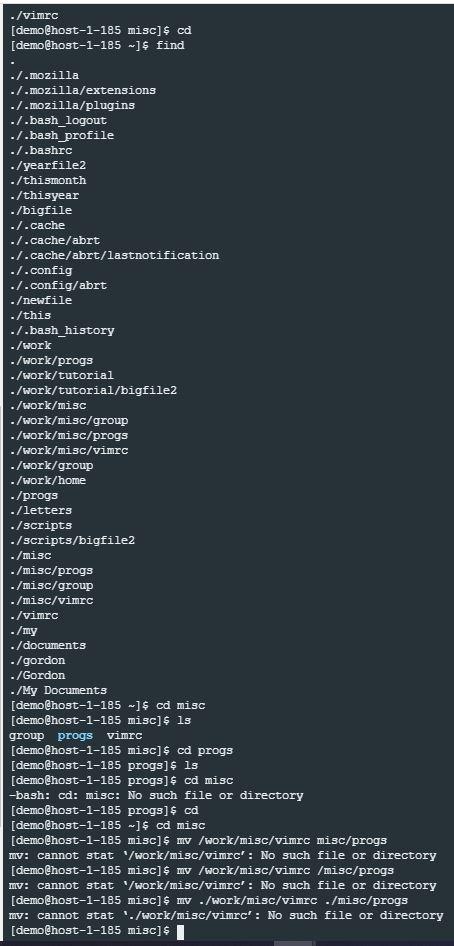
Please explain how I would go about finding the misc file. It clearly shows the file path. Why is this not working?
EDIT: to the guy saying, "i dont". what do you need?
./vimrc [demo@host-1-185 misc] $ cd (demo@host-1-185 -]$ find ./.mozilla ./.mozilla/extensions ./ -mozilla/plugins ./ .bash_logout ./.bash_profile ./.bashrc ./yearfile2 ./thismonth /thisyear ./bigfile -/.cache ./.cache/abrt ./.cache/abrt/lastnotification ./.config ./.config/abrt - ewfile -/this ./.bash_history - /work ./work/progs ./work/tutorial ./work/tutorial/bigfile2 ./work/misc ./work/misc/group -/work/misc/progs ./work/misc/vimrc ./work/group - /work/home ./progs ./letters ./scripts ./scripts/bigfile2 - /misc ./misc/progs ./misc/group ./misc/vimrc ./vimrc ./my ./documents ./gordon -/Gordon -/My Documents [demo@host-1-185 -]$ cd misc (demo@host-1-185 misc]$ ls group progs vimrc [demo@host-1-185 misc]$ cd progs [demo@host-1-185 progs] $ ls [demo@host-1-185 progs] $ cd misc -bash: cd: misc: No such file or directory [demo@host-1-185 progs] $ cd [demo@host-1-185 -] $ cd misc (demo@host-1-185 misc]$ m /work/misc/vimrc misc/progs mv: cannot stat /work/misc/vimrc': No such file or directory [demo@host-1-185 misc] $ mv /work/misc/vimrc /misc/progs MV: cannot stat /work/misc/vimrc': No such file or directory [demo@host-1-185 misc] $ mv ./work/misc/vimrc ./misc/progs mv: cannot stat './work/misc/vimrc': No such file or directory [demo@host-1-185 misc] $
Step by Step Solution
There are 3 Steps involved in it

Get step-by-step solutions from verified subject matter experts
 Study Help