







Question: NOTE: The formula for Weekly Total looks like this: =SUM(D36:041) This will some all the values in that column. You must include ALL cells in
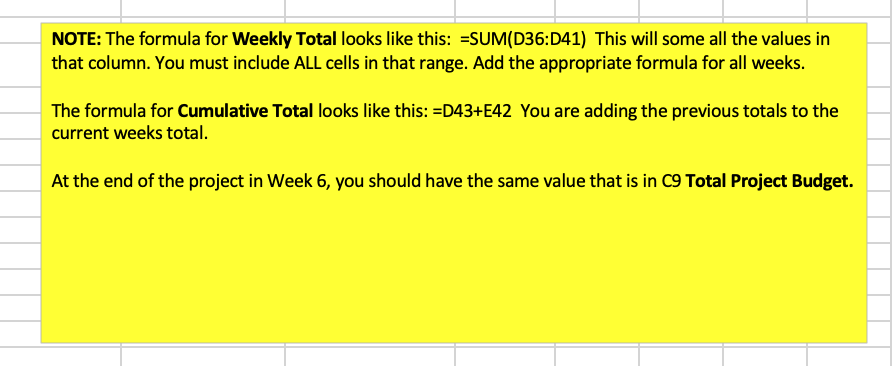
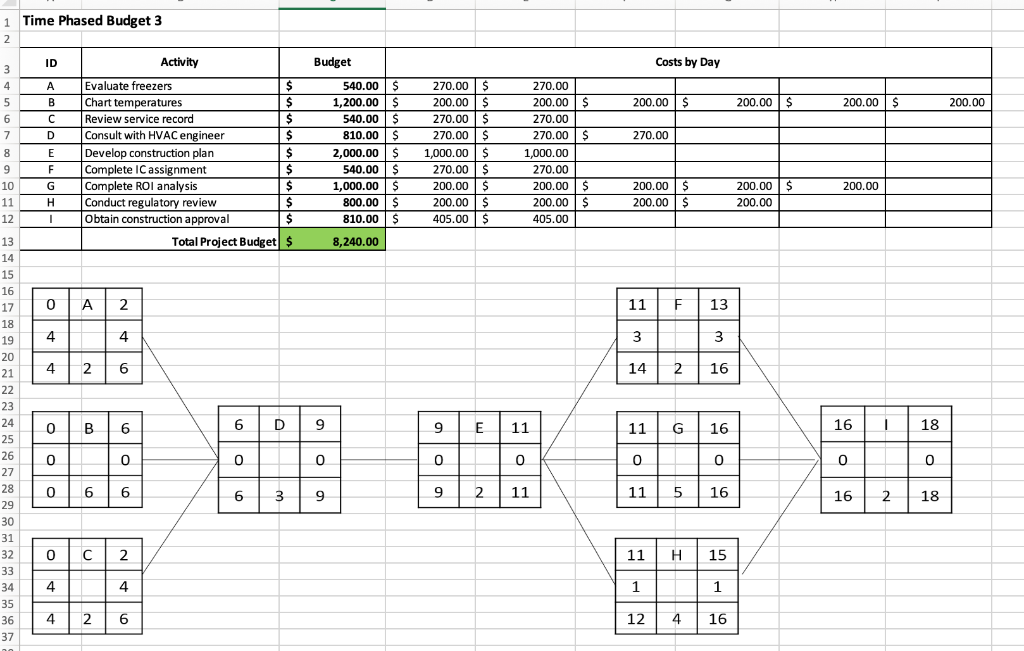

NOTE: The formula for Weekly Total looks like this: =SUM(D36:041) This will some all the values in that column. You must include ALL cells in that range. Add the appropriate formula for all weeks. The formula for Cumulative Total looks like this: =D43+E42 You are adding the previous totals to the current weeks total. At the end of the project in Week 6, you should have the same value that is in C9 Total Project Budget. 1 Time Phased Budget 3 2 ID Activity Budget Costs by Day 3 4 5 A 200.00 $ 200.00 $ 200.00 $ 200.00 6 7 B D 270.00 8 9 10 11 12 E F G H Evaluate freezers $ Chart temperatures $ Review service record $ Consult with HVAC engineer $ Develop construction plan $ Complete IC assignment $ Complete ROI analysis $ Conduct regulatory review $ Obtain construction approval $ Total Project Budget $ 540.00 $ 1,200.00 $ 540.00 $ 810.00 $ 2,000.00 $ 540.00 $ 1,000.00 $ 800.00 $ 810.00 $ 270.00 $ 200.00 $ 270.00 $ 270.00 $ 1,000.00 $ 270.00 $ 200.00 $ 200.00 $ 405.00 $ 270.00 200.00 $ 270.00 270.00 $ 1,000.00 270.00 200.00 $ 200.00 $ 405.00 200.00 200.00 $ 200.00 $ 200.00 $ 200.00 - 8,240.00 0 A 2 11 F 13 4 4 3 3 4 2 6 14 2 16 0 - B 6 6 D 9 9 E 11 11 G 16 16 18 13 14 15 16 17 18 19 20 21 22 23 24 25 26 27 28 29 30 31 32 34 33 34 35 36 37 0 0 0 0 0 0 0 0 0 0 0 6 6 6 3 9 9 2 11 11 5 16 16 2 18 0 C 2 11 H 15 4 4 1 1 4 2 6 12 4 16 3 4 5 6 7 8 10 11 12 13 14 15 16 17 ID A 18 B D E Activity Evaluate freezers Chart temperatures Review service record Consult with HVAC engineer Develop construction plan Complete IC assignment Complete ROI analysis Conduct regulatory review Obtain construction approval Budget $ $ $ $ $ $ $ $ $ 540.00 1,200.00 540.00 810.00 2,000.00 540.00 1,000.00 800.00 810.00 F G . Daily Total $0.00 Cumulative Total $0.00 This total should mat Total Project Budget NOTE: The formula for Weekly Total looks like this: =SUM(D36:041) This will some all the values in that column. You must include ALL cells in that range. Add the appropriate formula for all weeks. The formula for Cumulative Total looks like this: =D43+E42 You are adding the previous totals to the current weeks total. At the end of the project in Week 6, you should have the same value that is in C9 Total Project Budget. 1 Time Phased Budget 3 2 ID Activity Budget Costs by Day 3 4 5 A 200.00 $ 200.00 $ 200.00 $ 200.00 6 7 B D 270.00 8 9 10 11 12 E F G H Evaluate freezers $ Chart temperatures $ Review service record $ Consult with HVAC engineer $ Develop construction plan $ Complete IC assignment $ Complete ROI analysis $ Conduct regulatory review $ Obtain construction approval $ Total Project Budget $ 540.00 $ 1,200.00 $ 540.00 $ 810.00 $ 2,000.00 $ 540.00 $ 1,000.00 $ 800.00 $ 810.00 $ 270.00 $ 200.00 $ 270.00 $ 270.00 $ 1,000.00 $ 270.00 $ 200.00 $ 200.00 $ 405.00 $ 270.00 200.00 $ 270.00 270.00 $ 1,000.00 270.00 200.00 $ 200.00 $ 405.00 200.00 200.00 $ 200.00 $ 200.00 $ 200.00 - 8,240.00 0 A 2 11 F 13 4 4 3 3 4 2 6 14 2 16 0 - B 6 6 D 9 9 E 11 11 G 16 16 18 13 14 15 16 17 18 19 20 21 22 23 24 25 26 27 28 29 30 31 32 34 33 34 35 36 37 0 0 0 0 0 0 0 0 0 0 0 6 6 6 3 9 9 2 11 11 5 16 16 2 18 0 C 2 11 H 15 4 4 1 1 4 2 6 12 4 16 3 4 5 6 7 8 10 11 12 13 14 15 16 17 ID A 18 B D E Activity Evaluate freezers Chart temperatures Review service record Consult with HVAC engineer Develop construction plan Complete IC assignment Complete ROI analysis Conduct regulatory review Obtain construction approval Budget $ $ $ $ $ $ $ $ $ 540.00 1,200.00 540.00 810.00 2,000.00 540.00 1,000.00 800.00 810.00 F G . Daily Total $0.00 Cumulative Total $0.00 This total should mat Total Project Budget
Step by Step Solution
There are 3 Steps involved in it

Get step-by-step solutions from verified subject matter experts
 Study Help