







Question: Open Excel and create a new workbook. Create a worksheet ( should be the first worksheet of the workbook ) with your name in cell
Open Excel and create a new workbook. Create a worksheet should be the first worksheet of the workbook with your name in cell A date in cell A course in cell A instructor name in cell A and assignment name in cell A Name this worksheetModule Lab Assignment Info".
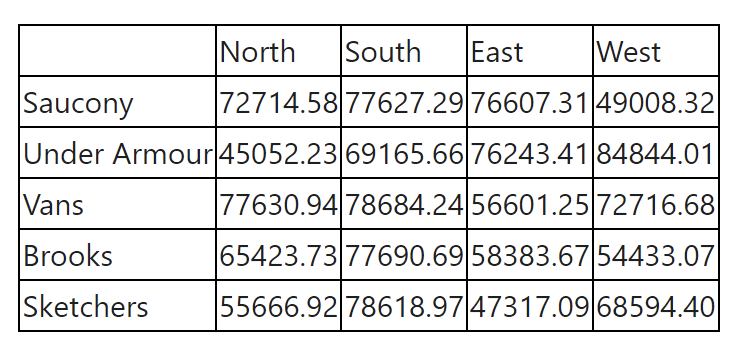
Create a worksheet. Name the worksheet "First Quarter Revenue Data", and change the worksheet tab color to a shade of green.Enter the worksheet title, Rebecca's Shoe Warehouse, in cell A and the worksheet subtitle, First Quarter Revenue Analysis, in cell A Beginning in row enter the region data shown below:
Create totals for each region and product. Also, create a company grand total.HINT: You will have both column TOTALS and row TOTALS.
Format the worksheet title with the Title cell style. Center and merge the title across columns A through F
Format the worksheet subtitle to point Calibri Light. Center and merge the subtitle across columns A through F
Use Cell Styles to format the range A:F with the Heading cell style, the range B:F with the Accent cell style, and the range A:F with the Total cell style.
Center the column titles in row Apply the accounting number format to the ranges B:F and B:F Apply the comma style format to the range B:F Adjust any column widths to the widest text entry in each column.
Select the ranges B:E and B:E and then insert a D pie chart. Apply the Style chart style to the chart. Move the chart to a new worksheet named "Revenue Analysis Chart". Change the chart title to First Quarter Revenue Analysis.
Change the "First Quarter Revenue Data" worksheet orientation to landscape orientation.
Reorder the worksheets: Module Lab Assignment Info, First Quarter Revenue Data, Revenue Analysis Chart.
begintabularlllll
hline & North & South & East & West
hline Saucony & & & &
hline Under Armour & & & &
hline Vans & & & &
hline Brooks & & & &
hline Sketchers & & & &
hline
endtabular
Step by Step Solution
There are 3 Steps involved in it
1 Expert Approved Answer
Step: 1 Unlock

Question Has Been Solved by an Expert!
Get step-by-step solutions from verified subject matter experts
Step: 2 Unlock
Step: 3 Unlock
 Study Help