







Question: OPERATIONS MANAGEMENT Background Now that you have a work breakdown structure and a rough timetable for the project, you want to see how HKA's $25,000
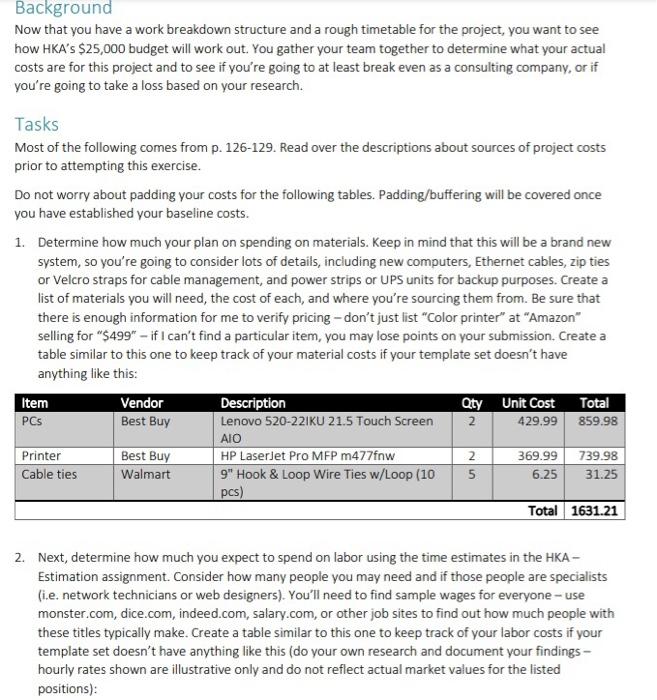
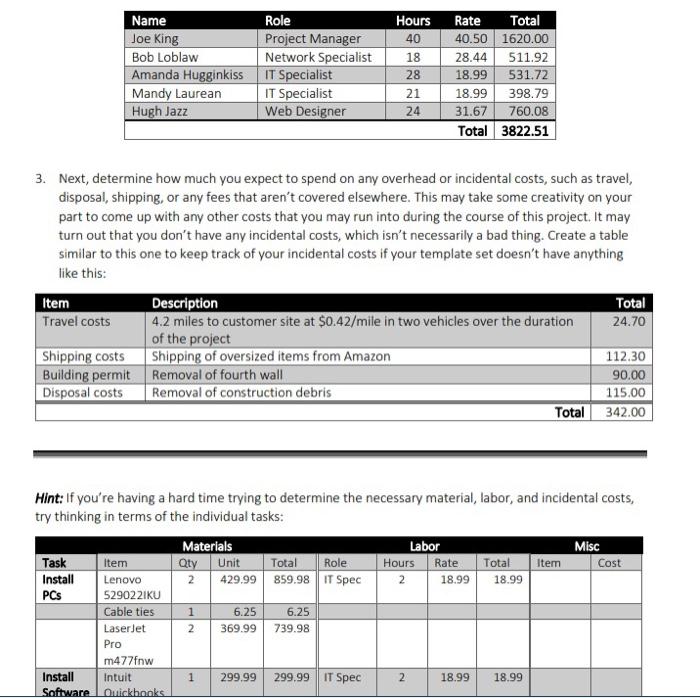
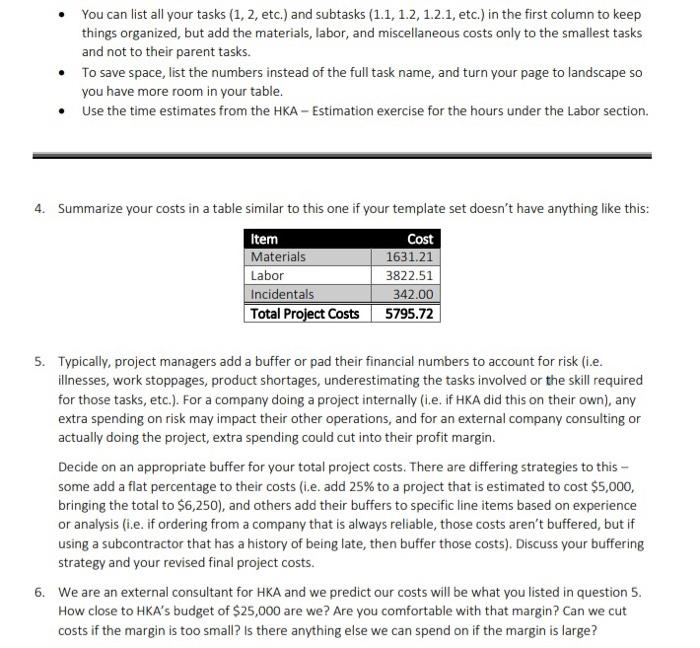
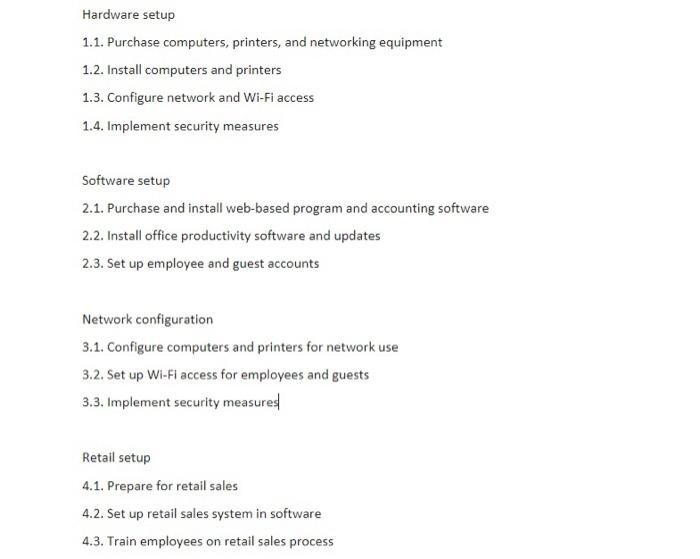
Background Now that you have a work breakdown structure and a rough timetable for the project, you want to see how HKA's $25,000 budget will work out. You gather your team together to determine what your actual costs are for this project and to see if you're going to at least break even as a consulting company, or if you're going to take a loss based on your research. Tasks Most of the following comes from p. 126-129. Read over the descriptions about sources of project costs prior to attempting this exercise. Do not worry about padding your costs for the following tables. Padding/buffering will be covered once you have established your baseline costs. 1. Determine how much your plan on spending on materials. Keep in mind that this will be a brand new system, so you're going to consider lots of details, including new computers, Ethernet cables, zip ties or Velcro straps for cable management, and power strips or UPS units for backup purposes. Create a list of materials you will need, the cost of each, and where you're sourcing them from. Be sure that there is enough information for me to verify pricing - don't just list "Color printer" at "Amazon" selling for "\$499" - if I can't find a particular item, you may lose points on your submission. Create a table similar to this one to keep track of your material costs if your template set doesn't have anything like this: 2. Next, determine how much you expect to spend on labor using the time estimates in the HKA Estimation assignment. Consider how many people you may need and if those people are specialists (i.e. network technicians or web designers). You'll need to find sample wages for everyone - use monster.com, dice.com, indeed.com, salary.com, or other job sites to find out how much people with these titles typically make. Create a table similar to this one to keep track of your labor costs if your template set doesn't have anything like this (do your own research and document your findings hourly rates shown are illustrative only and do not reflect actual market values for the listed positions): 3. Next, determine how much you expect to spend on any overhead or incidental costs, such as travel, disposal, shipping, or any fees that aren't covered elsewhere. This may take some creativity on your part to come up with any other costs that you may run into during the course of this project. It may turn out that you don't have any incidental costs, which isn't necessarily a bad thing. Create a table similar to this one to keep track of your incidental costs if your template set doesn't have anything like this: Hint: If you're having a hard time trying to determine the necessary material, labor, and incidental costs, try thinking in terms of the individual tasks: - You can list all your tasks (1,2, etc.) and subtasks (1.1,1.2,1.2.1, etc.) in the first column to keep things organized, but add the materials, labor, and miscellaneous costs only to the smallest tasks and not to their parent tasks. - To save space, list the numbers instead of the full task name, and turn your page to landscape so you have more room in your table. - Use the time estimates from the HKA - Estimation exercise for the hours under the Labor section. 4. Summarize your costs in a table similar to this one if your template set doesn't have anything like this: 5. Typically, project managers add a buffer or pad their financial numbers to account for risk (i.e. illnesses, work stoppages, product shortages, underestimating the tasks involved or the skill required for those tasks, etc.). For a company doing a project internally (i.e. if HKA did this on their own), any extra spending on risk may impact their other operations, and for an external company consulting or actually doing the project, extra spending could cut into their profit margin. Decide on an appropriate buffer for your total project costs. There are differing strategies to this some add a flat percentage to their costs (i.e. add 25% to a project that is estimated to cost $5,000, bringing the total to $6,250 ), and others add their buffers to specific line items based on experience or analysis (i.e. if ordering from a company that is always reliable, those costs aren't buffered, but if using a subcontractor that has a history of being late, then buffer those costs). Discuss your buffering strategy and your revised final project costs. 6. We are an external consultant for HKA and we predict our costs will be what you listed in question 5 . How close to HKA's budget of $25,000 are we? Are you comfortable with that margin? Can we cut costs if the margin is too small? Is there anything else we can spend on if the margin is large? Hardware setup 1.1. Purchase computers, printers, and networking equipment 1.2. Install computers and printers 1.3. Configure network and Wi-Fi access 1.4. Implement security measures Software setup 2.1. Purchase and install web-based program and accounting software 2.2. Install office productivity software and updates 2.3. Set up employee and guest accounts Network configuration 3.1. Configure computers and printers for network use 3.2. Set up Wi-Fi access for employees and guests 3.3. Implement security measures Retail setup 4.1. Prepare for retail sales 4.2. Set up retail sales system in software 4.3. Train employees on retail sales process Background Now that you have a work breakdown structure and a rough timetable for the project, you want to see how HKA's $25,000 budget will work out. You gather your team together to determine what your actual costs are for this project and to see if you're going to at least break even as a consulting company, or if you're going to take a loss based on your research. Tasks Most of the following comes from p. 126-129. Read over the descriptions about sources of project costs prior to attempting this exercise. Do not worry about padding your costs for the following tables. Padding/buffering will be covered once you have established your baseline costs. 1. Determine how much your plan on spending on materials. Keep in mind that this will be a brand new system, so you're going to consider lots of details, including new computers, Ethernet cables, zip ties or Velcro straps for cable management, and power strips or UPS units for backup purposes. Create a list of materials you will need, the cost of each, and where you're sourcing them from. Be sure that there is enough information for me to verify pricing - don't just list "Color printer" at "Amazon" selling for "\$499" - if I can't find a particular item, you may lose points on your submission. Create a table similar to this one to keep track of your material costs if your template set doesn't have anything like this: 2. Next, determine how much you expect to spend on labor using the time estimates in the HKA Estimation assignment. Consider how many people you may need and if those people are specialists (i.e. network technicians or web designers). You'll need to find sample wages for everyone - use monster.com, dice.com, indeed.com, salary.com, or other job sites to find out how much people with these titles typically make. Create a table similar to this one to keep track of your labor costs if your template set doesn't have anything like this (do your own research and document your findings hourly rates shown are illustrative only and do not reflect actual market values for the listed positions): 3. Next, determine how much you expect to spend on any overhead or incidental costs, such as travel, disposal, shipping, or any fees that aren't covered elsewhere. This may take some creativity on your part to come up with any other costs that you may run into during the course of this project. It may turn out that you don't have any incidental costs, which isn't necessarily a bad thing. Create a table similar to this one to keep track of your incidental costs if your template set doesn't have anything like this: Hint: If you're having a hard time trying to determine the necessary material, labor, and incidental costs, try thinking in terms of the individual tasks: - You can list all your tasks (1,2, etc.) and subtasks (1.1,1.2,1.2.1, etc.) in the first column to keep things organized, but add the materials, labor, and miscellaneous costs only to the smallest tasks and not to their parent tasks. - To save space, list the numbers instead of the full task name, and turn your page to landscape so you have more room in your table. - Use the time estimates from the HKA - Estimation exercise for the hours under the Labor section. 4. Summarize your costs in a table similar to this one if your template set doesn't have anything like this: 5. Typically, project managers add a buffer or pad their financial numbers to account for risk (i.e. illnesses, work stoppages, product shortages, underestimating the tasks involved or the skill required for those tasks, etc.). For a company doing a project internally (i.e. if HKA did this on their own), any extra spending on risk may impact their other operations, and for an external company consulting or actually doing the project, extra spending could cut into their profit margin. Decide on an appropriate buffer for your total project costs. There are differing strategies to this some add a flat percentage to their costs (i.e. add 25% to a project that is estimated to cost $5,000, bringing the total to $6,250 ), and others add their buffers to specific line items based on experience or analysis (i.e. if ordering from a company that is always reliable, those costs aren't buffered, but if using a subcontractor that has a history of being late, then buffer those costs). Discuss your buffering strategy and your revised final project costs. 6. We are an external consultant for HKA and we predict our costs will be what you listed in question 5 . How close to HKA's budget of $25,000 are we? Are you comfortable with that margin? Can we cut costs if the margin is too small? Is there anything else we can spend on if the margin is large? Hardware setup 1.1. Purchase computers, printers, and networking equipment 1.2. Install computers and printers 1.3. Configure network and Wi-Fi access 1.4. Implement security measures Software setup 2.1. Purchase and install web-based program and accounting software 2.2. Install office productivity software and updates 2.3. Set up employee and guest accounts Network configuration 3.1. Configure computers and printers for network use 3.2. Set up Wi-Fi access for employees and guests 3.3. Implement security measures Retail setup 4.1. Prepare for retail sales 4.2. Set up retail sales system in software 4.3. Train employees on retail sales process
Step by Step Solution
There are 3 Steps involved in it

Get step-by-step solutions from verified subject matter experts
 Study Help