







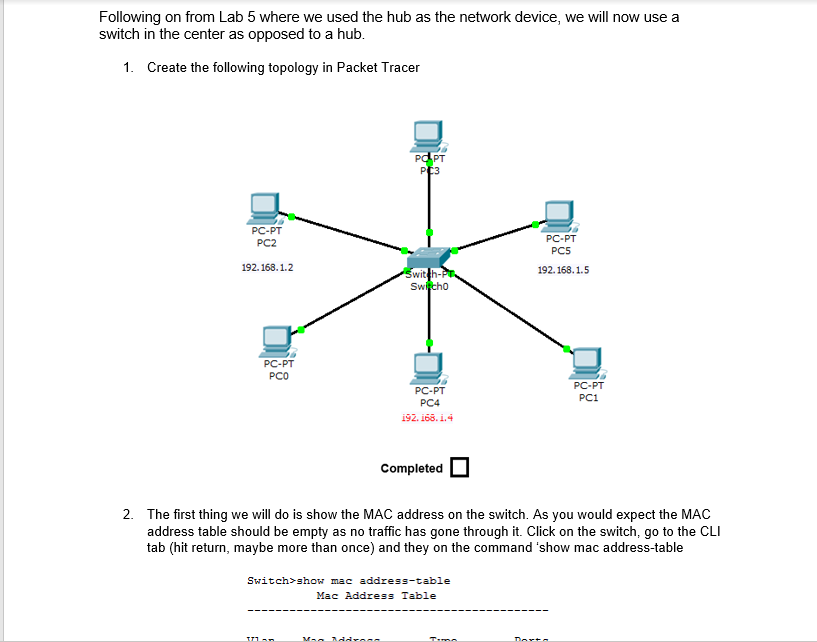
Question: Packet tracer help please. I cannot get more than 4 pcs to connect to the switch Create the following topology in Packet Tracer Completed The
Packet tracer help please. I cannot get more than pcs to connect to the switch
Create the following topology in Packet Tracer
Completed
The first thing we will do is show the MAC address on the switch. As you would expect the MAC address table should be empty as no traffic has gone through it Click on the switch, go to the CLI tab hit return, maybe more than once and they on the command 'show mac addresstable
Go into simulation mode and make sure that APR and ICMP are the only protocols enabled. We will now a packet from PC to PC As we did in lab hit the capture button and see the packet travel. The switch will do a broadcast that requested by the ARP. PC will accept it
Hit capture forward and this time PC will send back a reply. Notice that the reply only goes put one port from the switch and PC accepts the packet.
Now check the MAC address table on the switch and the ARP table on PC
Now ping PC again from PC and see how the switch handles the ping. The switch delivers the packet direct to the PC and no broadcast is required.
As a final step, clear the ARP cache table on PC and then once again ping PC from PC and see what happens......
Step by Step Solution
There are 3 Steps involved in it
1 Expert Approved Answer
Step: 1 Unlock

Question Has Been Solved by an Expert!
Get step-by-step solutions from verified subject matter experts
Step: 2 Unlock
Step: 3 Unlock
 Study Help