



Question: Part1:PhysicalCabling Create the system indicated in the diagram. Part2:BasicConfiguration AssigneachdevicethecorrectHostnameaccordingtotheTopologysheeti.e.Toronto, Vancouver, Calgary & New York Configureameaningfulwarningbanneroneachdevice ConfigureloggingsynchronousontheConsoleline Part3:IPAddressConfiguration ConfigureIPaddressingondevicesas below:
Part 1: Physical Cabling
Create the system indicated in the diagram.
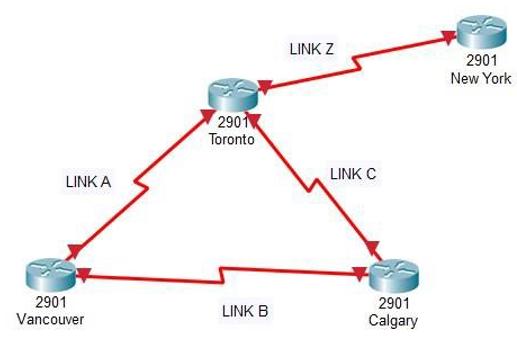
Part 2: BasicConfiguration
- Assign each device the correct Hostnameaccording to the Topology sheet i.e. Toronto, Vancouver, Calgary & New York
- Configure a meaningful warningbanner on each device
- Configure loggingsynchronous on the Console line
Part 3: IP AddressConfiguration
- Configure IP addressing on devices as below:
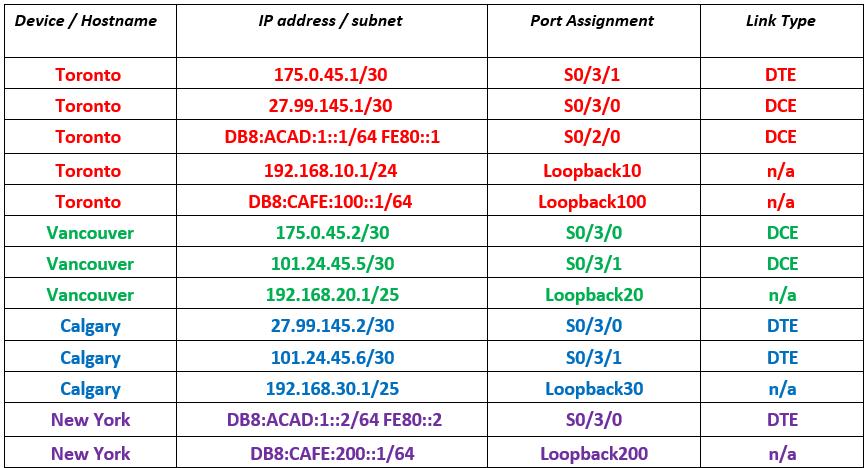
Part 4: SerialConnection Setup
- Configure serialconnections to use PPP encapsulation
- Configure DCE ends with a clockrate of 1,000,000
Part 5: OSPFv4
- Configure OSPFv4:
- Toronto:
- RID: 1.1.1.1
- Serial Links to Vancouver & Calgary: Area 0
- Loopback10: Area 10
- Reference Bandwidth: 10,000
- Vancouver:
- RID: 2.2.2.2
- Serial Links to Toronto & Calgary: Area 0
- Loopback20: Area 20
- Reference Bandwidth: 10,000
- Calgary:
- RID: 3.3.3.3
- Serial Links to Toronto & Vancouver: Area 0
- Loopback30: Area 30
- Reference Bandwidth: 10,000
- Toronto:
Part 6: OSPFv6
- Configure OSPFv6:
- Toronto:
- RID: 10.10.10.10
- Serial Link to New York: Area 0
- Loopback100: Area 100
- Reference Bandwidth: 10,000
- Toronto:
- New York:
- RID: 20.20.20.20
- Serial Link to Toronto: Area 0
- Loopback200: Area 200
- Reference Bandwidth: 10,000
Part 7: PPP on IPv4 Links
- Configure the IPv4 seriallinks with CHAP authentication as per the chart below. Once complete, all IPv4 routers should become adjacent and exchange routes to loopbacks.

Part 8: PPP on IPv6 Link
- Configure the IPv6 seriallink between Torontoand New York with CHAP authentication as per the chart below. Once complete, the two IPv6 routers should becomeadjacent and exchange routes to loopbacks.

Part 9: Submission
- Capture the following commandson each device and paste them all in sequencein one document
- Show Running-Configuration
- Show ip Route
- Show ip protocols
LINK A 2901 Vancouver 2901 Toronto LINK B LINK Z LINK C 2901 Calgary 2901 New York
Step by Step Solution
There are 3 Steps involved in it
1 Expert Approved Answer
Step: 1 Unlock

Question Has Been Solved by an Expert!
Get step-by-step solutions from verified subject matter experts
Step: 2 Unlock
Step: 3 Unlock