







Question: PING: Finding Other Computers The PING sends a small packet to any computer on the Internet to show you how long it takes the packet
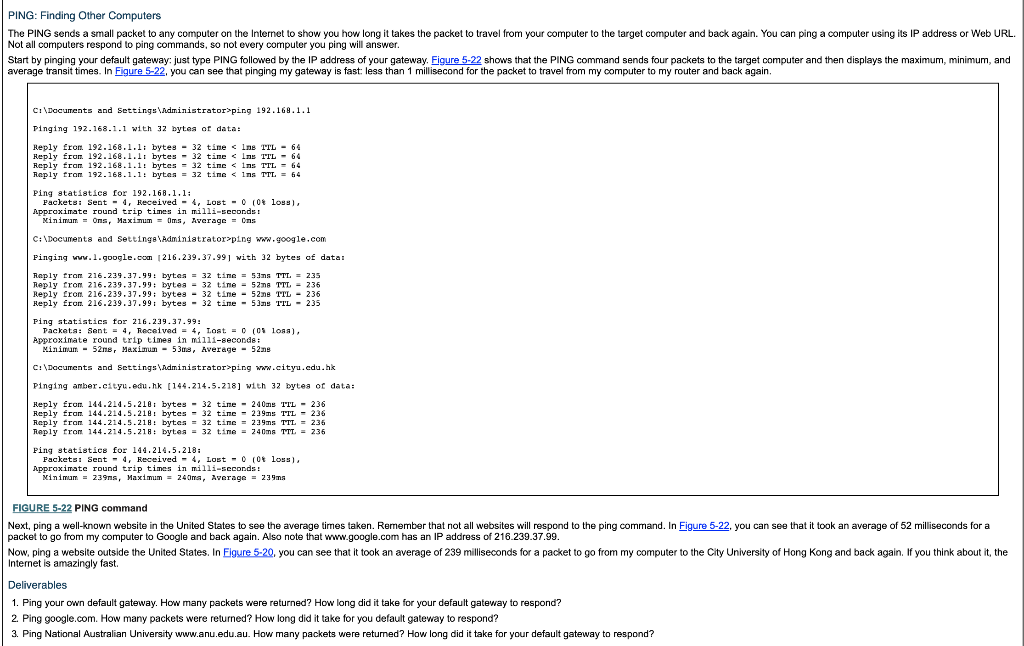
PING: Finding Other Computers The PING sends a small packet to any computer on the Internet to show you how long it takes the packet to travel from your computer to the target computer and back again. You can ping a computer using its IP address or Web URL Not all computers respond to ping commands, so not every computer you ping will answer. Start by pinging your default gateway: just type PING followed by the IP address of your gateway. Figure 5-22 shows that the PING command sends four packets to the target computer and then displays the maximum, minimum, and average transit times. In Figure 5-22, you can see that pinging my gateway is fast: less than 1 millisecond for the packet to travel from my computer to my router and back again. CIDocuents and Settings\idministrator ping 192.169.1.1 Pinging 192.168.1.1 with 32 bytea of data: Reply from 192.168.1.li byte 32 tinelne TTL 64 Reply from, 192.168 ..l i bytes-32 tine ping www.cityu.edu.hk Pinging amber.ctyu.eau.hk [144.214.5.218] with 32 bytea or data: Reply ron 144.214.5.2181 bytes 32 tie 240m TTL236 Reply fram. 144.214.5.218 bytes32 tine 239ms TTL-236 Reply from 144.214.5.218: bytes = 32 tine = 239ms TTL = 236 Reply tron 144.214.5.218: bytes = 32 tine = 240ms TTT.= 236 Ping statistic for 144.214.5.218: Packets : Sent -4, Received-4, Lost-0 0t loss), Appraximate round trip tines in milli-scconds: FIGURE 5-22 PING command Next, ping a well-known website in the United States to see the average times taken. Remember that not all websites will respond to the ping command. In Figure 5-22, you can see that it took an average of 52 milliseconds for a packet to go from my computer to Google and back again. Also note that www.google.com has an IP address of 216.239.37.99. Now, ping a website outside the United States. In Eigure 5-20, you can see that it took an average of 239 milliseconds for a packet to go from my computer to the City University of Hong Kong and back again. If you think about it, the Internet is amazingly fast. Deliverables 1. Ping your own default gateway. How many packets were returned? How long did it take for your default gateway to respond? 2. Ping google.com. How many packets were returned? How long did it take for you default gateway to respond? 3. Ping National Australian University www.anu.edu.au. How many packets were retumed? How long did it take for your default gateway to respond
Step by Step Solution
There are 3 Steps involved in it

Get step-by-step solutions from verified subject matter experts
 Study Help