







Question: Pl help me with this query. Load and execute the createInsuranceScript.sql script file (in SQL Developer) to create and populate the tables necessary for this
Pl help me with this query.
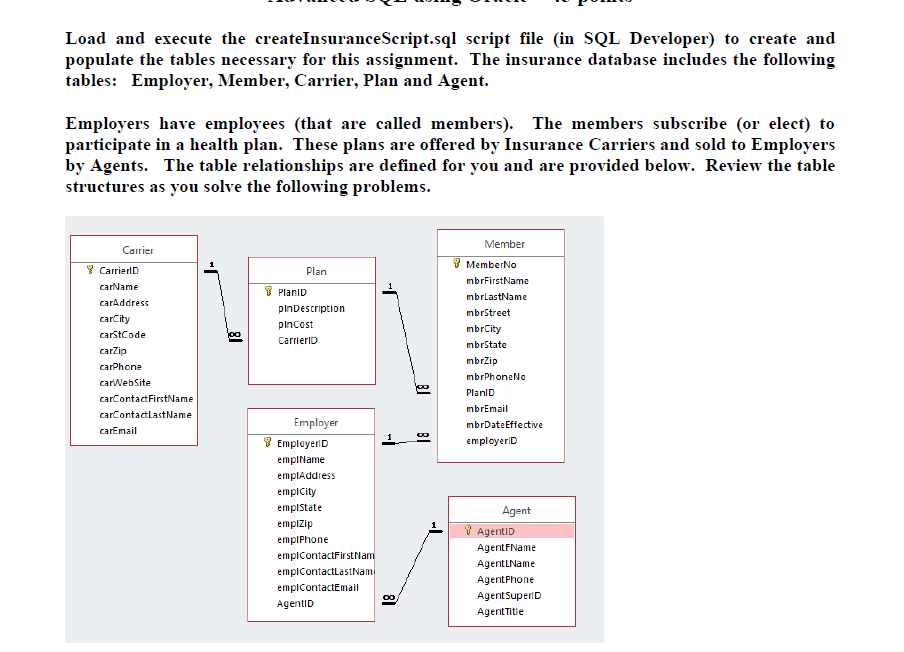
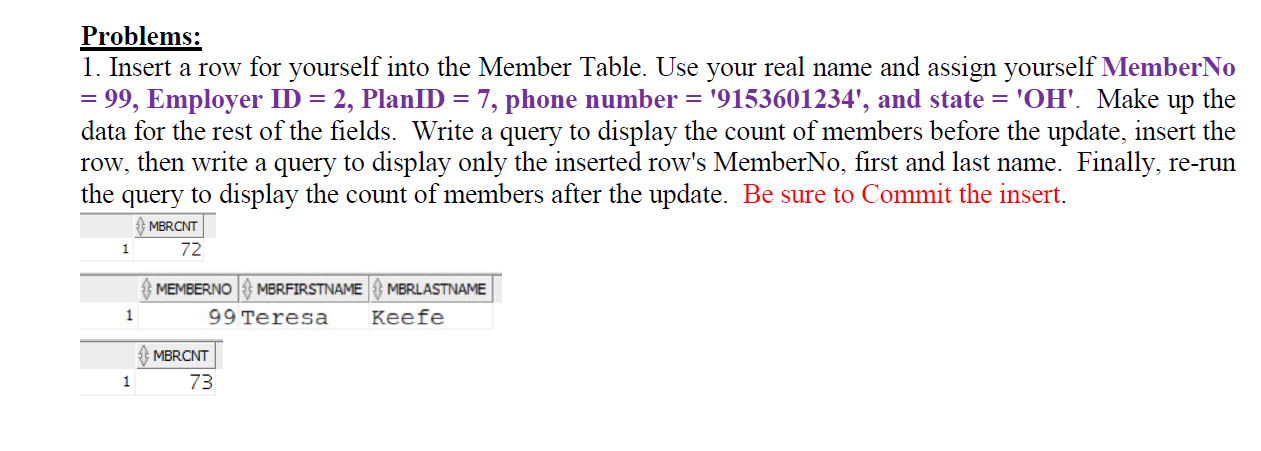
Load and execute the createInsuranceScript.sql script file (in SQL Developer) to create and populate the tables necessary for this assignment. The insurance database includes the following tables: Employer, Member, Carrier, Plan and Agent. Employers have employees (that are called members). The members subscribe (or elect) to participate in a health plan. These plans are offered by Insurance Carriers and sold to Employers by Agents. The table relationships are defined for you and are provided below. Review the table structures as you solve the following problems. 1. Insert a row for yourself into the Member Table. Use your real name and assign yourself MemberNo = 99, Employer ID =2, PlanID =7, phone number =9153601234 ', and state =OH '. Make up the data for the rest of the fields. Write a query to display the count of members before the update, insert the row, then write a query to display only the inserted row's MemberNo, first and last name. Finally, re-run the query to display the count of members after the update. Be sure to Commit the insert. Load and execute the createInsuranceScript.sql script file (in SQL Developer) to create and populate the tables necessary for this assignment. The insurance database includes the following tables: Employer, Member, Carrier, Plan and Agent. Employers have employees (that are called members). The members subscribe (or elect) to participate in a health plan. These plans are offered by Insurance Carriers and sold to Employers by Agents. The table relationships are defined for you and are provided below. Review the table structures as you solve the following problems. 1. Insert a row for yourself into the Member Table. Use your real name and assign yourself MemberNo = 99, Employer ID =2, PlanID =7, phone number =9153601234 ', and state =OH '. Make up the data for the rest of the fields. Write a query to display the count of members before the update, insert the row, then write a query to display only the inserted row's MemberNo, first and last name. Finally, re-run the query to display the count of members after the update. Be sure to Commit the insertStep by Step Solution
There are 3 Steps involved in it
1 Expert Approved Answer
Step: 1 Unlock

Question Has Been Solved by an Expert!
Get step-by-step solutions from verified subject matter experts
Step: 2 Unlock
Step: 3 Unlock
 Study Help