







Question: Please develop a verilog code that Works for this. DO NOT USE ieee or ports. Thanks, will rate thumbs up. You are going to create
Please develop a verilog code that Works for this. DO NOT USE ieee or ports. Thanks, will rate thumbs up.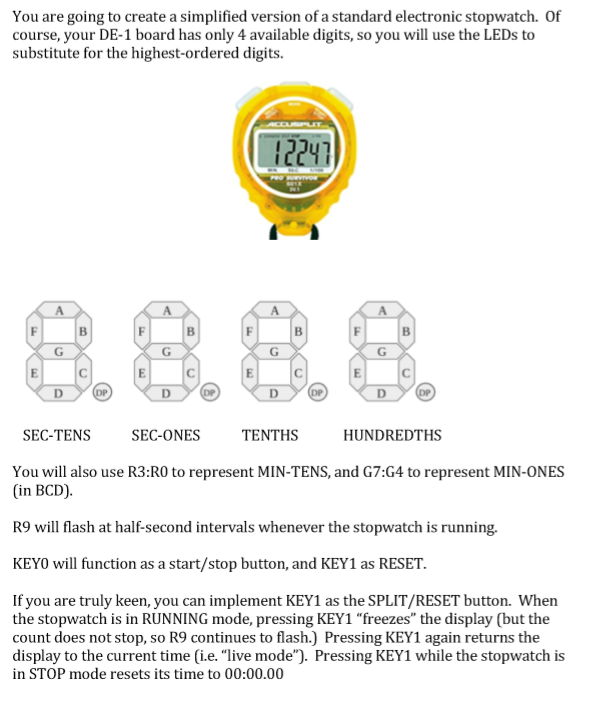
You are going to create a simplified version of a standard electronic stopwatch. Of course, your DE-1 board has only 4 available digits, so you will use the LEDs to substitute for the highest-ordered digits. 1224 SEC-TENS SEC-ONES TENTHS HUNDREDTHS You will also use R3:RO to represent MIN-TENS, and G7:G4 to represent MIN-ONES (in BCD). R9 will flash at half-second intervals whenever the stopwatch is running. KEYO will function as a start/stop button, and KEY1 as RESET. If you are truly keen, you can implement KEY1 as the SPLIT/RESET button. When the stopwatch is in RUNNING mode, pressing KEY1 "freezes" the display (but the count does not stop, so R9 continues to flash.) Pressing KEY1 again returns the display to the current time (i.e. "live mode"). Pressing KEY1 while the stopwatch is in STOP mode resets its time to 00:00.00 You are going to create a simplified version of a standard electronic stopwatch. Of course, your DE-1 board has only 4 available digits, so you will use the LEDs to substitute for the highest-ordered digits. 1224 SEC-TENS SEC-ONES TENTHS HUNDREDTHS You will also use R3:RO to represent MIN-TENS, and G7:G4 to represent MIN-ONES (in BCD). R9 will flash at half-second intervals whenever the stopwatch is running. KEYO will function as a start/stop button, and KEY1 as RESET. If you are truly keen, you can implement KEY1 as the SPLIT/RESET button. When the stopwatch is in RUNNING mode, pressing KEY1 "freezes" the display (but the count does not stop, so R9 continues to flash.) Pressing KEY1 again returns the display to the current time (i.e. "live mode"). Pressing KEY1 while the stopwatch is in STOP mode resets its time to 00:00.00
Step by Step Solution
There are 3 Steps involved in it

Get step-by-step solutions from verified subject matter experts
 Study Help