







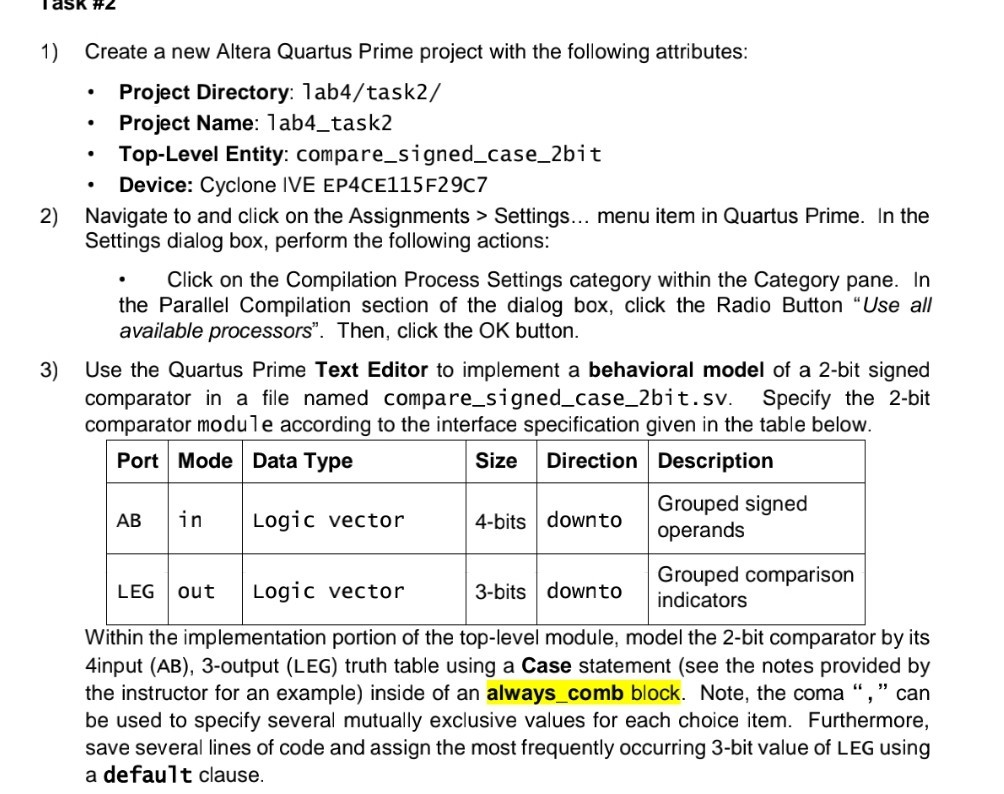
Question: please do 1, 2, 3 ask #2 1) Create a new Altera Quartus Prime project with the following attributes .Project Directory: lab4/task2/ .Project Name: lab4_task2
please do 1, 2, 3
ask #2 1) Create a new Altera Quartus Prime project with the following attributes .Project Directory: lab4/task2/ .Project Name: lab4_task2 Top-Level Entity: compare_signed_case_2bit Device: Cyclone IVE EP4CE115F29C7 2) Navigate to and click on the Assignments > Settings... menu item in Quartus Prime. In the Settings dialog box, perform the following actions: .Click on the Compilation Process Settings category within the Category pane. In the Parallel Compilation section of the dialog box, click the Radio Button "Use al available processors". Then, click the OK button 3) Use the Quartus Prime Text Editor to implement a behavioral model of a 2-bit signed comparator in a file named compare_signed_case_2bit.sv. Specify the 2-bit comparator module according to the interface specification given in the table below Port Mode Data Type SizeDirection |Description Grouped signed AB in 4-bits downto operands Logic vector Grouped comparison LEG out Logic vector 3-bits downto ndicators Within the implementation portion of the top-level module, model the 2-bit comparator by its 4input (AB), 3-output (LEG) truth table using a Case statement (see the notes provided by the instructor for an example) inside of an always_comb block. Note, the coma "," can be used to specify several mutually exclusive values for each choice item. Furthermore, save several lines of code and assign the most frequently occurring 3-bit value of LEG using a default clause
Step by Step Solution
There are 3 Steps involved in it

Get step-by-step solutions from verified subject matter experts
 Study Help