







Question: Please help with the code for this problem, please include comments throughout the code. Thanks Obiective: Effectively use loops, lists and/or dictionaries to implement a
Please help with the code for this problem, please include comments throughout the code. Thanks
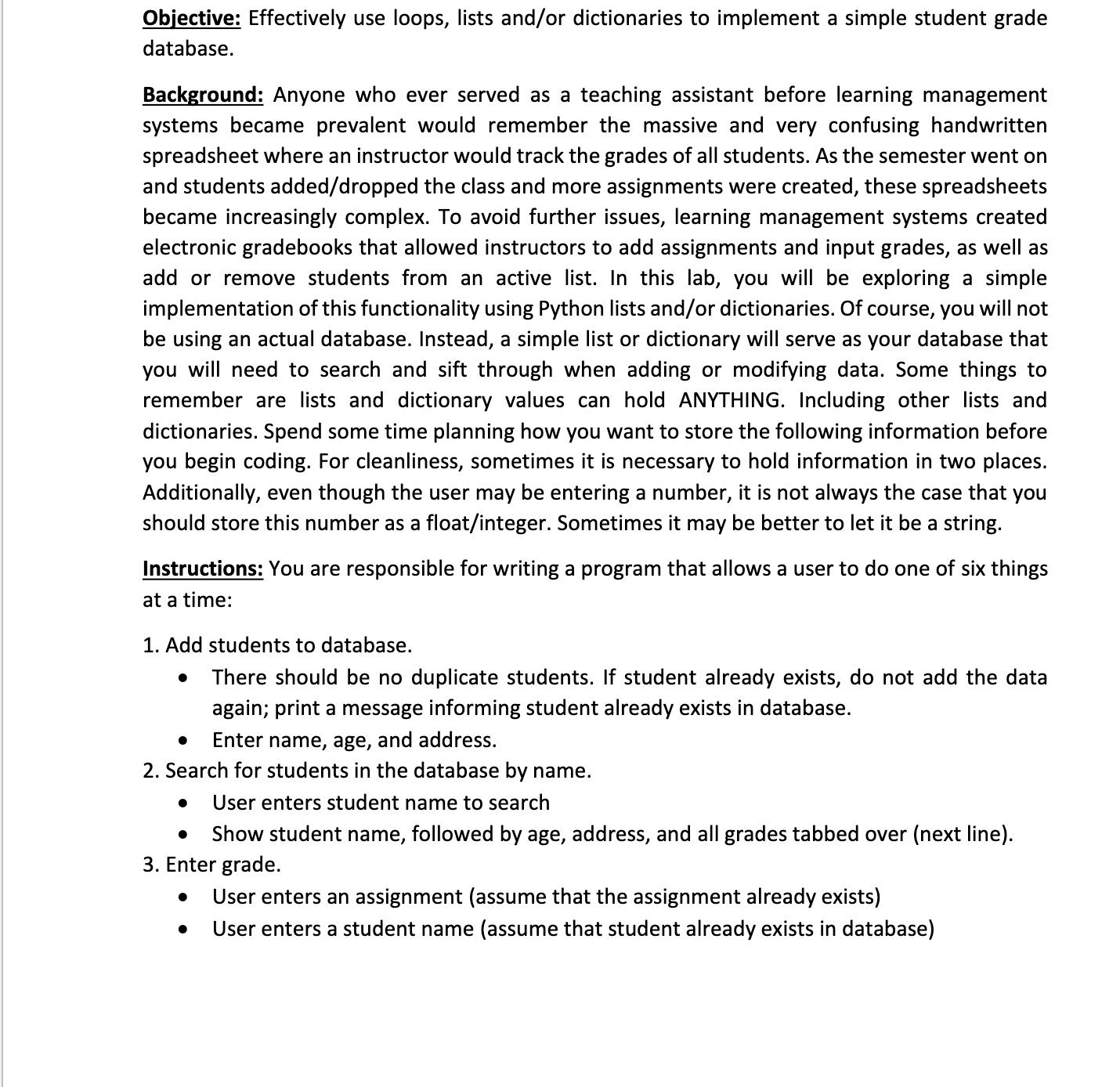
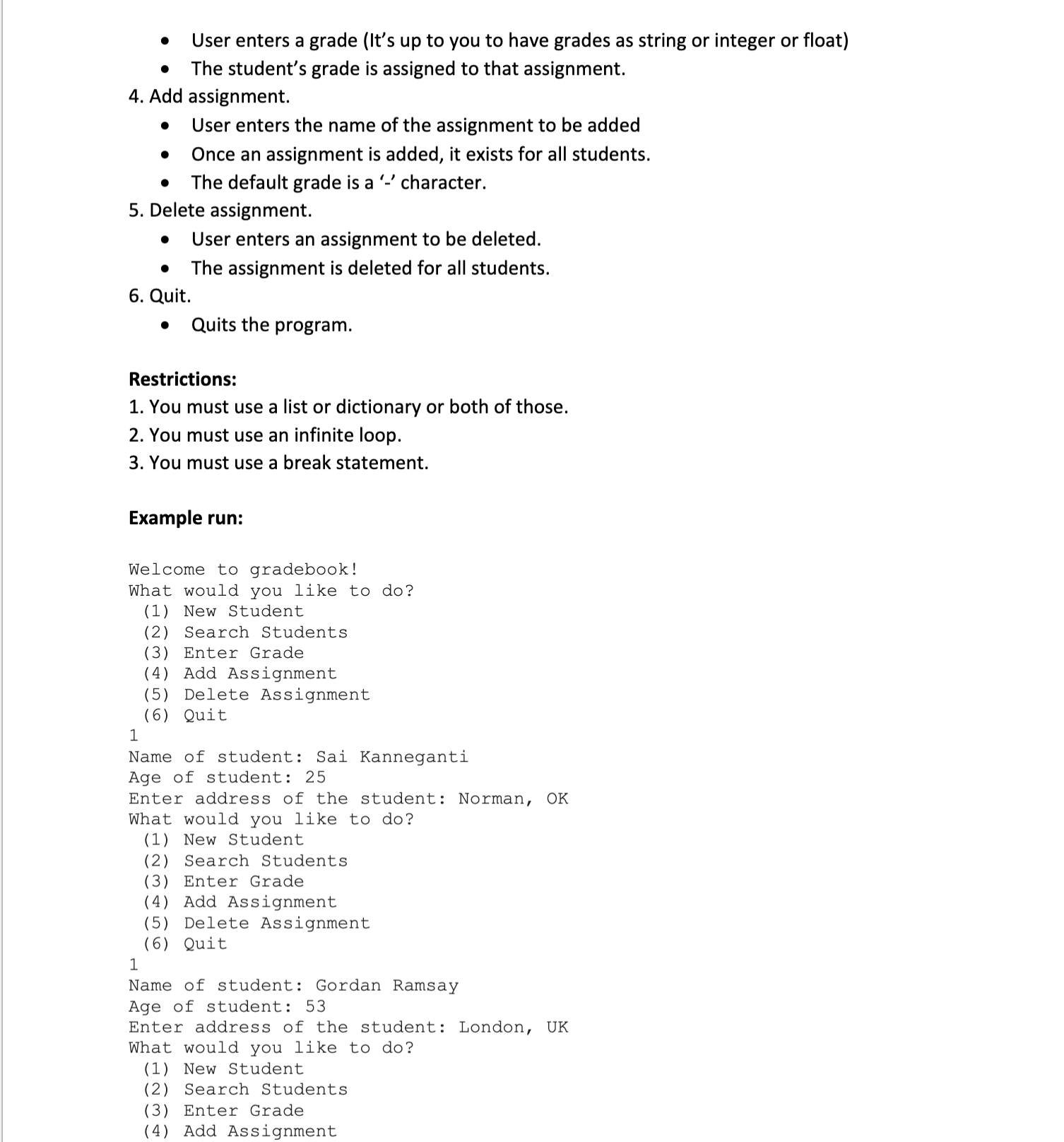
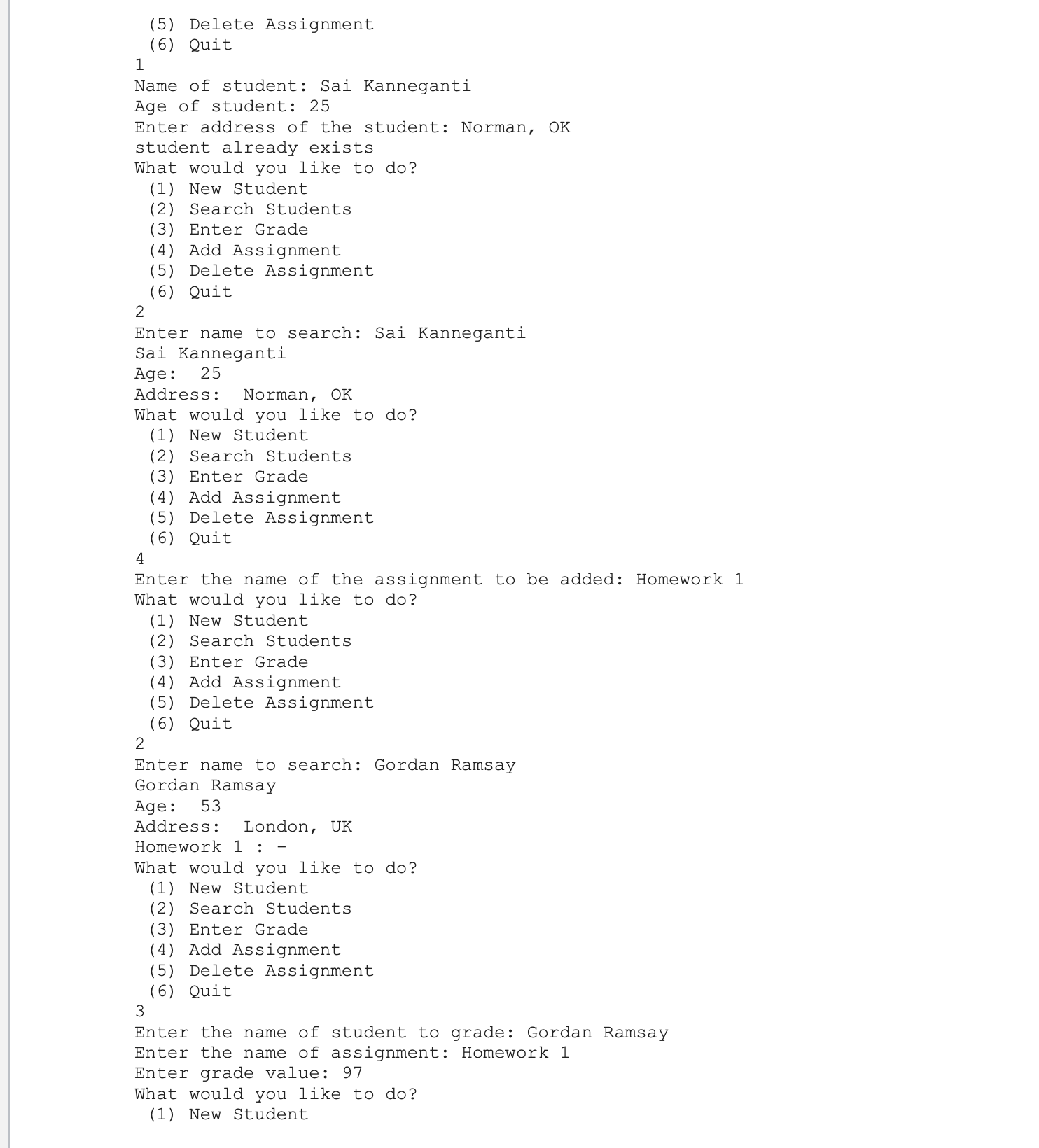
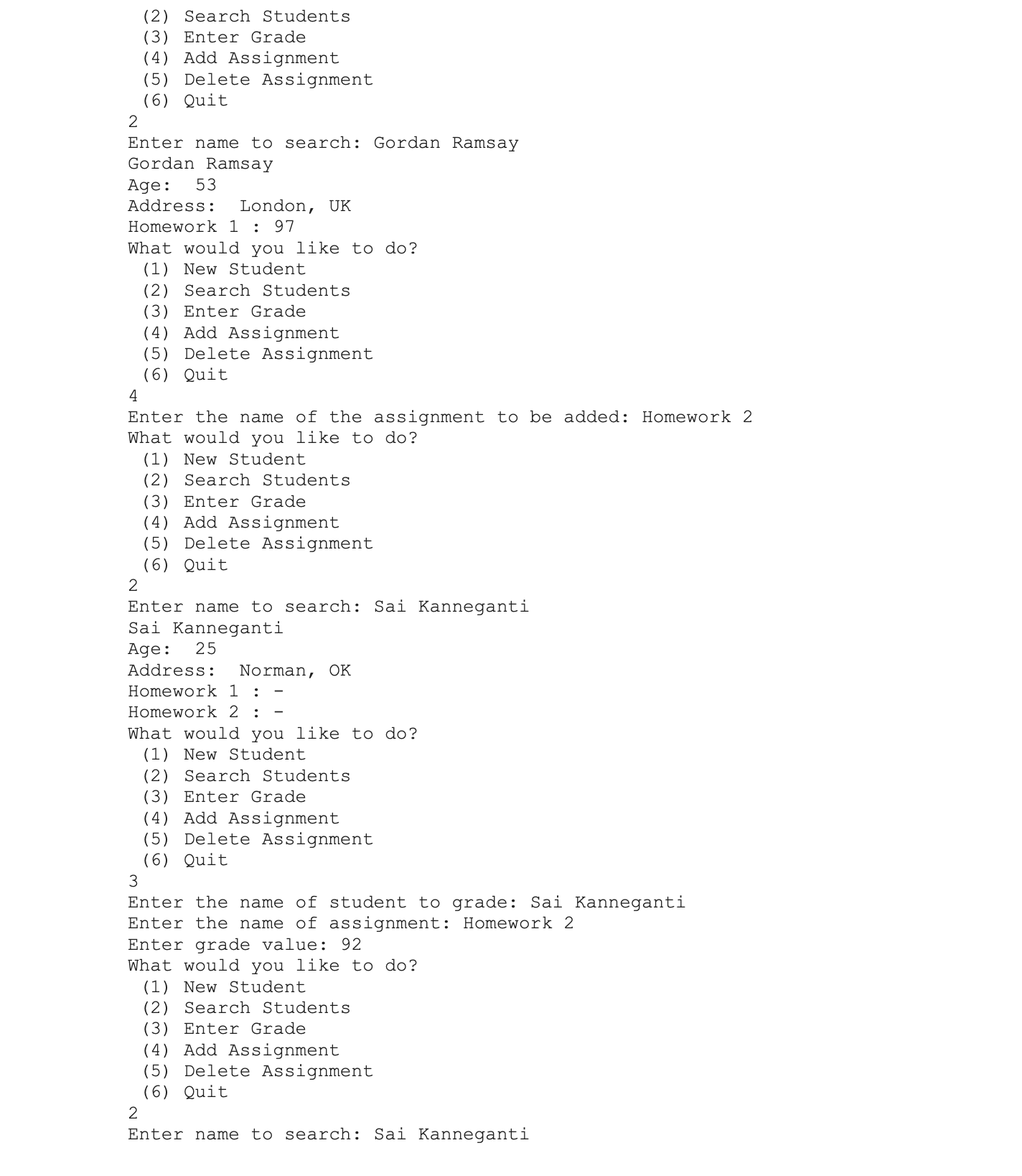
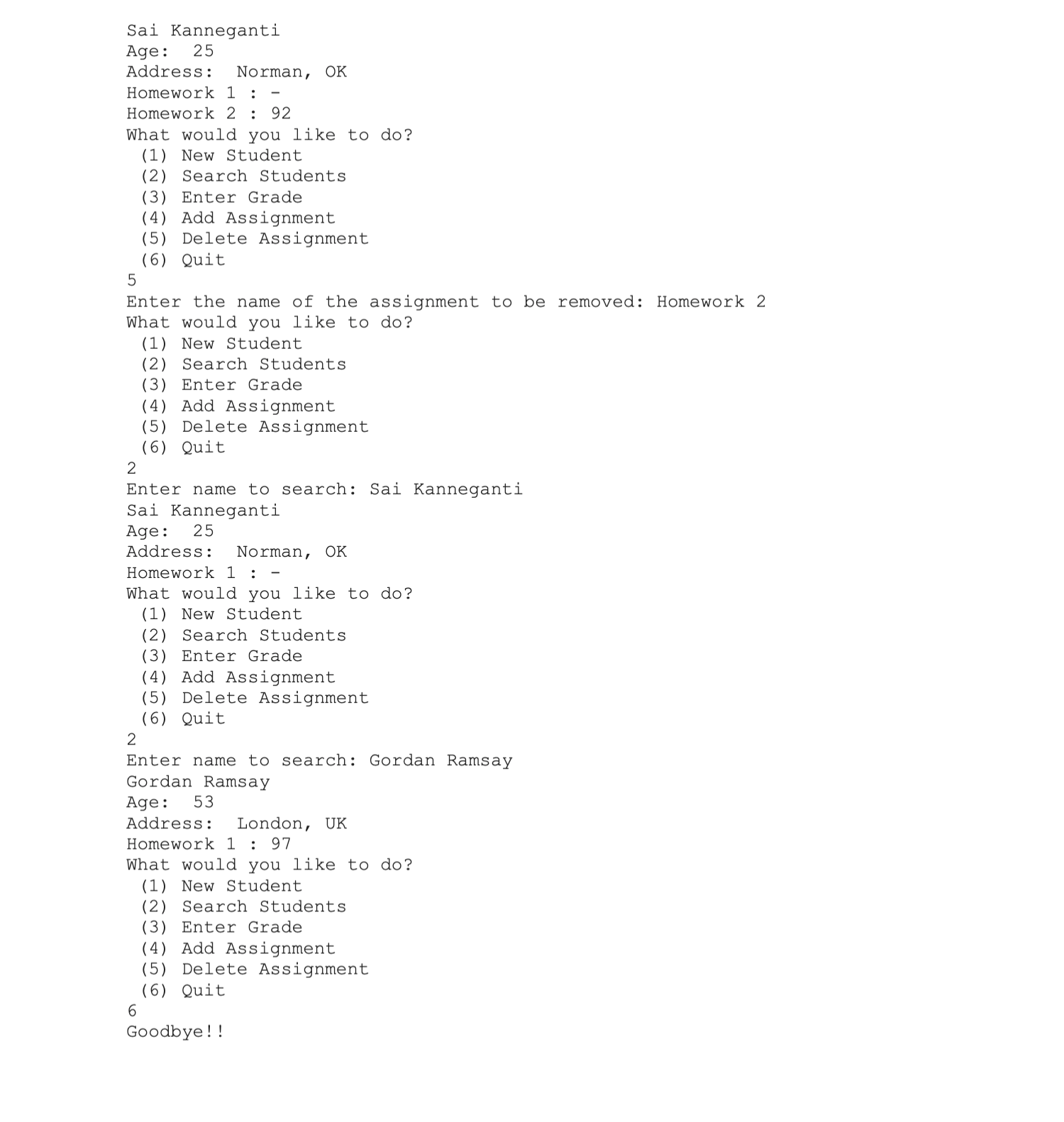
Obiective: Effectively use loops, lists and/or dictionaries to implement a simple student grade database. Background: Anyone who ever served as a teaching assistant before learning management systems became prevalent would remember the massive and very confusing handwritten spreadsheet where an instructor would track the grades of all students. As the semester went on and students added/dropped the class and more assignments were created, these spreadsheets became increasingly complex. To avoid further issues, learning management systems created electronic gradebooks that allowed instructors to add assignments and input grades, as well as add or remove students from an active list. In this lab, you will be exploring a simple implementation of this functionality using Python lists and/or dictionaries. Of course, you will not be using an actual database. Instead, a simple list or dictionary will serve as your database that you will need to search and sift through when adding or modifying data. Some things to remember are lists and dictionary values can hold ANYTHING. Including other lists and dictionaries. Spend some time planning how you want to store the following information before you begin coding. For cleanliness, sometimes it is necessary to hold information in two places. Additionally, even though the user may be entering a number, it is not always the case that you should store this number as a float/integer. Sometimes it may be better to let it be a string. Instructions: You are responsible for writing a program that allows a user to do one of six things at a time: 1. Add students to database. 0 There should be no duplicate students. If student already exists, do not add the data again; print a message informing student already exists in database. 0 Enter name, age, and address. 2. Search for students in the database by name. 0 User enters student name to search I Show student name, followed by age, address, and all grades tabbed over (next line). 3. Enter grade. 0 User enters an assignment (assume that the assignment already exists) 0 User enters a student name (assume that student already exists in database) - User enters a grade (It's up to you to have grades as string or integer or float) o The students grade is assigned to that assignment. 4. Add assignment. 0 User enters the name of the assignment to be added 0 Once an assignment is added, it exists for all students. 0 The default grade is a '-' character. 5. Delete assignment. 0 User enters an assignment to be deleted. 0 The assignment is deleted for all students. 6. Quit. o Quits the program. Restrictions: 1. You must use a list or dictionary or both of those. 2. You must use an infinite loop. 3. You must use a break statement. Example run: Welcome to gradebook! What would you like to do? (1) New Student (2) Search Students (3) Enter Grade (4) Add Assignment (5) Delete Assignment (6) Quit 1 Name of student: Sai Kanneganti Age of student: 25 Enter address of the student: Norman, OK What would you like to do? (1) New Student (2) Search Students (3) Enter Grade (4) Add Assignment (5) Delete Assignment (6) Quit 1 Name of student: Gordan Ramsay Age of student: 53 Enter address of the student: London, UK What would you like to do? (1) New Student (2) Search Students (3) Enter Grade (4) Add Assignment (5) Delete Assignment (6) Quit 1 Name of student: Sai Kanneganti Age of student: 25 Enter address of the student: Norman, O student already exists What would you like to do? (1) New Student (2 ) Search Students (3) Enter Grade (4) Add Assignment (5) Delete Assignment (6) Quit 2 Enter name to search: Sai Kanneganti Sai Kanneganti Age : 25 Address: Norman, OK What would you like to do? (1) New Student (2) Search Students (3) Enter Grade Add Assignment (5) Delete Assignment (6) Quit 4 Enter the name of the assignment to be added: Homework 1 What would you like to do? (1) New Student Search Students Enter Grade (4) Add Assignment (5) Delete Assignment (6) Quit 2 Enter name to search: Gordan Ramsay Gordan Ramsay Age : 53 Address : London, UK Homework 1 : What would you like to do? (1) New Student (2) Search Students (3) Enter Grade (4) Add Assignment (5 ) Delete Assignment (6) Quit 3 Enter the name of student to grade: Gordan Ramsay Enter the name of assignment: Homework 1 Enter grade value: 97 What would you like to do? (1) New Student(2) Search Students (3) Enter Grade (4) Add Assignment (5) Delete Assignment (6) Quit 2 Enter name to search: Gordan Ramsay Gordan Ramsay Age: 53 Address: London, UK Homework 1 : 97 What would you like to do? (1) New Student (2) Search Students (3) Enter Grade (4) Add Assignment (5) Delete Assignment (6) Quit 4 Enter the name of the assignment to be added: Homework 2 What would you like to do? (1) New Student (2) Search Students (3) Enter Grade (4) Add Assignment (5) Delete Assignment (6) Quit 2 Enter name to search: Sai Kanneganti Sai Kanneganti Age: 25 Address: Norman, OK Homework 1 : - Homework 2 : - What would you like to do? (1) New Student (2) Search Students (3) Enter Grade (4) Add Assignment (5) Delete Assignment (6) Quit 3 Enter the name of student to grade: Sai Kanneganti Enter the name of assignment: Homework 2 Enter grade value: 92 What would you like to do? (1) New Student (2) Search Students (3) Enter Grade (4) Add Assignment (5) Delete Assignment (6) Quit 2 Enter name to search: Sai Kanneganti Sai Kanneganti Age: 25 Address : Norman, OK Homework 1 : Homework 2 : 92 What would you like to do? (1) New Student (2) Search Students (3) Enter Grade (4) Add Assignment 5) Delete Assignment (6) Quit 5 Enter the name of the assignment to be removed: Homework 2 What would you like to do? (1) New Student (2) Search Students (3 ) Enter Grade (4) Add Assignment 5 ) I Delete Assignment (6) Quit 2 Enter name to search: Sai Kanneganti Sai Kanneganti Age : 25 Address: Norman, OK Homework 1 : What would you like to do? (1) New Student (2) Search Students (3) Enter Grade (4) Add Assignment (5) Delete Assignment (6) Quit 2 Enter name to search: Gordan Ramsay Gordan Ramsay Age : 53 Address : London, UK Homework 1 : 97 What would you like to do? (1) New Student (2) Search Students (3) Enter Grade (4) Add Assignment (5) Delete Assignment (6) Quit 6 Goodbye
Step by Step Solution
There are 3 Steps involved in it

Get step-by-step solutions from verified subject matter experts
 Study Help