







Question: Please help with this question in my Python assignment. I have provided screenshots of my code but I'm stuck at question 6. I am stuck
Please help with this question in my Python assignment. I have provided screenshots of my code but I'm stuck at question 6. I am stuck on the first option which is to have the user have 3 chances to pick a pin between 1 to 9999. Thank you! import os import random # Create objects for balances and transactions users = {'aaa' : 9999} account = 1000.00 # Allow 3 invalid pin entries tries = 1 pin_tries = 1 max_Tries = 3 pin_created = False user = input('Welcome to Cactus Bank. Please enter your username: ') # 4 if user in users: pin = users[user] while tries = 0 and amount = 0: account += amount print(f'After Withdrawal new balance is {account:.2f}') else: print(f'Invalid entry. Please try again.') # End of the transaction loop # 6 else: print(f"{user}, Didn't find your username.") ans = input('Do you want to create an account (Y/N)? ').casefold() if ans == 'y': v = input('Enter 1 to create a pin yourself or 2 and the system will create a pin for you: ') if v == 1: print('Select a number between 1 and 9999 as your pin: ') # End of the application loop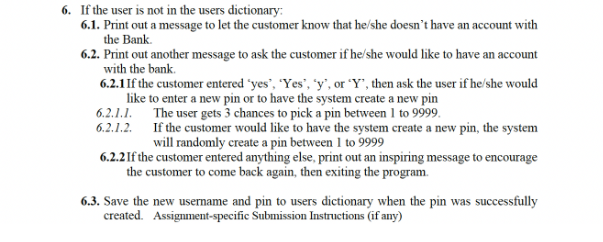
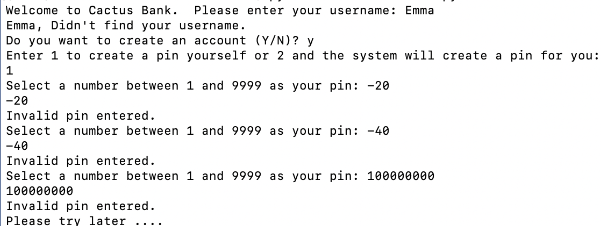
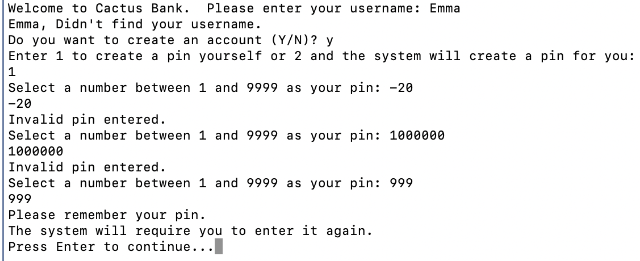
6. If the user is not in the users dictionary 6.1. Print out a message to let the customer know that he/she doesn't have an account with the Bank 6.2. Print out another message to ask the customer if he/she would like to have an account with the bank 6.2.11f the customer entered 'yes, 'Yes', 'y', or 'Y', then ask the user if he/she would like to enter a new pin or to have the system create a new pin 6.2.1.1. The user gets 3 chances to pick a pin between 1 to 9999 6.2.1.2. If the customer would like to have the system create a new pin, the system will randomly create a pin between 1 to 9999 6.2.2 If the customer entered anything else, print out an inspiring message to encourage the customer to come back again, then exiting the program. 6.3. Save the new username and pin to users dictionary when the pin was successfully created. Assignment-specific Submission Instructions (if any) Welcome to Cactus Bank. Please enter your username: Emma Emma, Didn't find your username. Do you want to create an account (Y/N)? y Enter 1 to create a pin yourself or 2 and the system will create a pin for you: 1 Select a number between 1 and 9999 as your pin: -20 -20 Invalid pin entered. Select a number between 1 and 9999 as your pin: -40 -40 Invalid pin entered. Select a number between 1 and 9999 as your pin: 100000000 100000000 Invalid pin entered. Please try later Welcome to Cactus Bank. Please enter your username: Emma Emma, Didn't find your username. Do you want to create an account (Y/N)? y Enter 1 to create a pin yourself or 2 and the system will create a pin for you: 1 Select a number between 1 and 9999 as your pin: -20 -20 Invalid pin entered. Select a number between 1 and 9999 as your pin: 1000000 1000000 Invalid pin entered. Select a number between 1 and 9999 as your pin: 999 999 Please remember your pin. The system will require you to enter it again. Press Enter to continue
Step by Step Solution
There are 3 Steps involved in it

Get step-by-step solutions from verified subject matter experts
 Study Help