







Question: Please refer to this first part of code to code for the question: class DFSTimeCounter: def _ _ init _ _ ( self ) :
Please refer to this first part of code to code for the question:
class DFSTimeCounter:
def initself:
self.count
def resetself:
self.count
def incrementself:
self.count self.count
def getself:
return self.count
class UndirectedGraph:
# n is the number of vertices
# we will label the vertices from to self.n
# Initialize to an empty adjacency list
# We will store the outgoing edges using a set data structure
def initself n:
self.n n
self.adjlist set for i in rangeselfn
def addedgeself i j:
assert i self.n
assert j self.n
assert i j
# Make sure to add edge from i to j
self.adjlistiaddj
# Also add edge from j to i
self.adjlistjaddi
# get a set of all vertices that
# are neighbors of the
# vertex i
def getneighboringverticesself i:
assert i self.n
return self.adjlisti
# Function: dfsvisit
# Program a DFS visit of a graph.
# We maintain a list of discovery times and finish times.
# Initially all discovery times and finish times are set to None.
# When a vertex is first visited, we will set discovery time
# When DFS visit has processed all the neighbors then
# set the finish time.
# DFS visit should update the list of discovery and finish times inplace
# Arguments
# i id of the vertex being visited.
# dfstimer An instance of DFSTimeCounter structure provided for you.
# discovery discovery time of each vertex a list of size self.n
# None if the vertex is yet to be visited.
# finish finish time of each vertex a list of size self.n
# None if the vertex is yet to be finished.
# dfstreeparent the parent for for each node
# if we visited node j from node i then js parent is i
# Do not forget to set treeparent when you call dfsvisit
# on node j from node i
# dfsbackedges a list of back edges.
# a back edge is an edge from i to j wherein
# DFS has already discovered j when i is discovered
# but not finished j
def dfsvisitself i dfstimer, discoverytimes, finishtimes,
dfstreeparent, dfsbackedges:
assert i self.n
assert discoverytimesi None
assert finishtimesi None
discoverytimesi dfstimer.get
dfstimer.increment
# your code here
for v in self.getneighboringverticesi:
if discoverytimesv is not None and finishtimesv is None:
dfsbackedges.appendiv
if discoverytimesv is None:
dfstreeparentv i
self.dfsvisitv dfstimer, discoverytimes, finishtimes, dfstreeparent, dfsbackedges
finishtimesi dfstimer.get
dfstimer.increment
# Function: dfstraversegraph
# Traverse the entire graph.
def dfstraversegraphself:
dfstimer DFSTimeCounter
discoverytimes Noneselfn
finishtimes Noneselfn
dfstreeparents Noneselfn
dfsbackedges
for i in rangeselfn:
if discoverytimesi None:
self.dfsvisitidfstimer, discoverytimes, finishtimes,
dfstreeparents, dfsbackedges
# Clean up the back edges so that if ij is a back edge then j cannot
# be is parent.
nontrivialbackedges ij for ij in dfsbackedges if dfstreeparentsi j
return dfstreeparents, nontrivialbackedges, discoverytimes, finishtimes
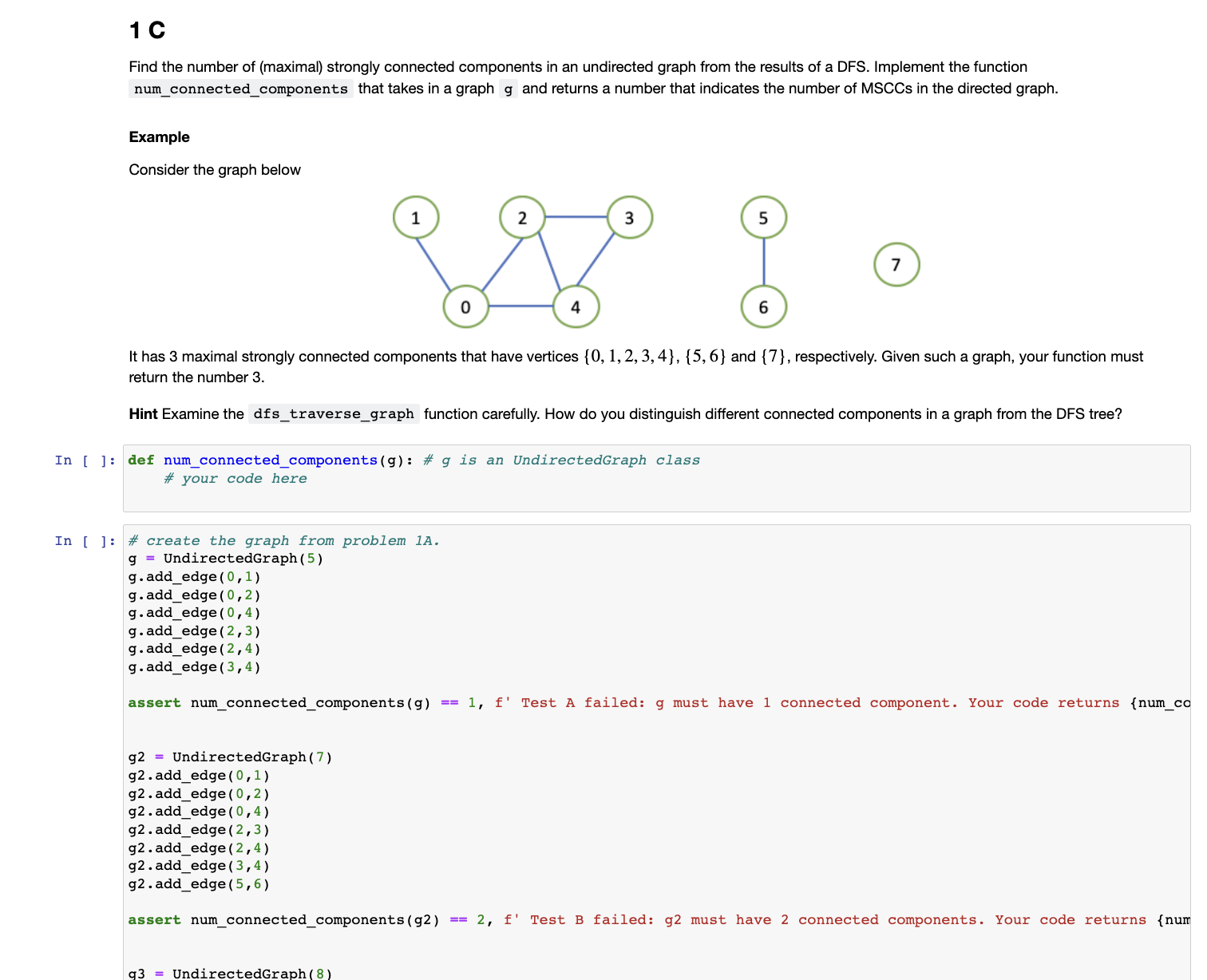
The second question is in the image.Find the number of maximal strongly connected components in an undirected graph from the results of a DFS Implement the function
numconnectedcomponents that takes in a graph g and returns a number that indicates the number of MSCCs in the directed graph.
Example
Consider the graph below
It has maximal strongly connected components that have vertices and respectively. Given such a graph, your function must
return the number
Hint Examine the dfstraversegraph function carefully. How do you distinguish different connected components in a graph from the DFS tree?
In : def numconnectedcomponentsg: # g is an UndirectedGraph classIn : # create the graph from problem A
g UndirectedGraph
gaddedge
gaddedge
Step by Step Solution
There are 3 Steps involved in it
1 Expert Approved Answer
Step: 1 Unlock

Question Has Been Solved by an Expert!
Get step-by-step solutions from verified subject matter experts
Step: 2 Unlock
Step: 3 Unlock
 Study Help