







Question: please solve using the equations for the first row then the excel function for the second row. 1. Present Value (PV) Enter the interest rate
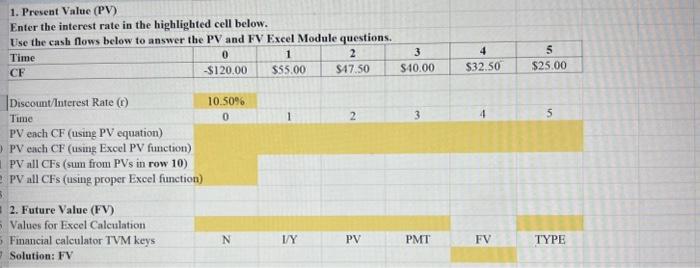
1. Present Value (PV) Enter the interest rate in the highlighted cell below. Use the cash flows below to answer the PV and FV Excel Module questions. Use the cash flows below to answer the PV and FV Excel Module questions. \begin{tabular}{|l|c|c|c|c|c|c|} \hline Time & 0 & 1 & 2 & 3 & 4 & 5 \\ \hline CF & $120.00 & $55.00 & $47.50 & $40.00 & $32.50 & $25.00 \\ \hline \end{tabular} Discount/lnterest Rate (r) Time 10.50% PV each CF (using PV equation) PV each CF (using Excel PV function) PV all CFs (sum from PVs in row 10) PV all CFs (using proper Excel function) 2. Future Value (FV) Values for Excel Calculation Financial calculator TVM keys 0 1 2. 3 4 5 Solution: FV
Step by Step Solution
There are 3 Steps involved in it

Get step-by-step solutions from verified subject matter experts
 Study Help