







Question: Please use html language Chapter 4 Visual Elements and Graphics selector for an id named homehero. declarations to configure 300px Code 8. d a new
Please use html language
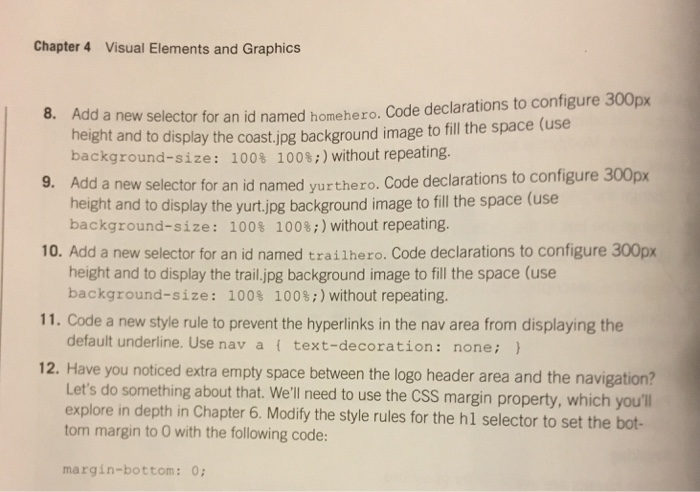
Chapter 4 Visual Elements and Graphics selector for an id named homehero. declarations to configure 300px Code 8. d a new height and to display the co background image to fill the space (use background-size 1008 100s;) without repeating. Add a new for an id named yurthero, Code declarations to configure 300px selector height and to display the yurt jpg background image to fill the space (use background-size: 100$ 100 without repeating. 10. Add a new selector for an id named trail hero. Code declarations to configure 300px height and to display the trail jpg background image to fill the space (use background-size: 100 100 without repeating. 11. Code a new style rule to prevent the hyperlinks in the nav area from displaying the default underline. Use nav a text-decoration none; 12. Have you noticed extra empty space between the logo header area and the navigation? Let's do something about that. We'll need to use the css margin property, which you'll explore in depth in Chapter 6. Modify the style rules for the hl selector to set the bot- tom margin to 0 with the following code: margin-bottom: 0; Chapter 4 Visual Elements and Graphics selector for an id named homehero. declarations to configure 300px Code 8. d a new height and to display the co background image to fill the space (use background-size 1008 100s;) without repeating. Add a new for an id named yurthero, Code declarations to configure 300px selector height and to display the yurt jpg background image to fill the space (use background-size: 100$ 100 without repeating. 10. Add a new selector for an id named trail hero. Code declarations to configure 300px height and to display the trail jpg background image to fill the space (use background-size: 100 100 without repeating. 11. Code a new style rule to prevent the hyperlinks in the nav area from displaying the default underline. Use nav a text-decoration none; 12. Have you noticed extra empty space between the logo header area and the navigation? Let's do something about that. We'll need to use the css margin property, which you'll explore in depth in Chapter 6. Modify the style rules for the hl selector to set the bot- tom margin to 0 with the following code: margin-bottom: 0
Step by Step Solution
There are 3 Steps involved in it

Get step-by-step solutions from verified subject matter experts
 Study Help