







Question: Prepare project schedule by using the attached document on MS EXCEL 2.) start with provided Activity List to prepare a Gantt Chart using the 3.)
Prepare project schedule by using the attached document on MS EXCEL
- 2.)start with provided Activity List to prepare aGantt Chart using the3.)FastGantt softwareas demonstrated in the on-line tutorials. You'll need to ensure that your FastGantt contains4.)durations,5.)start/end dates,6.)progress status and7.)who's assigned to the work.
- Your FastGantt schedule should include8.)all of the activities contained in your Activity List.
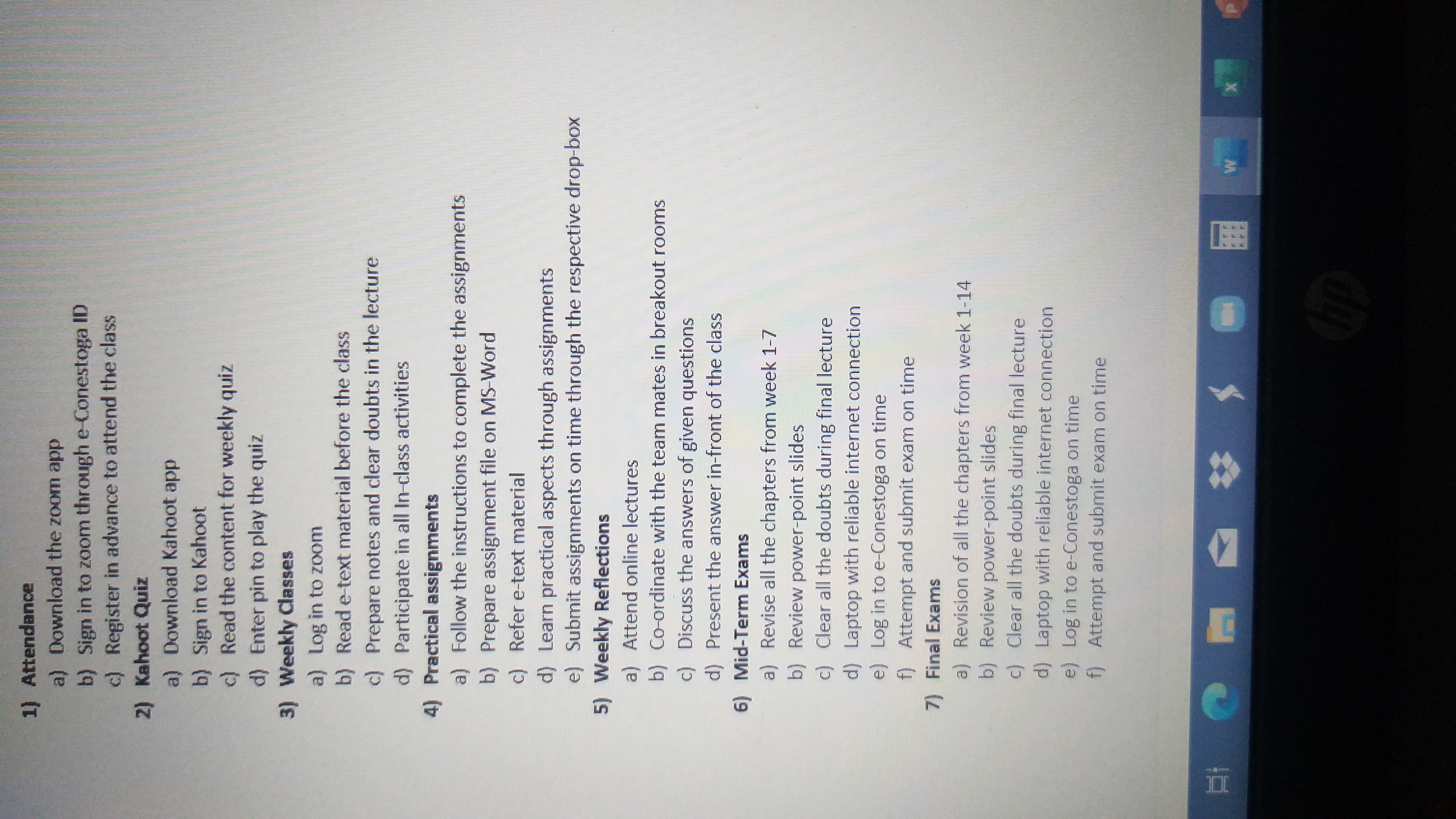
1) Attendance a) Download the zoom app b) Sign in to zoom through e Conestoga ID c) Register in advance to attend the class 2) Kahoot Quiz a) Download Kahoot app b) Sign in to Kahoot c) Read the content for weekly quiz d) Enter pin to play the quiz 3) Weekly Classes a) Log in to zoom b) Read e-text material before the class c) Prepare notes and clear doubts in the lecture d) Participate in all In-class activities 4) Practical assignments a) Follow the instructions to complete the assignments b) Prepare assignment file on MS-Word c) Refer e-text material d) Learn practical aspects through assignments e) Submit assignments on time through the respective drop-box 5) Weekly Reflections a) Attend online lectures b) Co-ordinate with the team mates in breakout rooms c) Discuss the answers of given questions d) Present the answer in-front of the class 6) Mid-Term Exams a) Revise all the chapters from week 1-7 b) Review power-point slides c) Clear all the doubts during final lecture d) Laptop with reliable internet connection e) Log in to e-Conestoga on time f) Attempt and submit exam on time 7) Final Exams a) Revision of all the chapters from week 1-14 b) Review power-point slides c) Clear all the doubts during final lecture d) Laptop with reliable internet connection e) Log in to e-Conestoga on time f) Attempt and submit exam on time A hp
Step by Step Solution
There are 3 Steps involved in it

Get step-by-step solutions from verified subject matter experts
 Study Help