







Question: Problem 10-16 Complete the steps below using cell references to given data or previous calculations. In some cases, a simple cell reference is all you
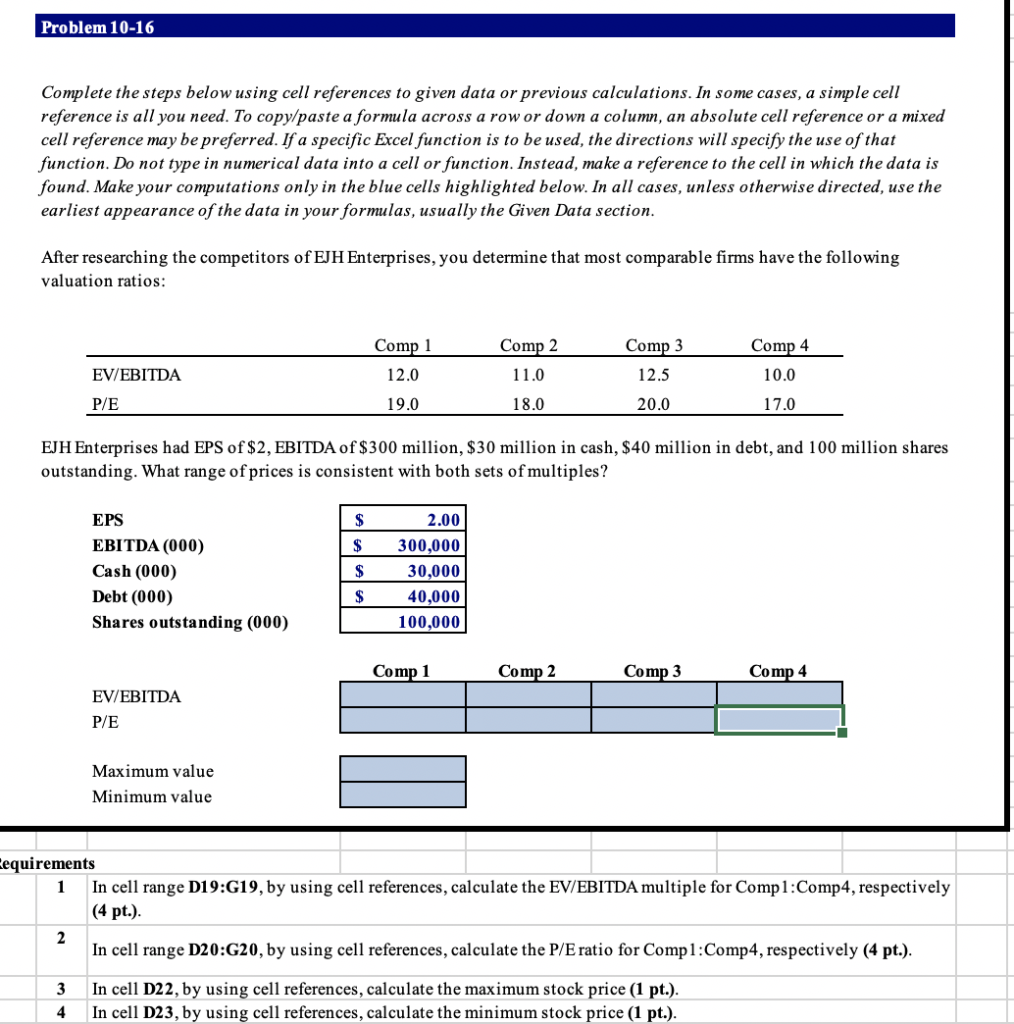
Problem 10-16 Complete the steps below using cell references to given data or previous calculations. In some cases, a simple cell reference is all you need. To copy/paste a formula across a row or down a column, an absolute cell reference or a mixed cell reference may be preferred. If a specific Excel function is to be used, the directions will specify the use of that function. Do not type in numerical data into a cell or function. Instead, make a reference to the cell in which the data is found. Make your computations only in the blue cells highlighted below. In all cases, unless otherwise directed, use the earliest appearance of the data in your formulas, usually the Given Data section. After researching the competitors of EJH Enterprises, you determine that most comparable firms have the following valuation ratios: Comp 1 12.0 19.0 Comp 2 11.0 EV/EBITDA P/E Comp 3 12.5 20.0 Comp 4 10.0 17.0 18.0 EJH Enterprises had EPS of $2, EBITDA of $300 million, $30 million in cash, $40 million in debt, and 100 million shares outstanding. What range of prices is consistent with both sets of multiples? $ $ EPS EBITDA (000) Cash (000) Debt (000) Shares outstanding (000) 2.00 300,000 30,000 40,000 100,000 $ Comp 1 Comp 2 Comp 3 Comp 4 EV/EBITDA P/E Maximum value Minimum value Cequirements 1 In cell range D19:G19, by using cell references, calculate the EV/EBITDA multiple for Compl.Comp4, respectively (4 pt.). In cell range D20:G20, by using cell references, calculate the P/E ratio for Comp 1:Comp4, respectively (4 pt.). 3 In cell D22, by using cell references, calculate the maximum stock price (1 pt.). In cell D23, by using cell references, calculate the minimum stock price (1 pt.). Problem 10-16 Complete the steps below using cell references to given data or previous calculations. In some cases, a simple cell reference is all you need. To copy/paste a formula across a row or down a column, an absolute cell reference or a mixed cell reference may be preferred. If a specific Excel function is to be used, the directions will specify the use of that function. Do not type in numerical data into a cell or function. Instead, make a reference to the cell in which the data is found. Make your computations only in the blue cells highlighted below. In all cases, unless otherwise directed, use the earliest appearance of the data in your formulas, usually the Given Data section. After researching the competitors of EJH Enterprises, you determine that most comparable firms have the following valuation ratios: Comp 1 12.0 19.0 Comp 2 11.0 EV/EBITDA P/E Comp 3 12.5 20.0 Comp 4 10.0 17.0 18.0 EJH Enterprises had EPS of $2, EBITDA of $300 million, $30 million in cash, $40 million in debt, and 100 million shares outstanding. What range of prices is consistent with both sets of multiples? $ $ EPS EBITDA (000) Cash (000) Debt (000) Shares outstanding (000) 2.00 300,000 30,000 40,000 100,000 $ Comp 1 Comp 2 Comp 3 Comp 4 EV/EBITDA P/E Maximum value Minimum value Cequirements 1 In cell range D19:G19, by using cell references, calculate the EV/EBITDA multiple for Compl.Comp4, respectively (4 pt.). In cell range D20:G20, by using cell references, calculate the P/E ratio for Comp 1:Comp4, respectively (4 pt.). 3 In cell D22, by using cell references, calculate the maximum stock price (1 pt.). In cell D23, by using cell references, calculate the minimum stock price (1 pt.)
Step by Step Solution
There are 3 Steps involved in it

Get step-by-step solutions from verified subject matter experts
 Study Help