







Question: Problem 2 O solutions submitted (max: 4) Use the demographics equation derived in class to make a function which finds the population histories for each
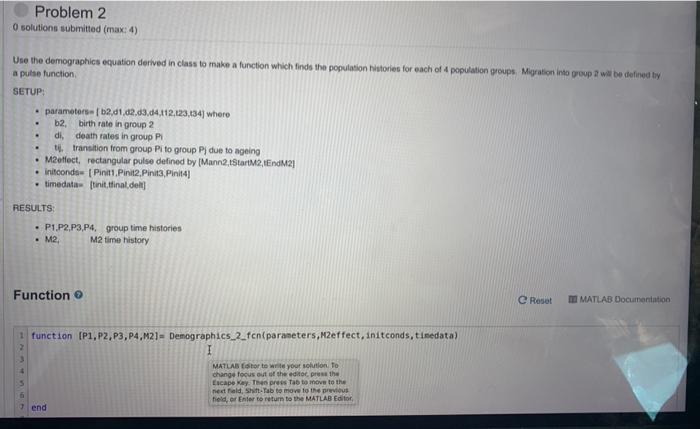
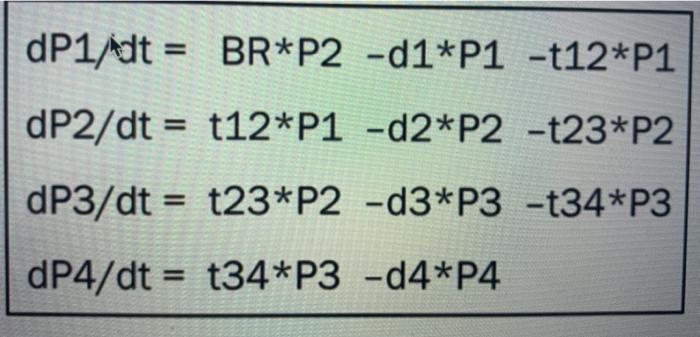
Problem 2 O solutions submitted (max: 4) Use the demographics equation derived in class to make a function which finds the population histories for each of 4 population groups Migration into group will be defined by a pulse function SETUP: . parameter [b2,41,42,43,44,112,123,134) whero b2, birth rate in group 2 di, death rates in group Pi tj. transition from group Pito group PJ due to ageing M2effect, rectangular pulse defined by (Mann2,1StartM2, EndM2 Initcondo [Pinit1 Pinit2. Pinit3 Pinit4] . timedat tinit,final delt] . . RESULTS P1.P2 P3,P4, group time histories M2, M2 time history Function e Reset M MATLAB Documentation i function (P1, P2, P3, P4,M2]= Demographics_2_fcn(parameters,Meffect, initconds, tinedata) I MATLAB tor to write your solution to change focus of the edito. press the Escape way. The press tab to move to the nestad, ShiftTab to move to the previous field, or Enter to return to the MATLAB Editor end dP1/dt = BR*P2 -d1*P1 -t12*P1 dP2/dt = t12*P1 -d2*P2 -t23*P2 dP3/dt = t23*P2 -d3*P3 -t34*P3 dP4/dt = t34*P3 -d4*P4 Problem 2 O solutions submitted (max: 4) Use the demographics equation derived in class to make a function which finds the population histories for each of 4 population groups Migration into group will be defined by a pulse function SETUP: . parameter [b2,41,42,43,44,112,123,134) whero b2, birth rate in group 2 di, death rates in group Pi tj. transition from group Pito group PJ due to ageing M2effect, rectangular pulse defined by (Mann2,1StartM2, EndM2 Initcondo [Pinit1 Pinit2. Pinit3 Pinit4] . timedat tinit,final delt] . . RESULTS P1.P2 P3,P4, group time histories M2, M2 time history Function e Reset M MATLAB Documentation i function (P1, P2, P3, P4,M2]= Demographics_2_fcn(parameters,Meffect, initconds, tinedata) I MATLAB tor to write your solution to change focus of the edito. press the Escape way. The press tab to move to the nestad, ShiftTab to move to the previous field, or Enter to return to the MATLAB Editor end dP1/dt = BR*P2 -d1*P1 -t12*P1 dP2/dt = t12*P1 -d2*P2 -t23*P2 dP3/dt = t23*P2 -d3*P3 -t34*P3 dP4/dt = t34*P3 -d4*P4
Step by Step Solution
There are 3 Steps involved in it

Get step-by-step solutions from verified subject matter experts
 Study Help