







Question: Problem 3 Java Script (4 hrs) Write a page named: javascript.html that appears similar to what is shown on the right. The page should fulfill
Problem 3 Java Script (4 hrs)
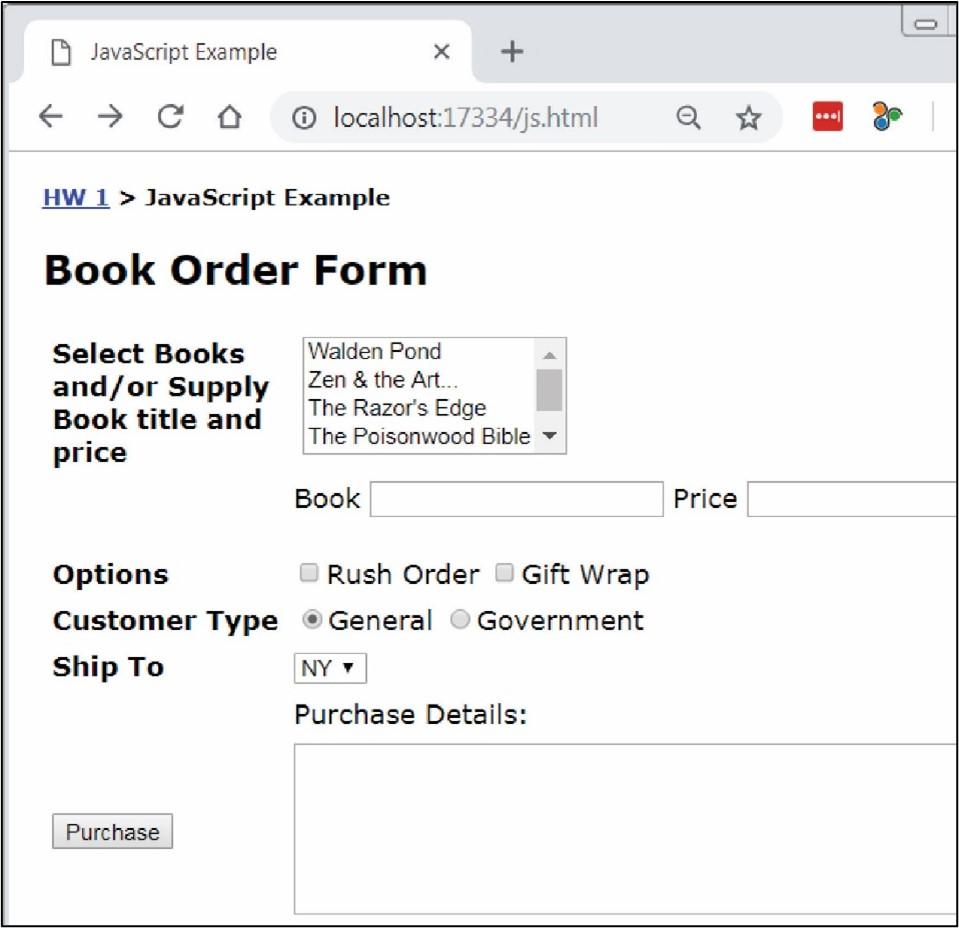
Write a page named: javascript.html that appears similar to what is shown on the right. The page should fulfill these requirements:
Modify the Problem 3 link on default.html to link to this page.
Ignore the bread crumbs: HW 1 > JavaScript Example. You do not need this on your page.
The easiest approach is to use a table to organize the input portion of the page. 2 columns are all that is needed. You are allowed to use a more advanced approach.
All code must be written in JavaScript (not jQuery).
The multi-select box must display these exact 5 books with the corresponding prices:
Walden Pond ($20)
Zen and the Art($15)
The Razors Edge ($8)
The Poisonwood Bible ($15)
Wuthering Heights ($10)
The user can select multiple books from the drop down.
The user can optionally supply a book with a title and price in the textboxes.
A rush order is $10 and gift wrapping is $5.
A general customer receives no discount and is the default. A government customer receives a 10% discount on the entire purchase.
The dropdown lists these exact three states and the corresponding price to ship to that state:
NY ($5)
CA ($7)
SC ($3)
When the purchase button is pressed the complete order is neatly displayed along with the total price. For example:
| Example 1 |
| Example 2 |
|
Order ---------------------- $15.00 Zen and the Art $15.00 The Poisonwood Bible General Customer $10.00 Rush order $3.00 Ship to SC ---------------------- Total: $43.00 |
|
Order ---------------------- $15.00 Zen and the Art $15.00 The Poisonwood Bible $25.00 On the Road (user specified) Government Customer $10.00 Rush order $5.00 Gift wrap $3.00 Ship to SC ---------------------- Sub Total: $73.00 Discount (10%): $7.30 Total: $65.70 |
Each time the user presses the purchase button, a fresh calculation is done based on whatever is supplied, selected, etc. In other words, if the user supplies the data in Example 1 and presses Purchase, then the result is as shown above. Then, if they change from General Customer to Government Customer, and remove a book, then the correct total should be displayed. Your code will doe this correctly as long as you do not use any global variables.
Book Order Form Select Books and/or Supply Book title and price \begin{tabular}{l} Walden Pond \\ Zen \& the Art... \\ The Razor's Edge \\ The Poisonwood Bible - \\ \hline \end{tabular} Book Options Rush Order Gift Wrap Customer Type General Government Ship To Purchase Details
Step by Step Solution
There are 3 Steps involved in it

Get step-by-step solutions from verified subject matter experts
 Study Help