







Question: Problem While developing solutions or new technologies, engineers are faced with balancing trade-offs in their design. For example, in designing a car, reducing the size
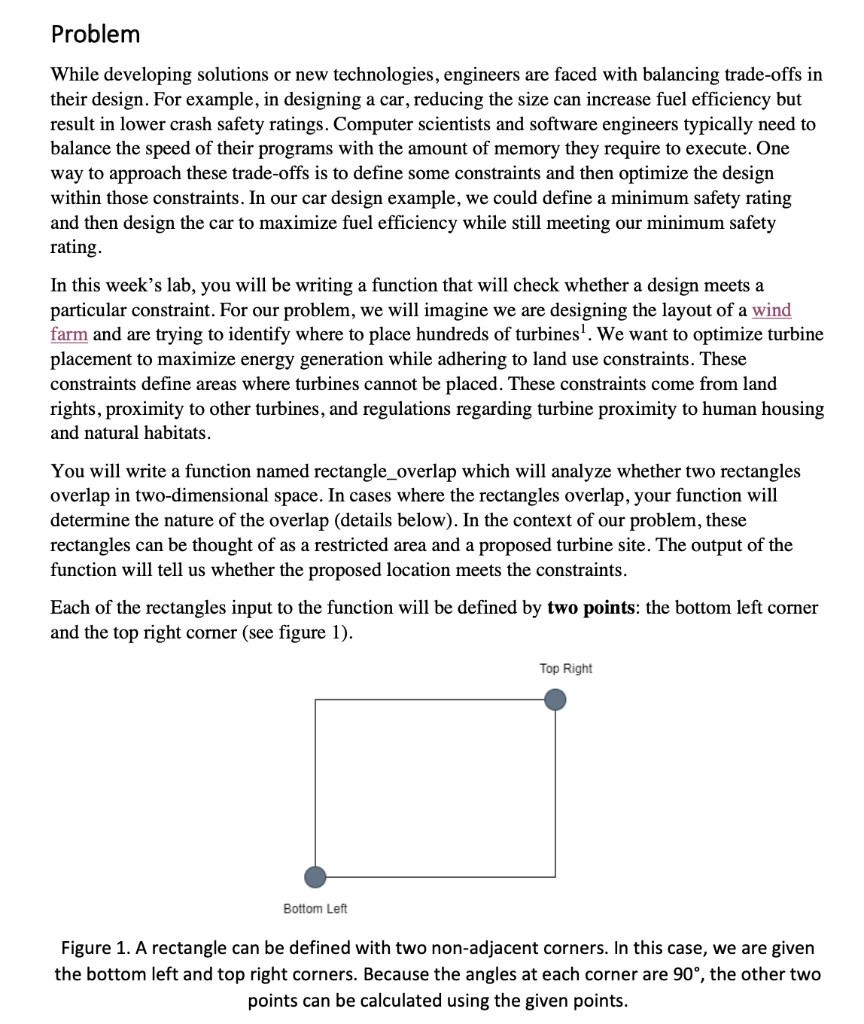
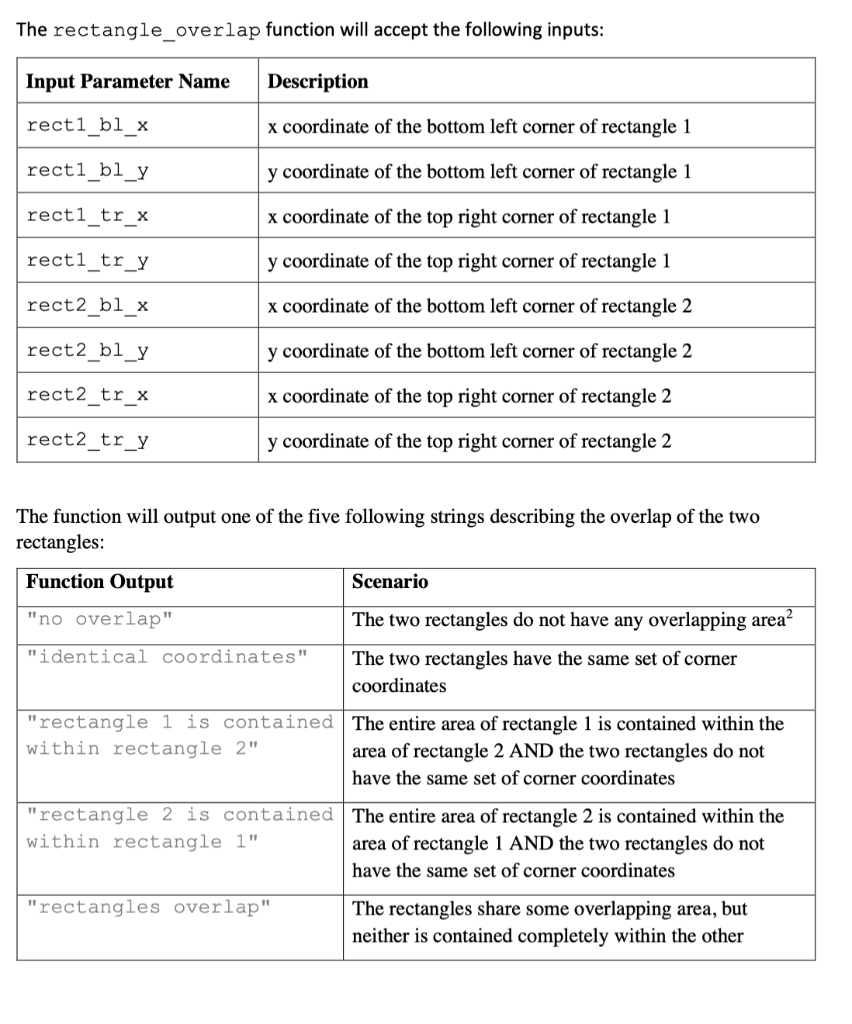
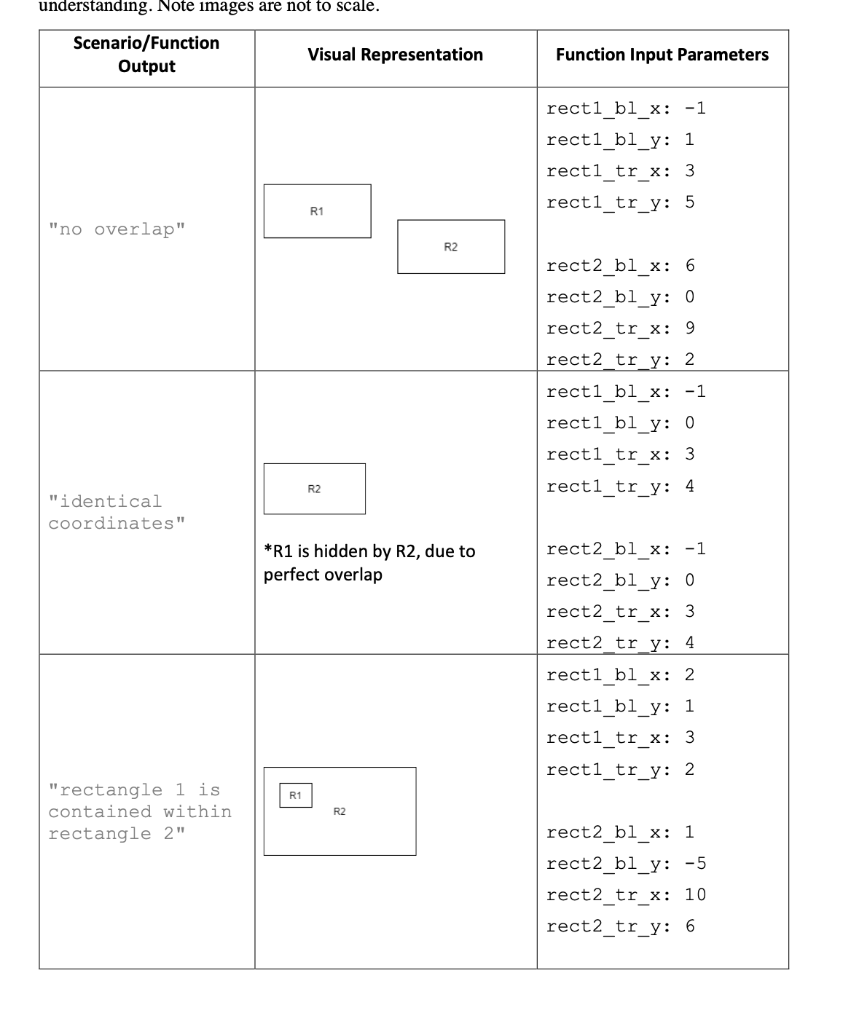
Problem While developing solutions or new technologies, engineers are faced with balancing trade-offs in their design. For example, in designing a car, reducing the size can increase fuel efficiency but result in lower crash safety ratings. Computer scientists and software engineers typically need to balance the speed of their programs with the amount of memory they require to execute. One way to approach these trade-offs is to define some constraints and then optimize the design within those constraints. In our car design example, we could define a minimum safety rating and then design the car to maximize fuel efficiency while still meeting our minimum safety rating. In this week's lab, you will be writing a function that will check whether a design meets a particular constraint. For our problem, we will imagine we are designing the layout of a wind farm and are trying to identify where to place hundreds of turbines'. We want to optimize turbine placement to maximize energy generation while adhering to land use constraints. These constraints define areas where turbines cannot be placed. These constraints come from land rights, proximity to other turbines, and regulations regarding turbine proximity to human housing and natural habitats. You will write a function named rectangle_overlap which will analyze whether two rectangles overlap in two-dimensional space. In cases where the rectangles overlap, your function will determine the nature of the overlap (details below). In the context of our problem, these rectangles can be thought of as a restricted area and a proposed turbine site. The output of the function will tell us whether the proposed location meets the constraints. Each of the rectangles input to the function will be defined by two points: the bottom left corner and the top right corner (see figure 1). Top Right Bottom Left Figure 1. A rectangle can be defined with two non-adjacent corners. In this case, we are given the bottom left and top right corners. Because the angles at each corner are 90, the other two points can be calculated using the given points. Deliverables For this lab, you must submit a function rectangle_overlap within a single file named lab4.py' to MarkUS by the posted deadline. Five test cases are provided on MarkUs to help you prepare your solution. Passing all these test cases does not guarantee your code is correct. You will need to develop your own test cases to verify your solution works correctly. Your programs will be graded using ten secret test cases. These test cases will be released after the assignment deadline. IMPORTANT: Do not change the file name or function names Do not use input() inside your program The rectangle_overlap function will accept the following inputs: Input Parameter Name Description recti_bl_x x coordinate of the bottom left corner of rectangle 1 rectl_bl_y y coordinate of the bottom left corner of rectangle 1 recti_tr_x x coordinate of the top right corner of rectangle 1 recti_tr_y y coordinate of the top right corner of rectangle 1 rect2_bl_x x coordinate of the bottom left corner of rectangle 2 rect2_bl_y y coordinate of the bottom left corner of rectangle 2 rect2_tr_x x coordinate of the top right corner of rectangle 2 rect2_tr_y y coordinate of the top right corner of rectangle 2 The function will output one of the five following strings describing the overlap of the two rectangles: Function Output Scenario "no overlap" The two rectangles do not have any overlapping area? "identical coordinates" The two rectangles have the same set of corner coordinates "rectangle 1 is contained The entire area of rectangle 1 is contained within the within rectangle 2" area of rectangle 2 AND the two rectangles do not have the same set of corner coordinates "rectangle 2 is contained The entire area of rectangle 2 is contained within the within rectangle 1" area of rectangle 1 AND the two rectangles do not have the same set of corner coordinates "rectangles overlap" The rectangles share some overlapping area, but neither is contained completely within the other understanding. Note images are not to scale. Scenario/Function Visual Representation Output Function Input Parameters recti_bl_x: -1 recti_bl_y: 1 rectl_tr_x: 3 recti_tr_y: 5 R1 "no overlap" R2 rect2_bl_x: 6 rect2_bl_y: 0 rect2_tr_x: 9 rect2_tr_y: 2 recti_bl_x: -1 recti_bl_y: 0 recti_tr_x: 3 recti_tr_y: 4 R2 "identical coordinates" *R1 is hidden by R2, due to perfect overlap rect2_bl_x: -1 rect2_bl_y: 0 rect2_tr_x: 3 rect2_tr_y: 4 recti_bl_x: 2 recti_bl_y: 1 rect1_tr_x: 3 recti_tr_y: 2 R1 "rectangle 1 is contained within rectangle 2" R2 rect2_bl_x: 1 rect2_bl_y: -5 rect2_tr_x: 10 rect2_tr_y: 6
Step by Step Solution
There are 3 Steps involved in it

Get step-by-step solutions from verified subject matter experts
 Study Help