







Question: Python 3 Programming Based on the BFS code given in attachment, allow user to create their own graph by entering vertices and edges of the
Python 3 Programming
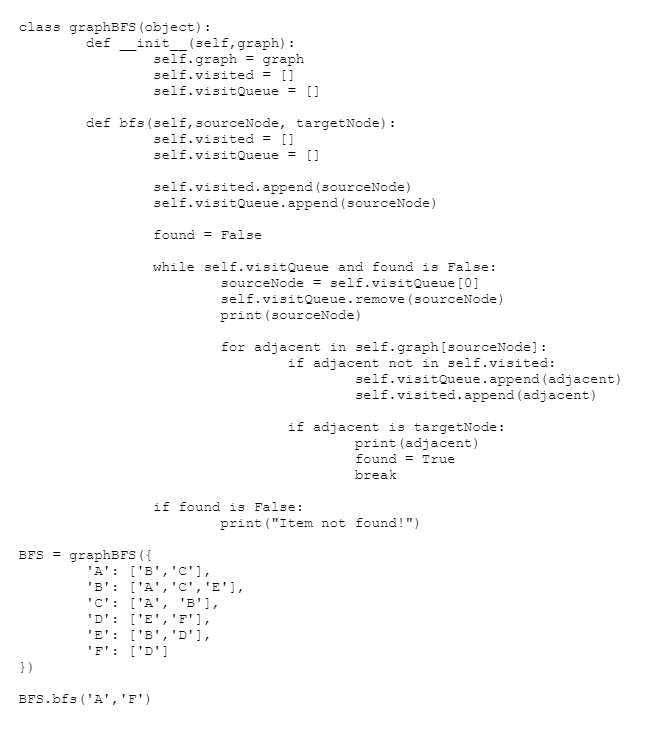
Based on the BFS code given in attachment, allow user to create their own graph by entering vertices and edges of the graph
1. Use the graph information entered by user to implement DFS traversal, let user specify the source node and your code should print the traversal order.
2. Use the concept of traversal learn in BFS, create a GUI to implement DFS search using class based object.
class graphBFS (object) def init (self,graph): self.graph graph self.visited - [1 self.visitQueue[ def bfs (self, sourceNode, targetNode) self.visited - [1 self.visitQueue[ self.visited.append (sourceNode) self.visitQueue.append (sourceNode) found False while self.visitQueue and found is False: sourceNode = self.visitQueue [O] self.visitQueue.remove (sourceNode) print (sourceNode) Eor adjacent in self.graph [sourceNode]: if adjacent not in self.visited: self.visitQueue.append (adjacent) self.visited.append (adjacent) if adjacent is targetNode: print (adjacent) found = True break if found is False: print ("Item not found!") BFSgraphBFS ( E:'D'1 BFS.bfs 'A, F) class graphBFS (object) def init (self,graph): self.graph graph self.visited - [1 self.visitQueue[ def bfs (self, sourceNode, targetNode) self.visited - [1 self.visitQueue[ self.visited.append (sourceNode) self.visitQueue.append (sourceNode) found False while self.visitQueue and found is False: sourceNode = self.visitQueue [O] self.visitQueue.remove (sourceNode) print (sourceNode) Eor adjacent in self.graph [sourceNode]: if adjacent not in self.visited: self.visitQueue.append (adjacent) self.visited.append (adjacent) if adjacent is targetNode: print (adjacent) found = True break if found is False: print ("Item not found!") BFSgraphBFS ( E:'D'1 BFS.bfs 'A, F)
Step by Step Solution
There are 3 Steps involved in it

Get step-by-step solutions from verified subject matter experts
 Study Help