







Question: Python GUI: Problem Statement: The purpose of this lab assignment is to gain experience in python's tkinter GUI Application. This assignment is a part of
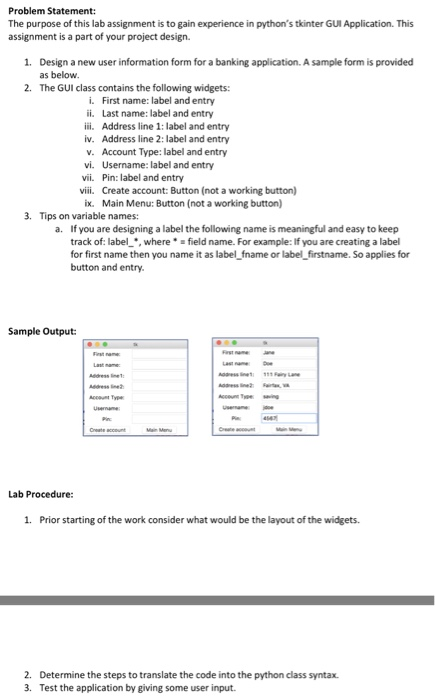
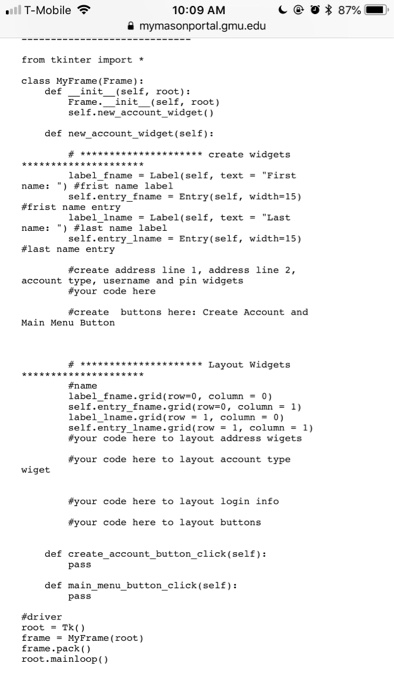
Problem Statement: The purpose of this lab assignment is to gain experience in python's tkinter GUI Application. This assignment is a part of your project design. 1. Design a new user information form for a banking application. A sample form is provided as below. The GUI class contains the following widgets: 2. i. First name: label and entry ii. Last name: label and entry ii. Address line 1: label and entry iv. Address line 2: label and entry v. Account Type: label and entry vi. Username: label and entry vii. Pin: label and entry viii. Create account: Button (not a working button) Main Menu: Button (not a working button) ix. 3. Tips on variable names: a. If you are designing a label the following name is meaningful and easy to keep track of: label,wherefield name. For example: If you are creating a label for first name then you name it as label_fname or label firstname. So applies for button and entry. Sample Output: Accu Tye 1. Prior starting of the work consider what would be the layout of the widgets. 2. 3. Determine the steps to translate the code into the python class syntax. Test the application by giving some user input
Step by Step Solution
There are 3 Steps involved in it

Get step-by-step solutions from verified subject matter experts
 Study Help