







Question: Questions: 1) The SQL script to (i) drop the two tables, (ii) create the two tables, (iii) insert the sample data, and (iv) show the
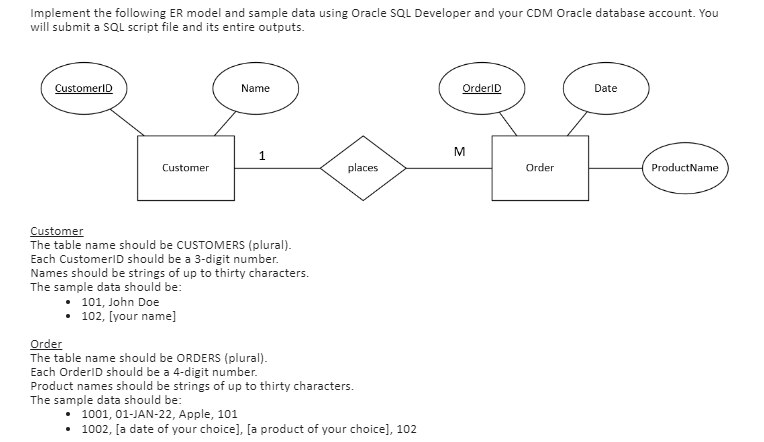
Questions: 1) The SQL script to (i) drop the two tables, (ii) create the two tables, (iii) insert the sample data, and (iv) show the full contents of the two tables.
a) Make sure to start your script file with DROP TABLE commands for the two tables in order to avoid conflicts. Use the DROP TABLE commands in the following order.
i. ORDERS
ii. CUSTOMERS
b) Make sure that your SQL script runs without an error from the first line to the last one.
2) The Word/text file to show the entire outputs of your SQL script.
a) The easiest is to clear the Script Output window first and then save the output of your script file after running it.
Implement the following ER model and sample data using Oracle SQL Developer and your CDM Oracle database account. You will submit a SQL script file and its entire outputs. Customer The table name should be CUSTOMERS (plural). Each CustomerID should be a 3-digit number. Names should be strings of up to thirty characters. The sample data should be: - 101, John Doe - 102, [your name] Order The table name should be ORDERS (plural). Each OrderID should be a 4-digit number. Product names should be strings of up to thirty characters. The sample data should be: - 1001, 01-JAN-22, Apple, 101 - 1002, [a date of your choice], [a product of your choice], 102
Step by Step Solution
There are 3 Steps involved in it

Get step-by-step solutions from verified subject matter experts
 Study Help