







Question: Recreate the following page: For ease in completing this task, you should copy the skeleton code that is provided into Notepad++, make the necessary modifications,
Recreate the following page:
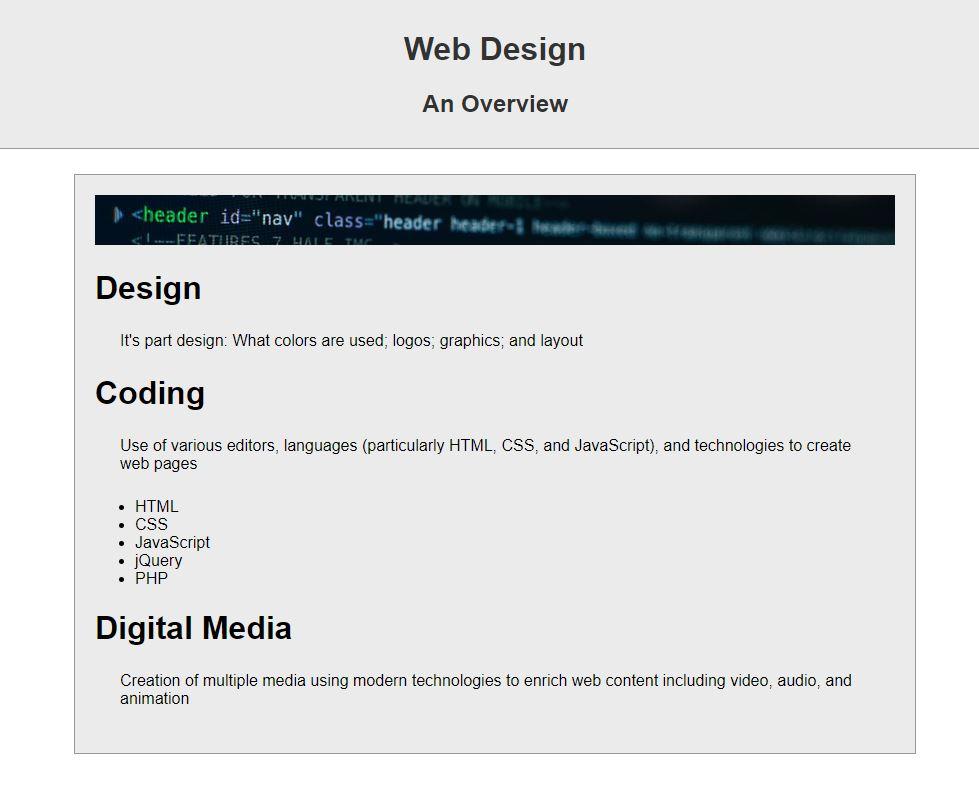
For ease in completing this task, you should copy the skeleton code that is provided into Notepad++, make the necessary modifications, and copy/paste the completed code back into your response (over-writing the skeleton code)
The page should meet the following specifications:
- The character set defined
- A title ('Midterm')
- Meta-information completed
- Comment information completed
- Styling:
- body: define a sans-serif font
- header: Light gray background, dark gray text, no margins, space around text should be 10 pixels on all sides; a solid border on the bottom that is one pixel wide and dark gray
- headings 1 and 2 inside the header: text centered
- div:
- same background as the header;
- 800 pixels wide;
- top and bottom margin 25 pixels;
- centered on the display;
- 20 pixels of space around the content on all sides;
- a solid border all around one pixel wide and dark gray
- paragraph: space around the paragraph content on all sides, 25 pixels
- : Add the headings and paragraphs inside the . Each heading should be a heading 1. The list should be between the second paragraph and the third heading
- Add above the tag
- The image file is located at https://csci1210.com/images/midterm.jpg
Web Design An Overview
Step by Step Solution
There are 3 Steps involved in it
1 Expert Approved Answer
Step: 1 Unlock

Question Has Been Solved by an Expert!
Get step-by-step solutions from verified subject matter experts
Step: 2 Unlock
Step: 3 Unlock
 Study Help