







Question: Required information Lab Note: The tools presented in this lab periodically change. Updated instructions, If applicable, can be found in the eBook and lab walkthrough
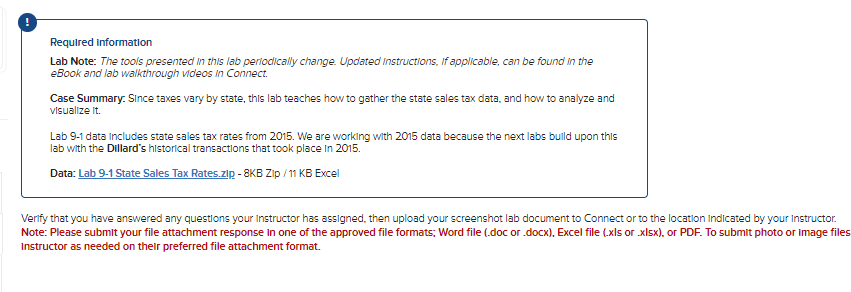
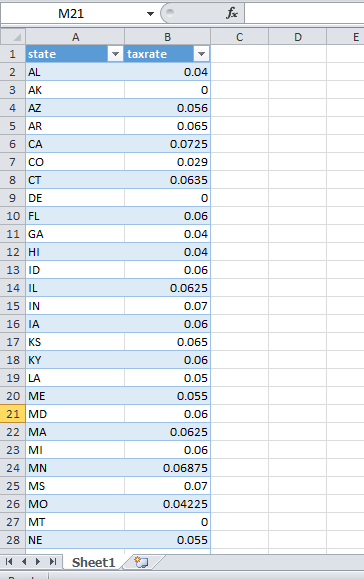
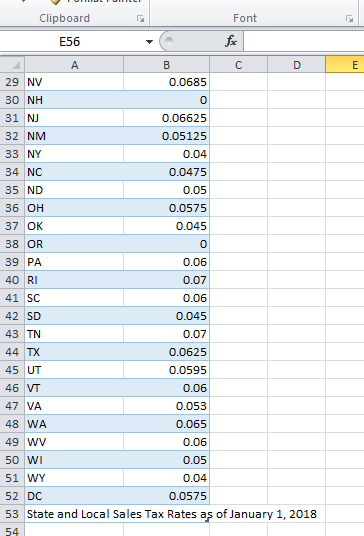
Required information Lab Note: The tools presented in this lab periodically change. Updated instructions, If applicable, can be found in the eBook and lab walkthrough videos in Connect. Case Summary. Since taxes vary by state, this lab teaches how to gather the state sales tax data, and how to analyze and visualize It. Lab 9-1 data includes state sales tax rates from 2015 . We are working with 2015 data because the next labs build upon this lab with the Dillard's historical transactlons that took place In 2015. Data: Lab 9-1 State Sales Tax Rates.zlp - 8KB Zp / 11 KB Excel Verlfy that you have answered any questions your instructor has assigned, then upload your screenshot lab document to Connect or to the location indicated by your Instructor. Note: Please submit your file attachment response in one of the approved file formats; Word file (.doc or .docx), Excel file (.xls or .xlsx), or PDF. To submit photo or image file: Instructor as needed on their preferred file attachment format. Required information Lab Note: The tools presented in this lab periodically change. Updated instructions, If applicable, can be found in the eBook and lab walkthrough videos in Connect. Case Summary. Since taxes vary by state, this lab teaches how to gather the state sales tax data, and how to analyze and visualize It. Lab 9-1 data includes state sales tax rates from 2015 . We are working with 2015 data because the next labs build upon this lab with the Dillard's historical transactlons that took place In 2015. Data: Lab 9-1 State Sales Tax Rates.zlp - 8KB Zp / 11 KB Excel Verlfy that you have answered any questions your instructor has assigned, then upload your screenshot lab document to Connect or to the location indicated by your Instructor. Note: Please submit your file attachment response in one of the approved file formats; Word file (.doc or .docx), Excel file (.xls or .xlsx), or PDF. To submit photo or image file: Instructor as needed on their preferred file attachment format
Step by Step Solution
There are 3 Steps involved in it

Get step-by-step solutions from verified subject matter experts
 Study Help