







Question: Router is set as a default router for both HostA and HostB. HostA and HostB's ARP tables are cleared, the router ARP tables are not
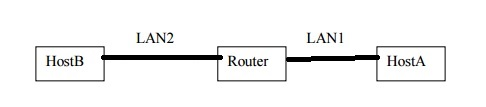
Router is set as a default router for both HostA and HostB.
HostA and HostB's ARP tables are cleared, the router ARP tables are not cleared (i.e., removing the need of two transmissions to router no packet dropping).
Then HostB pings HostA
a. Below find a list of packets that may or may not be transmitted, on each indicated LAN, when the HostB pings HostA. For each frame/packet, indicate if it was or was not transmitted on the indicated LAN (True or False).
b. For those that you determine were transmitted (i.e., TRUE), arrange in order of transmission, i.e., indicate the sequence of packet transmission events as they play out on the two LANs.
c. Fill in the fields of the various frames/packets transmitted, e.g., Ethernet source and destination addresses, IP source and destination addresses, etc. for the frames/packets that traverse the two LANs. (Use the following notation for your answer: HostA_eth0, or Router_eth1, HostA_IP, HostB_IP, etc., for broadcast use the hexadecimal notation). Assume the Router interface on LAN1 is eth0 and IP address is IP1 and on LAN2 it is eth1 and IP2
[Transmissions on LAN1]
ARP Request: sent? True or False
eth_src =
eth_dst =
sender_ip =
target ip =
ARP Reply: sent? True or False
eth_src =
eth_dst =
sender_ip =
target ip =
ICMP Echo Request: sent? True or False
eth_src =
eth_dest =
ip_src =
ip_dest =
ICMP Echo Reply: sent? True or False
eth_src =
eth_dest =
ip_src =
ip_dest =
[Transmissions on LAN2]
ARP Request: sent? True or False
eth_src =
eth_dst =
sender_ip =
target ip =
ARP Reply: sent? True or False
eth_src =
eth_dst =
sender_ip =
target ip =
ICMP Echo Request: sent? True or False
eth_src =
eth_dest =
ip_src =
ip_dest =
ICMP Echo Reply: sent? True or False
eth_src =
eth_dest =
ip_src =
ip_dest =
LANI LAN2 Host B Router Host A
Step by Step Solution
There are 3 Steps involved in it

Get step-by-step solutions from verified subject matter experts
 Study Help