







Question: SDEV 140 / Introduction to Software Development Menu-Driven Programs TASKS : Language translator. Design a program that display the following menu: Select a language and
SDEV 140 / Introduction to Software Development
Menu-Driven Programs
TASKS: Language translator.
Design a program that display the following menu:
Select a language and I will say Good Morning
English
Italian
Spanish
German
End the Program
Enter your selection.
Ask the user to make a selection, and process the selection. The program should display Good Morning if the user selects 1, Buongiorno if the user selects 2, Buenos dias if the user selects 3, Guten morgen if selects 4. If the user selects 5 the program should end.
ASSIGNMENT: Start Visual Studio, and then do the assignment outlined in step 1. Save the Project on your flash drive or PC as MenuDriven. Submit this file in Blackboard.
1) Save the Project as MenuDriven
2) Create a program as follows.
a. Include the comment lines for Author, Date and Description.
b. Display the menu presented in Exercise 1.
c. Ask the user to input a menu choice.
d. Display the appropriate greeting for the users choice.
e. If the user selects the last choice, the program ends.
f. The menu should loop until the user enters 5
3) Run the program, and test it. If there are any errors, recheck the instructions and correct them, then resave the file.
Step by step using Visual Basic (especially the code)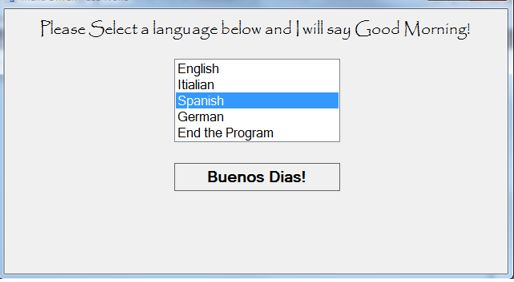
ease Select a language below and Twill say Good Morning! English Itialian Spanish German End the Program Buenos Dias
Step by Step Solution
There are 3 Steps involved in it

Get step-by-step solutions from verified subject matter experts
 Study Help