







Question: Select variables to import using checkboxes Create variables matching preview. Create vectors from each column using column names. Create vectors from each row using row
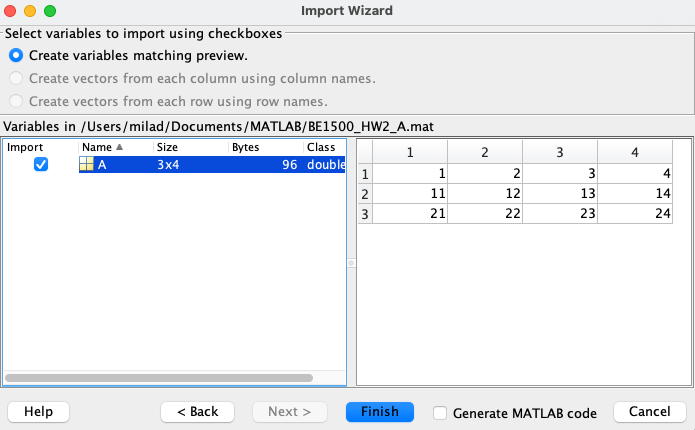
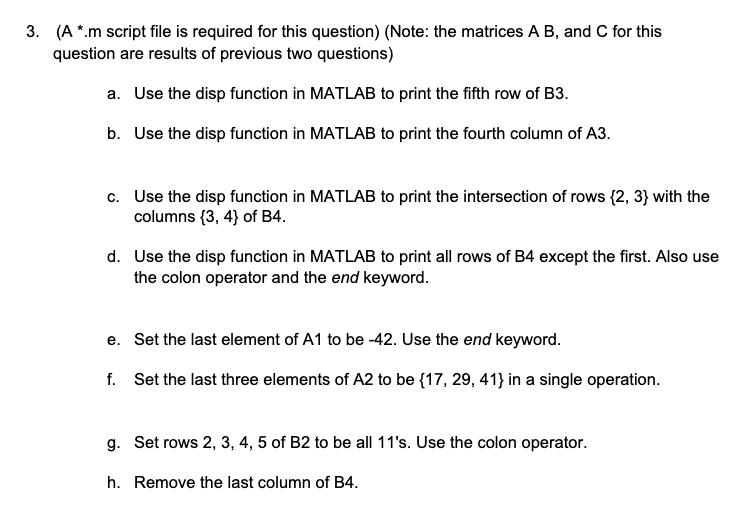
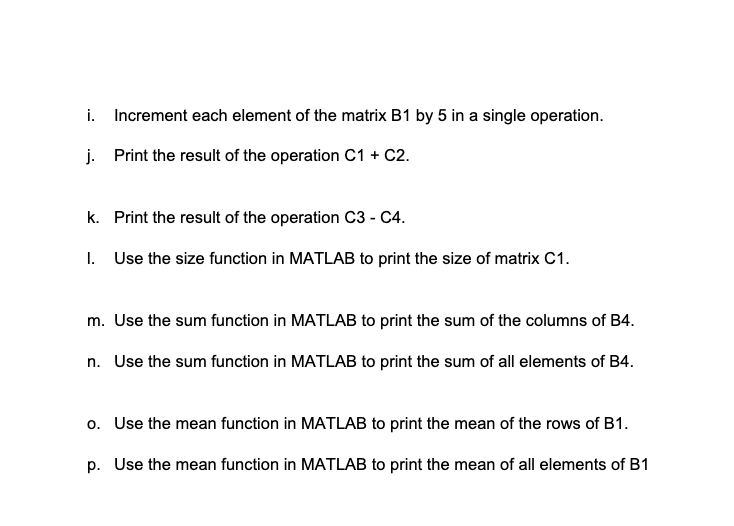
Select variables to import using checkboxes Create variables matching preview. Create vectors from each column using column names. Create vectors from each row using row names. ( A.m script file is required for this question) (Note: the matrices AB, and C for this question are results of previous two questions) a. Use the disp function in MATLAB to print the fifth row of B3. b. Use the disp function in MATLAB to print the fourth column of A3. c. Use the disp function in MATLAB to print the intersection of rows {2,3} with the columns {3,4} of B4. d. Use the disp function in MATLAB to print all rows of B4 except the first. Also use the colon operator and the end keyword. e. Set the last element of A1 to be 42. Use the end keyword. f. Set the last three elements of A2 to be {17,29,41} in a single operation. g. Set rows 2, 3, 4, 5 of B2 to be all 11's. Use the colon operator. h. Remove the last column of B4. i. Increment each element of the matrix B1 by 5 in a single operation. j. Print the result of the operation C1+C2. k. Print the result of the operation C3C4. I. Use the size function in MATLAB to print the size of matrix C1. m. Use the sum function in MATLAB to print the sum of the columns of B4. n. Use the sum function in MATLAB to print the sum of all elements of B4. o. Use the mean function in MATLAB to print the mean of the rows of B1. p. Use the mean function in MATLAB to print the mean of all elements of B1
Step by Step Solution
There are 3 Steps involved in it

Get step-by-step solutions from verified subject matter experts
 Study Help