







Question: Select variables to import using checkboxes Create variables matching preview. Create vectors from each column using column names. Create vectors from each row using row
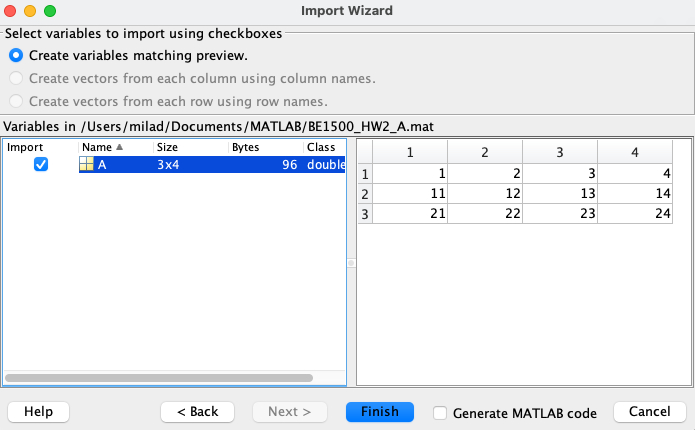
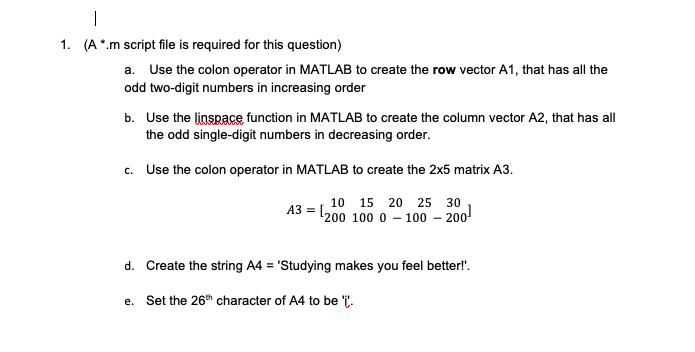
Select variables to import using checkboxes Create variables matching preview. Create vectors from each column using column names. Create vectors from each row using row names. (A*.m script file is required for this question) a. Use the colon operator in MATLAB to create the row vector A1, that has all the odd two-digit numbers in increasing order b. Use the linspace function in MATLAB to create the column vector A2, that has all the odd single-digit numbers in decreasing order. c. Use the colon operator in MATLAB to create the 25 matrix A3. A3=[10200151002002510030200] d. Create the string A4 = 'Studying makes you feel betterl'. e. Set the 26th character of A4 to be 'i
Step by Step Solution
There are 3 Steps involved in it

Get step-by-step solutions from verified subject matter experts
 Study Help