







Question: skills Review Create a form. In your editor, open HTM.J-3.html from the SR folder where you store your Data Files order.html, then repeat to save
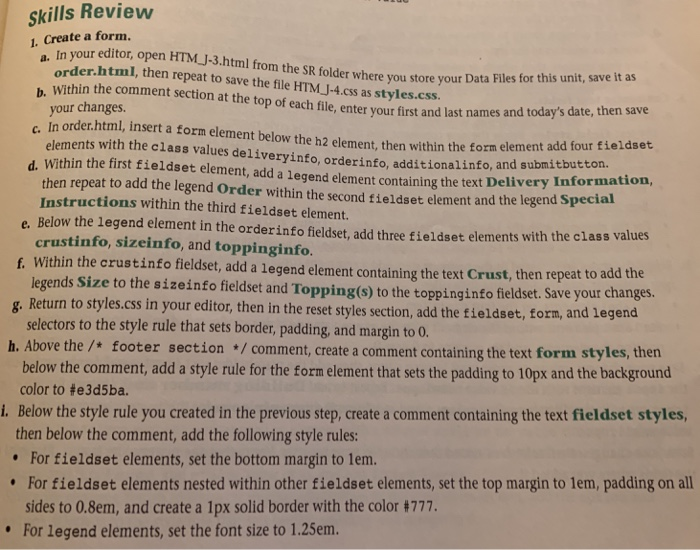
skills Review Create a form. In your editor, open HTM.J-3.html from the SR folder where you store your Data Files order.html, then repeat to save the file HTM J-4.css as styles.css. Within the comment section at the top of each file, enter your b. names and today's date, then save element, then within the form element add four fieldset t containing the text Delivery Information first and last r your changes. order.html, insert a form element below the h2 elements with the class values deliveryinfo, orderinfo, additionalinfo, and submitbutton. d. Within the first fieldset element, add a legend elemen then repeat to add the legend Order within the second fieldset element and the legend Specia Instructions within the third fieldset element. e. Below the legend element in the orderinfo fieldset, add three fieidset element s with the class values crustinfo, sizeinfo, and toppinginfo f Within the crustinfo fieldset, add a legend element containing the text Crust, then repeat to legends Size to the sizeinfo fieldset and Topping(s) to the to ppinginfo fieldset. Save your changes. g. Return to styles.css in your editor, then in the reset styles section, add the tieldset, form, and legend h. Above the /* footer section/comment, create a comment containing the text form styles, then selectors to the style rule that sets border, padding, and margin to 0 below the comment, add a style rule for the form element that sets the padding to 10px and the background color to #e3d5ba. i. Below the style rule you created in the previous step, create a comment containing the text fieldset styles then below the comment, add the following style rules: For fieldset elements, set the bottom margin to lem. For fieldset elements nested within other fieldset elements, set the top margin to 1em, padding on all sides to 0.8em, and create a 1px solid border with the color #777 For legend elements, set the font size to 1.25erm skills Review Create a form. In your editor, open HTM.J-3.html from the SR folder where you store your Data Files order.html, then repeat to save the file HTM J-4.css as styles.css. Within the comment section at the top of each file, enter your b. names and today's date, then save element, then within the form element add four fieldset t containing the text Delivery Information first and last r your changes. order.html, insert a form element below the h2 elements with the class values deliveryinfo, orderinfo, additionalinfo, and submitbutton. d. Within the first fieldset element, add a legend elemen then repeat to add the legend Order within the second fieldset element and the legend Specia Instructions within the third fieldset element. e. Below the legend element in the orderinfo fieldset, add three fieidset element s with the class values crustinfo, sizeinfo, and toppinginfo f Within the crustinfo fieldset, add a legend element containing the text Crust, then repeat to legends Size to the sizeinfo fieldset and Topping(s) to the to ppinginfo fieldset. Save your changes. g. Return to styles.css in your editor, then in the reset styles section, add the tieldset, form, and legend h. Above the /* footer section/comment, create a comment containing the text form styles, then selectors to the style rule that sets border, padding, and margin to 0 below the comment, add a style rule for the form element that sets the padding to 10px and the background color to #e3d5ba. i. Below the style rule you created in the previous step, create a comment containing the text fieldset styles then below the comment, add the following style rules: For fieldset elements, set the bottom margin to lem. For fieldset elements nested within other fieldset elements, set the top margin to 1em, padding on all sides to 0.8em, and create a 1px solid border with the color #777 For legend elements, set the font size to 1.25erm
Step by Step Solution
There are 3 Steps involved in it

Get step-by-step solutions from verified subject matter experts
 Study Help