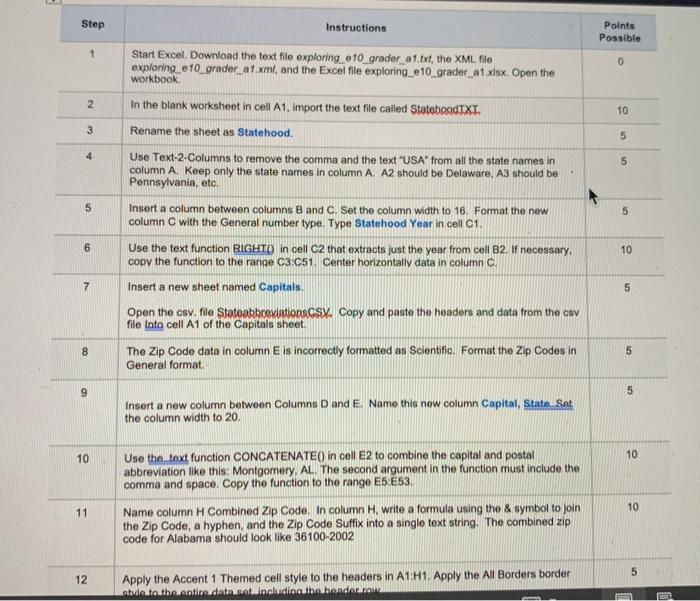
Question: Step Points Possible 1 0 2 Instructions Start Excel. Download the text file exploring 610_grader_a1.txt, the XML file exploring e10_grader a1.xml, and the Excel file
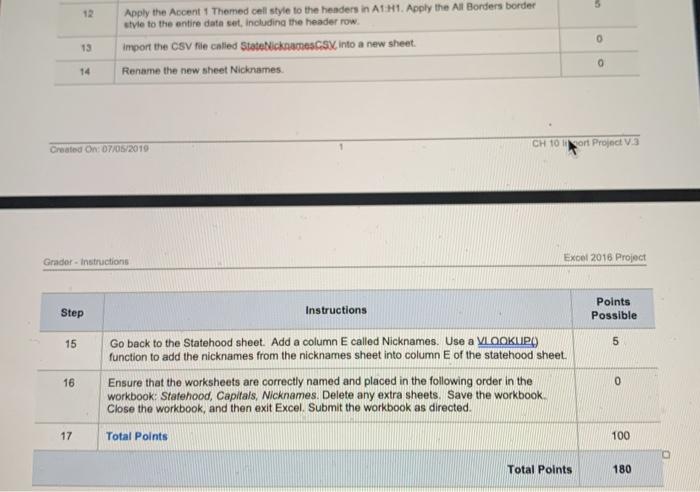
Step Points Possible 1 0 2 Instructions Start Excel. Download the text file exploring 610_grader_a1.txt, the XML file exploring e10_grader a1.xml, and the Excel file exploring_e10 grader_a1.xlsx Open the workbook In the blank worksheet in cell A1, import the text file called StateboodTXT. Rename the sheet as Statehood. Use Text 2 Columns to remove the comma and the text "USA from all the state names in column A. Keep only the state names in column A. A2 should be Delaware, A3 should be Pennsylvania, etc. 10 3 5 4 5 5 6 Insert a column between columns B and C. Set the column width to 16. Format the new column C with the General number type. Type Statehood Year in cell C1. Use the text function RIGHT) in cell C2 that extracts just the year from cell B2. If necessary. copy the function to the range C3.C51. Center horizontally data in column C Insert a new sheet named Capitals. 10 7 5 Open the osv. file Statoabbreviationssy. Copy and paste the headers and data from the asy file Inta cell A1 of the Capitals sheet. 8 5 The Zip Code data in column E is incorrectly formatted as Scientific. Format the Zip Codes in General format 9 5 Insert a new column between Columns D and E. Namo this new column Capital, State Sat the column width to 20 10 10 Use the text function CONCATENATE() in cell E2 to combine the capital and postal abbreviation like this Montgomery, AL. The second argument in the function must include the comma and space. Copy the function to the range E5 E53. 10 11 Name column H Combined Zip Code. In column H. write a formula using the & symbol to join the Zip Code, a hyphen, and the Zip Code Suffix into a single text string. The combined zip code for Alabama should look like 36100-2002 5 12 Apply the Accent 1 Themed cell style to the headers in A1:H1. Apply the All Borders border side to the entire data.setIncluding the bandar.com 12 Apply the Accent 1 Themed cell style to the headers in A1:A1. Apply the All Borders border style to the entire data set, including the header row import the CSV file called StateNickness into a new sheet. Rename the new sheet Nicknames. 0 13 0 14 Created On: 07/05/2010 CH 10 Sort Project V3 Grador - Instructions Excel 2016 Project Step Instructions Points Possible 15 5 Go back to the Statehood sheet. Add a column E called Nicknames. Use a VLOOKUPO function to add the nicknames from the nicknames sheet into column E of the statehood sheet. 16 0 Ensure that the worksheets are correctly named and placed in the following order in the workbook: Statehood, Capitals, Nicknames. Delete any extra sheets. Save the workbook Close the workbook, and then exit Excel. Submit the workbook as directed. 17 Total Points 100 Total Points 180 Step Points Possible 1 0 2 Instructions Start Excel. Download the text file exploring 610_grader_a1.txt, the XML file exploring e10_grader a1.xml, and the Excel file exploring_e10 grader_a1.xlsx Open the workbook In the blank worksheet in cell A1, import the text file called StateboodTXT. Rename the sheet as Statehood. Use Text 2 Columns to remove the comma and the text "USA from all the state names in column A. Keep only the state names in column A. A2 should be Delaware, A3 should be Pennsylvania, etc. 10 3 5 4 5 5 6 Insert a column between columns B and C. Set the column width to 16. Format the new column C with the General number type. Type Statehood Year in cell C1. Use the text function RIGHT) in cell C2 that extracts just the year from cell B2. If necessary. copy the function to the range C3.C51. Center horizontally data in column C Insert a new sheet named Capitals. 10 7 5 Open the osv. file Statoabbreviationssy. Copy and paste the headers and data from the asy file Inta cell A1 of the Capitals sheet. 8 5 The Zip Code data in column E is incorrectly formatted as Scientific. Format the Zip Codes in General format 9 5 Insert a new column between Columns D and E. Namo this new column Capital, State Sat the column width to 20 10 10 Use the text function CONCATENATE() in cell E2 to combine the capital and postal abbreviation like this Montgomery, AL. The second argument in the function must include the comma and space. Copy the function to the range E5 E53. 10 11 Name column H Combined Zip Code. In column H. write a formula using the & symbol to join the Zip Code, a hyphen, and the Zip Code Suffix into a single text string. The combined zip code for Alabama should look like 36100-2002 5 12 Apply the Accent 1 Themed cell style to the headers in A1:H1. Apply the All Borders border side to the entire data.setIncluding the bandar.com 12 Apply the Accent 1 Themed cell style to the headers in A1:A1. Apply the All Borders border style to the entire data set, including the header row import the CSV file called StateNickness into a new sheet. Rename the new sheet Nicknames. 0 13 0 14 Created On: 07/05/2010 CH 10 Sort Project V3 Grador - Instructions Excel 2016 Project Step Instructions Points Possible 15 5 Go back to the Statehood sheet. Add a column E called Nicknames. Use a VLOOKUPO function to add the nicknames from the nicknames sheet into column E of the statehood sheet. 16 0 Ensure that the worksheets are correctly named and placed in the following order in the workbook: Statehood, Capitals, Nicknames. Delete any extra sheets. Save the workbook Close the workbook, and then exit Excel. Submit the workbook as directed. 17 Total Points 100 Total Points 180









 Study Help